Bridgeframe Studio

Bridgeframe Studio creates calm Notion workspaces for creators, freelancers, and solo operators. Our digital templates help organize projec...
2 joined
Profile picture
Bridgeframe StudioProfile picture@bridgeframestudio·4d

As work grows, the system needs more than projects and tasks.

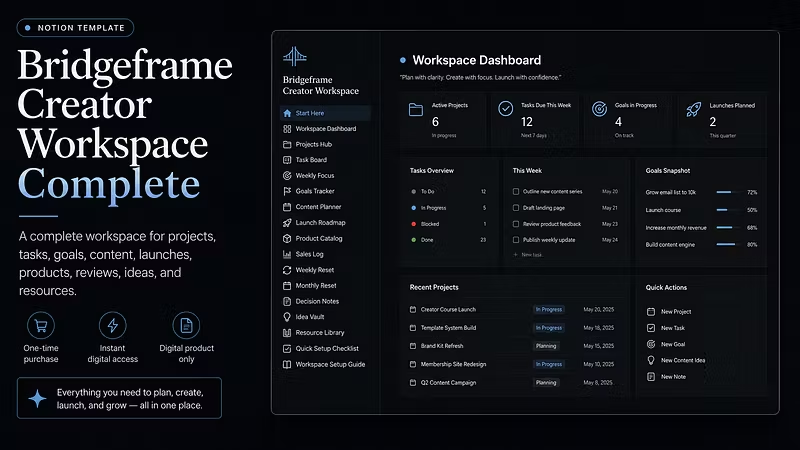
Bridgeframe Creator Workspace Complete adds dedicated areas for goals, content planning, launches, product details, decision notes, sales records, and review routines.

More depth.

Still clear.

Built to keep the full workflow easier to manage.

Profile picture
Bridgeframe StudioProfile picture@bridgeframestudio·Aug 17

Bridgeframe Studio is designed to make daily work easier to organize.

Projects stay connected to tasks.
Weekly priorities stay visible.
Ideas have a place to land.
Resources stay close when you need them.

A clear workspace helps you spend less time rebuilding context and more time moving work forward.

Profile picture
Bridgeframe StudioProfile picture@bridgeframestudio·Aug 11

Your workspace should support growth without becoming another source of clutter.

Bridgeframe Studio provides a clear foundation for projects, tasks, planning, ideas, resources, and reviews.

Start with the sections you need now. Add more detail as the work develops. Keep the overall system readable enough to return to every day.

Profile picture
Bridgeframe StudioProfile picture@bridgeframestudio·Aug 1

Bridgeframe Creator Workspace Complete brings deeper planning into the same connected workspace.

Use Goals Tracker to define outcomes, Content Planner to organize publishing work, Launch Roadmap to prepare key steps, and review pages to keep progress visible.

A fuller system for creators and solo operators managing more moving parts.

Profile picture
Bridgeframe StudioProfile picture@bridgeframestudio·Jul 29

Bridgeframe Studio includes a dedicated Resource Library for keeping useful materials easier to reach.

Save links, notes, documents, references, templates, and supporting information in one organized place.

Less time searching through scattered folders.
More support for the work already in progress.

Profile picture
Bridgeframe StudioProfile picture@bridgeframestudio·Jul 23

Weekly priorities should guide the work, not sit on a separate page and disappear.

Bridgeframe Studio keeps weekly focus closer to active projects and current tasks, making it easier to see what deserves attention now.

Set the direction.
Connect the work.
Follow through with more clarity.

Profile picture
Bridgeframe StudioProfile picture@bridgeframestudio·Jul 21

A project becomes easier to manage when you can quickly understand where it stands.

Bridgeframe Studio helps keep project status, priorities, upcoming tasks, and useful notes connected inside one workspace.

Instead of rebuilding the full picture each time, you can review the current state and continue from the next useful action.

Profile picture
Bridgeframe StudioProfile picture@bridgeframestudio·Jul 17

Bridgeframe Studio helps creators and solo operators build a clearer operating space inside Notion.

The workspace supports project planning, task management, weekly focus, goal tracking, content planning, launch preparation, idea capture, resource storage, and review routines.

A more organized system makes daily execution easier to return to.

Profile picture
Bridgeframe StudioProfile picture@bridgeframestudio·Jul 16

Bridgeframe Studio gives ideas a clear place to live.

Use the Idea Vault to capture early thoughts, content angles, workflow improvements, product ideas, and notes worth revisiting.

Not every idea needs action today.
But useful ideas should be easy to find later.

Profile picture
Bridgeframe StudioProfile picture@bridgeframestudio·Jul 14

Bridgeframe Studio workspaces are built around a clear starting point.

The dashboard helps you review active work, current priorities, upcoming tasks, and useful workspace areas in one place.

Instead of opening multiple pages to understand where things stand, you can begin from one organized view.