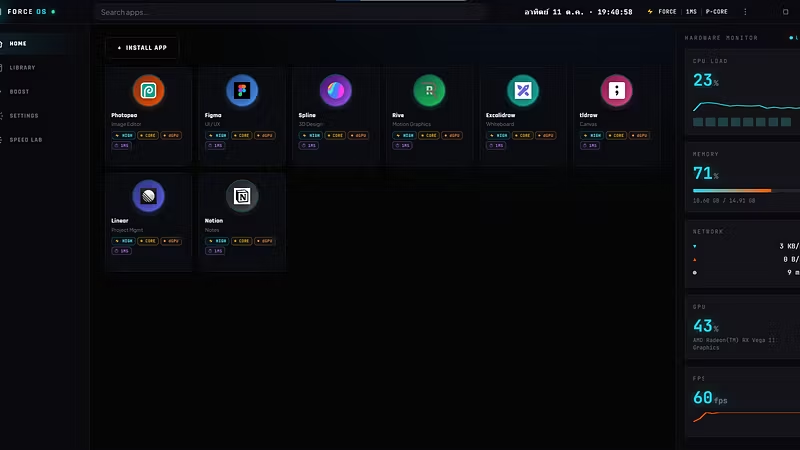


Force OS — Hardware-Unlocking Native Runtime for Web Applications
Standard browsers like Chrome and Edge force web applications to run within restrictive sandboxed environments. This results in throttled CPU threads, enforced integrated graphics (iGPU) usage, lowered process priorities, and capped network bandwidth. Consequently, demanding client-side web applications such as Figma, Photopea, Spline, and CapCut Web suffer from frame drops, input lag, and slow rendering.
Force OS resolves these bottlenecks by encapsulating web applications inside a high-performance native desktop shell (Tauri v2 + Chromium). By leveraging Administrator-level privileges, Force OS directly tunes low-level Windows OS parameters to expose the full power of your underlying hardware.
Low-Level OS Optimization Architecture
Process Priority & Throttling Override: Forces process priority to HIGH/REALTIME via SetPriorityClass and disables execution speed limits via SetProcessInformation to prevent Windows background down-clocking.
P-Core Affinity Locking: Queries CPU topology through GetLogicalProcessorInformationEx to explicitly lock application execution threads onto high-performance cores (P-Cores).
1ms High-Precision Timer: Invokes timeBeginPeriod to enforce a 1ms timer resolution, eliminating animation jitter and minimizing input latency.
Forced Discrete GPU Execution: Applies direct Chromium flags to bypass integrated graphics, offloading WebGL, WebGPU, and Canvas 2D rasterization straight to the discrete GPU (dGPU).
Network Stack Optimization: Tunes Windows Registry parameters and TCP Autotuning profiles via netsh to eliminate artificial network throttling and achieve maximum ISP bandwidth.
Working Set Memory Flush: Executes EmptyWorkingSet upon application closure to reclaim allocated system memory immediately.
Target Audience
UI/UX & Graphic Designers: Figma, Photopea, Canva
Video Editors & Content Creators: CapCut Web, Clipchamp, Veed
3D Artists & WebGL Developers: Spline, Three.js, Onshape
Power Users & Web Gamers: Web-based emulators, canvas games, and resource-heavy browser workflows
Safety Architecture & System Reversibility
Automatic Baseline Snapshot: Captures a full state snapshot of original Windows Registry, network, and power settings prior to applying system tweaks.
One-Click Reversion: Restores all Windows default settings instantly via the RESTORE DEFAULTS button.
Clean Code & Verified Binary: Developed natively in Rust and Win32 APIs without third-party script wrappers, ensuring clean threat detection status across major antivirus vendors.
What You Get
Primary installer: Force OS_1.0.0_x64-setup.exe
Enterprise / silent installer: Force OS_1.0.0_x64_en-US.msi
Comprehensive documentation: User Guide, EULA, and Privacy Policy
Lifetime License: One-time purchase, free lifetime updates, no recurring subscription fees
System Requirements
Operating System: Windows 10 or Windows 11 (64-bit)
Privileges: Administrator authorization required (a one-time UAC prompt upon launch to apply low-level system adjustments)
Troubleshooting: What to Do If the Windows Security Warning Appears (Windows Protected Your PC)Because Force OS is a newly compiled release, the Windows SmartScreen security system may display a blue warning window stating "Windows protected your PC." This is standard Windows behavior for newly built software that has not yet accumulated cloud reputation history—it does not indicate the presence of malware or viruses.All installation packages have been explicitly submitted to and verified clean by Microsoft Security Intelligence (Defender Cloud Security).
Steps to Bypass the Warning Screen and Complete Installation
When the blue Windows protected your PC window appears, click the More info link located directly beneath the warning message.
The interface will expand to display the application details, revealing the Run anyway button in the bottom-right corner.
Click Run anyway to proceed with the standard installation process.
File Safety & Verification Summary
Microsoft Verification: Both Force OS_1.0.0_x64-setup.exe and .msi packages have passed Microsoft Cloud Security scans with zero threats detected (No malware detected).
Native Code Security: Built entirely with native Rust and Win32 APIs, containing zero obfuscated scripts or unauthorized background operations.
Privilege Scope: Administrator elevation (UAC) is utilized strictly to perform low-level performance tuning for CPU, RAM, GPU, and network stacks as described.
Please stay tuned for future version updates and progress. Moving forward, this project will enter a critical phase and evolve into a fully-fledged operating system for client-side web applications.