Workframe Studio

Workframe Studio creates simple Notion workspaces for solo builders, creators, freelancers, and independent workers. Our digital templates h...
Charlotte, US
Created byProfile pictureWorkframe Studio
4 joined
Profile picture
Workframe StudioProfile picture@workframestudio·2d

Not every task needs action at the same time.

Solo Builder Workspace helps separate tasks that are ready, in progress, waiting, blocked, or better left for later.

Clearer task status makes it easier to protect priorities and choose the right next action.

Profile picture
Workframe StudioProfile picture@workframestudio·6d

Project progress is easier to understand when it stays connected to the work behind it.

Solo Builder Workspace helps keep current tasks, next actions, priorities, notes, resources, and open decisions close to each project.

Instead of seeing only a completion percentage, you can understand what is actually moving and what still needs attention.

Profile picture
Workframe StudioProfile picture@workframestudio·Aug 11

Solo Builder Workspace gives solo builders a clear foundation for projects, tasks, ideas, resources, responsibilities, and weekly direction.

Start with the sections you need now.

Add more context as the work develops.

The structure stays flexible enough to support growth while remaining clear enough for daily use.

Profile picture
Workframe StudioProfile picture@workframestudio·Aug 6

Idea Vault and Resource Hub give useful information a clear place to stay until it becomes relevant.

Saved ideas can become projects.

References can support tasks.

Templates can make execution faster.

Notes can restore context.

Solo Builder Workspace helps stored information become useful support for active work.

Profile picture
Workframe StudioProfile picture@workframestudio·Aug 1

Weekly Focus helps keep the direction of the week close to the work supporting it.

Connect the main goal with active projects, current priorities, important tasks, and useful resources.

Instead of keeping weekly planning separate, Solo Builder Workspace helps turn direction into visible action.

Profile picture
Workframe StudioProfile picture@workframestudio·Jul 29

Projects and tasks become harder to manage when their current state is unclear.

Solo Builder Workspace helps you see what is active, blocked, waiting, or ready for action.

Clearer status means less unnecessary checking and a better understanding of where attention is needed next.

Profile picture
Workframe StudioProfile picture@workframestudio·Jul 23

Solo Builder Workspace helps make priorities easier to see before the workday begins.

Use the Command Center to review the bigger picture, then move into Task Queue to decide what needs attention now, what belongs this week, and what can wait.

A clearer starting point makes action easier to choose.

Profile picture
Workframe StudioProfile picture@workframestudio·Jul 21

Atlas Focus OS helps make active projects
easier to understand.

Use the workspace to see:

• what is in progress
• which tasks need attention
• what is waiting
• which priorities matter now
• what should move next

A clearer project view
helps you spend less time checking the system
and more time continuing the work.

Profile picture
Workframe StudioProfile picture@workframestudio·Jul 17

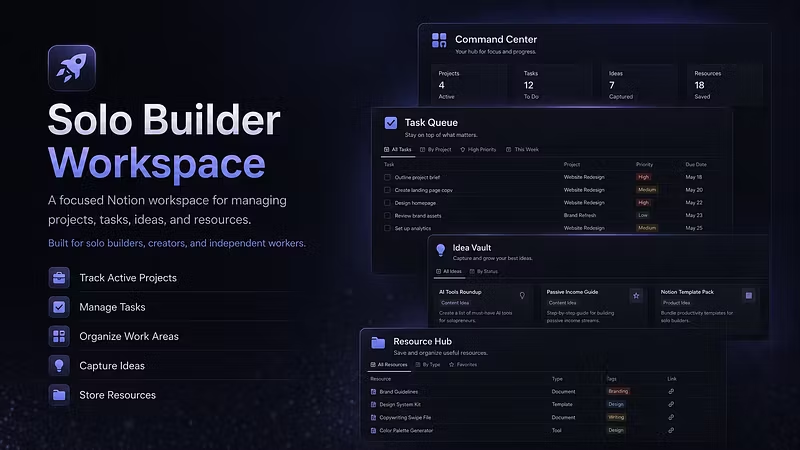
Solo Builder Workspace brings the main parts of solo work into one simple connected structure.

Command Center gives you the overview.
Task Queue keeps action clear.
Work Areas organize responsibilities.
Idea Vault saves future possibilities.
Resource Hub keeps materials close.
Weekly Focus keeps direction visible.

A calmer workspace helps the work feel easier to scan, easier to manage, and easier to continue.

Profile picture
Workframe StudioProfile picture@workframestudio·Jul 16

Resource Hub helps keep useful materials organized inside the same workflow.

Save references, templates, tools, examples, links, and supporting notes so they are easier to find when the project needs them.

When resources stay close to the work, projects become easier to review and continue.

Less searching.
More useful context.