Whop sellers can apply for buy now, pay later (BNPL) approval and offer financing on products and offers through one central payment system.
The way we spend money is changing, and financing for basic purchases has become the norm. That means Buy Now, Pay Later (BNPL) has become a standard checkout option across ecommerce, and it’s built right into Whop Payments.
With partners like Klarna, Afterpay, Zip, Sezzle, and Splitit, your customers can buy instantly and pay over time, while you still receive the full payment upfront.
Here’s how BNPL works on Whop.
What is Buy Now, Pay Later (BNPL) and how does it help my business?
Buy Now, Pay Later (BNPL) lets customers spread a purchase over several smaller payments, often interest-free. But it's not just about payments getting processed. It's the psychology behind making a sale.
Financing gives customers instant access (and gratification) to what they want, whilst removing a lot of the stress or burden they can feel over the cost.
This isn't new, by the way. A study in 1998 found we tend to feel less negatively toward the cost of things when the act of paying and the act of purchasing are seperate. Back in the day, layaway was the answer. Today, it's BNPL.
Instead of paying the full amount at checkout, they can pay over time (usually in monthly installments), while you receive the total sale amount right away.
BNPL increases affordability and lowers friction at checkout, helping businesses convert more sales and reach customers who prefer flexible payment options. And like I mentioned earlier, it's becoming the norm. Estimates put global users at 900 million by 2027.
That means your customers aren't just using BNPL, they're probably expecting it.
We've built our own payments infrastructure that allows us so much more flexibility on everything, from what payment methods we accept, to which countries we can pay out, to which ways we can pay out.
- Steven Schwartz, Whop CEO
Whop partners with ten of the top financing companies (including Afterpay, Klarna, Zip, Sezzle, and more) to increase AOV on purchases made through Whop Payments.
Decrease Whop checkout friction with BNPL
Once approved for financing, Whop automatically adds available BNPL providers to your checkout pages. Here’s what the process looks like:
- A customer selects a BNPL provider in their region (like Afterpay or Klarna) at checkout.
- They’re redirected to the provider’s site for instant approval.
- Once approved, the purchase is completed.
- You receive the full payment upfront, minus standard processing fees.
You can toggle which BNPL options appear on each checkout link directly from your dashboard.
How to apply for Whop BNPL financing
BNPL isn’t automatically enabled; it’s available to eligible businesses using Whop Payments.
You can apply for financing on your Whop dashboard, either on your Payouts page (on the Financing and other payment methods tab) or directly when you create a checkout link on the Checkout links page of your dashboard:
- Click + Create checkout link
- Select One-time as your pricing type
- Under Payment methods, click Apply for financing
- Complete the application form
You will receive an email, Whop DM, and notification if your application is missing information or cannot be accepted.
Once you have been granted financing access, you will be notified via email, Whop DM, and on your Payouts page that you have been approved. From there, all active financing options will automatically show up at customer checkout.
You can toggle which financing options you do or do not want as an option on each checkout link.
Eligibility requirements: Who can use BNPL on Whop?
To qualify for BNPL financing, your business must:
- Have a fully set-up and verified Whop Payments account
- Maintain a dispute rate under 2% (under 1% for Klarna)
- Process at least $30,000 in volume from 10+ customers over the past 90 days
- Operate in an eligible business category (no gambling, adult, credit, or high-risk financial services)
- Have a complete store page that clearly describes what you sell and how you deliver it
If you’re new to Whop, you can submit recent payment-processor statements to demonstrate eligibility.
Supported providers and limits
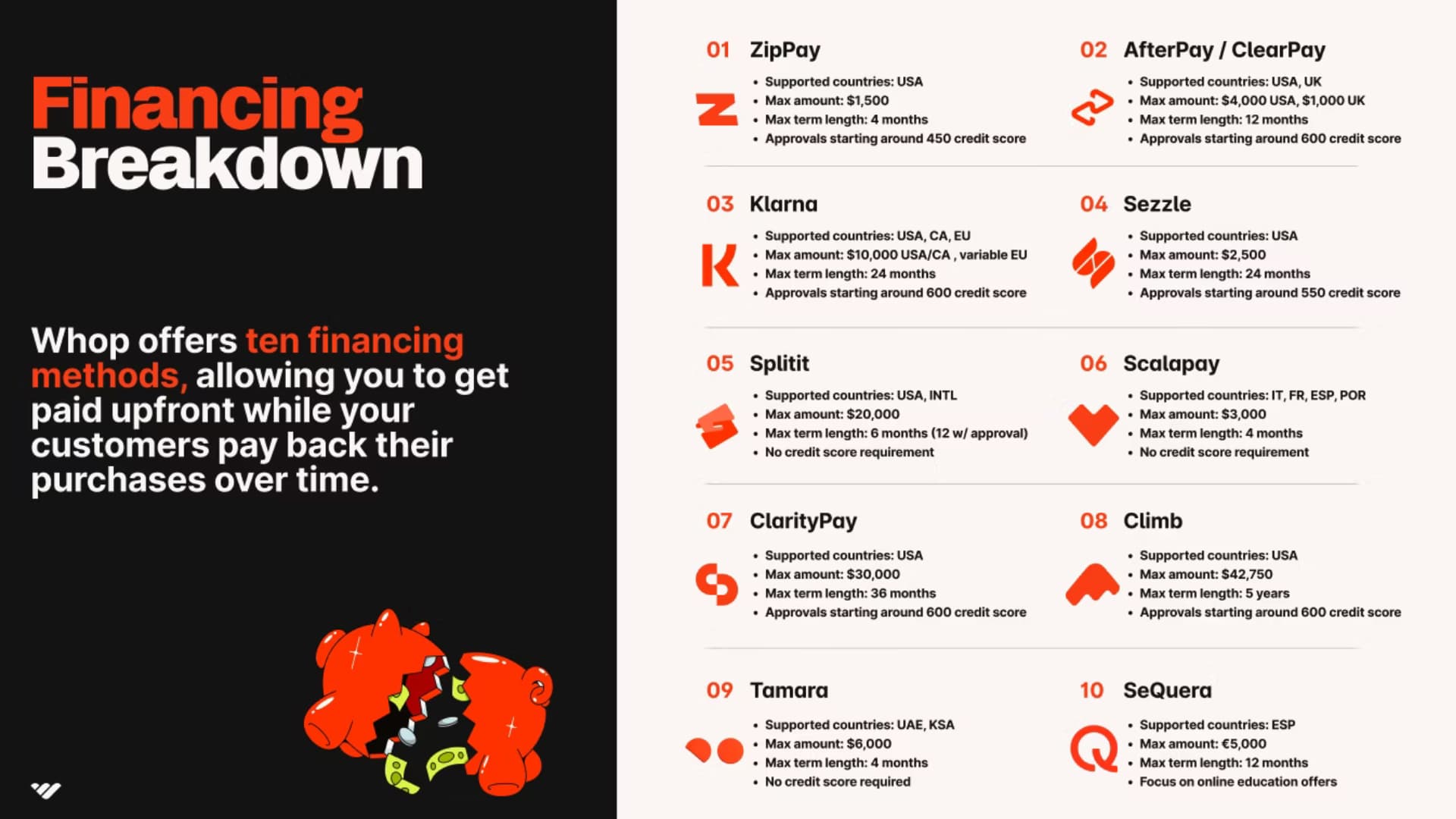
Whop partners with ten major BNPL services. Each has its own transaction limits and coverage regions:
- Sezzle: Up to $2,500 (Max term length 24 months)
- Afterpay/Clearpay: Up to $4,000 (Max term length 12 months)
- Klarna: Up to $10,000 (Max term length 24 months)
- Zip Pay: Up to $1,500 (Max term length 4 months)
- Splitit: Up to $20,000 (Max term length 6 months)
- Scalapay: Up to $3,000 (Max term length 4 months)
- Climb: Up to $42,750 (Max term length 5 years)
- Claritypay: Up to $30,000 (Max term length 12 months)
- Tamara: Up to $6,000 (Max term length 4 months)
- SeQura: Up to €5,000 (Max term length 12 months)
BNPL currently supports one-time payments only (it doesn’t apply to subscriptions or recurring memberships).
Find out more about each financing option, including limits, supported regions, approvals and terms in our documentation.
Keeping your BNPL access
Whop actively monitors dispute rates to help you maintain financing access. You’ll receive alerts if dispute rates approach the warning threshold (0.5% for Klarna, 1% for others).
To stay in good standing:
- Keep your dispute rates under 2% overall (1% for Klarna).
- Use clear product descriptions and refund policies.
- Resolve customer issues quickly before they escalate into chargebacks.
If thresholds are exceeded, financing access may be paused until dispute rates improve.
How does BNPL help Whop sellers make more money?
Adding BNPL gives your customers flexibility while you maintain full, immediate cash flow.
I decided to move over to Whop because they had access to amazing buy now, pay later options, which I just couldn't secure on my previous platform.
I started getting payments that I ordinarily couldn't make because people just couldn't afford my fee up front.
- Whop coach Carl Parnell
You don’t manage collections or credit risk: the financing partners handle everything.
Combined with Whop’s core payment stack (2.7% + $0.30 per transaction, 100+ payment methods, global payouts across 190+ countries), BNPL helps you sell faster, reduce friction, and grow revenue confidently.
The average business sees a 27% increase in sales volume when offering BNPL options.
Set up BNPL for your Whop today
Want to offer Buy Now, Pay Later to your customers? You can apply directly through your Whop dashboard in just a few minutes.
Once approved, BNPL options like Klarna, Afterpay, Zip, Sezzle, and Splitit will automatically appear at checkout, with no coding or extra setup required.
If you haven’t activated Whop Payments yet, start there first.
After your account is verified, complete the short financing application to unlock BNPL for your store and give your customers more flexible ways to buy.
Activate Whop Payments, apply for financing, and start selling smarter with Whop.
Buy now, pay later FAQs
How can I offer BNPL to my customers?
On Whop, buy now, pay later (BNPL) is automatically available to creators who use Whop Payments. If you don't already use Whop Payments, you'll need to set it up to give your customers the option to pay with BNPL.
What are the fees for BNPL?
The buy now, pay later (BNPL) fees are 15% + Whop's processing fees.
How do refunds work with buy now, pay later (BNPL)?
Refunds for BNPL transactions are handled just like debit or credit card payments. As a creator, you can issue refunds directly from your dashboard.
How are disputes handled for buy now, pay later (BNPL)?
Disputes for BNPL work just like those for debit or credit card payments. As a creator, you'll see and manage any disputes through your dashboard.
How do Dispute Protection Alerts work with buy now, pay later (BNPL)?
We don't receive alerts for BNPL disputes.
Here's why:
When a customer disputes a BNPL charge, their complaint typically goes directly to the BNPL provider, like Klarna, rather than their bank or card network. This means Whop isn't notified. To receive these alerts, we'd need to establish relationships with BNPL companies, which isn't currently part of our system.
If a customer disputes through their credit card company and it contains an identifier we're subscribed to, we'd receive the alert as usual—but that's rare, as BNPL disputes are usually handled directly by the BNPL provider. Moreover, companies like Klarna don't have formal programs for monitoring disputes.