
Read this guide to learn about the top 10 no-code app builders, including who they are best for, what they do, and how you can use them.
Key takeaways
- No-code app builders vary widely in focus—some excel at mobile apps, others at web apps or internal business tools.
- Full-stack platforms like Bubble include built-in backends, while frontend-only tools require external database connections.
- Usage-based pricing can escalate quickly with high traffic, so evaluate long-term costs before committing to a platform.
Building an app used to mean spending months (or even years) learning to code or hiring pricey developers.
But now, no-code app builders let you create web apps, native mobile apps, and progressive web apps (PWAs) without writing a single line of code.
But there are so many app builders out there that picking the right one for your project can feel very confusing and overwhelming.
For example, some app builders focus on mobile apps, while others are better for web-based projects. Some are beginner-friendly, while others offer more customization for those with technical experience. Some are better for building internal business tools while others can handle the complexity of consumer apps. You get the drift.
In this guide, we’ll break down the top 10 no-code app builders, highlighting what each one does, who it’s best for, and its ideal use cases.
What should you look for in a no-code app builder?
Here are the different factors to consider when evaluating no-code app builders for your business or project:
Ease of use
Look for a platform with an easy-to-use drag-and-drop interface, especially if you're new to app building. It also helps if it comes with a good selection of templates that fit your needs.
If you’d rather not deal with extra software, you might want a full-stack app builder with a built-in backend—or at least one that works with a backend you’re already comfortable using.
Customization
Choose a tool that lets you fully customize your app’s design, logic, and backend. Depending on your app’s complexity, check if the builder also lets you import custom code to add extra features to your app.
Code export
Some platforms lock you into their ecosystem, while others allow you to download your app’s code and host it elsewhere if needed. If you want the flexibility to switch platforms later—whether due to hosting preferences, pricing changes, or an unexpected shutdown—it’s important to check for this feature upfront.
Cross-platform support
Most no-code platforms are primarily built for either mobile apps or web apps, so figure out which one is more important for your project. And if you need both, find the platform that can handle both to a decent standard.
Integrations
Your no-code app builder should integrate smoothly with your preferred backend software, whether that’s Airtable, Google Sheets, Xano, Supabase, Firebase, MySQL, or PostgreSQL.
If you also need to connect with third-party apps like Stripe, Google Drive, or Zapier, ensure the platform supports these integrations or allows custom connections via API and webhooks.
Documentation and support
Check whether the app builder has organized and comprehensive help center documentation along with support options like live chat or email, for when you run into issues. Another big plus is if it has an active community of users who share tips, troubleshoot problems, and offer advice.
Best no-code app builders
1. Google AppSheet
Best all around no-code builder for desktop, mobile, and web
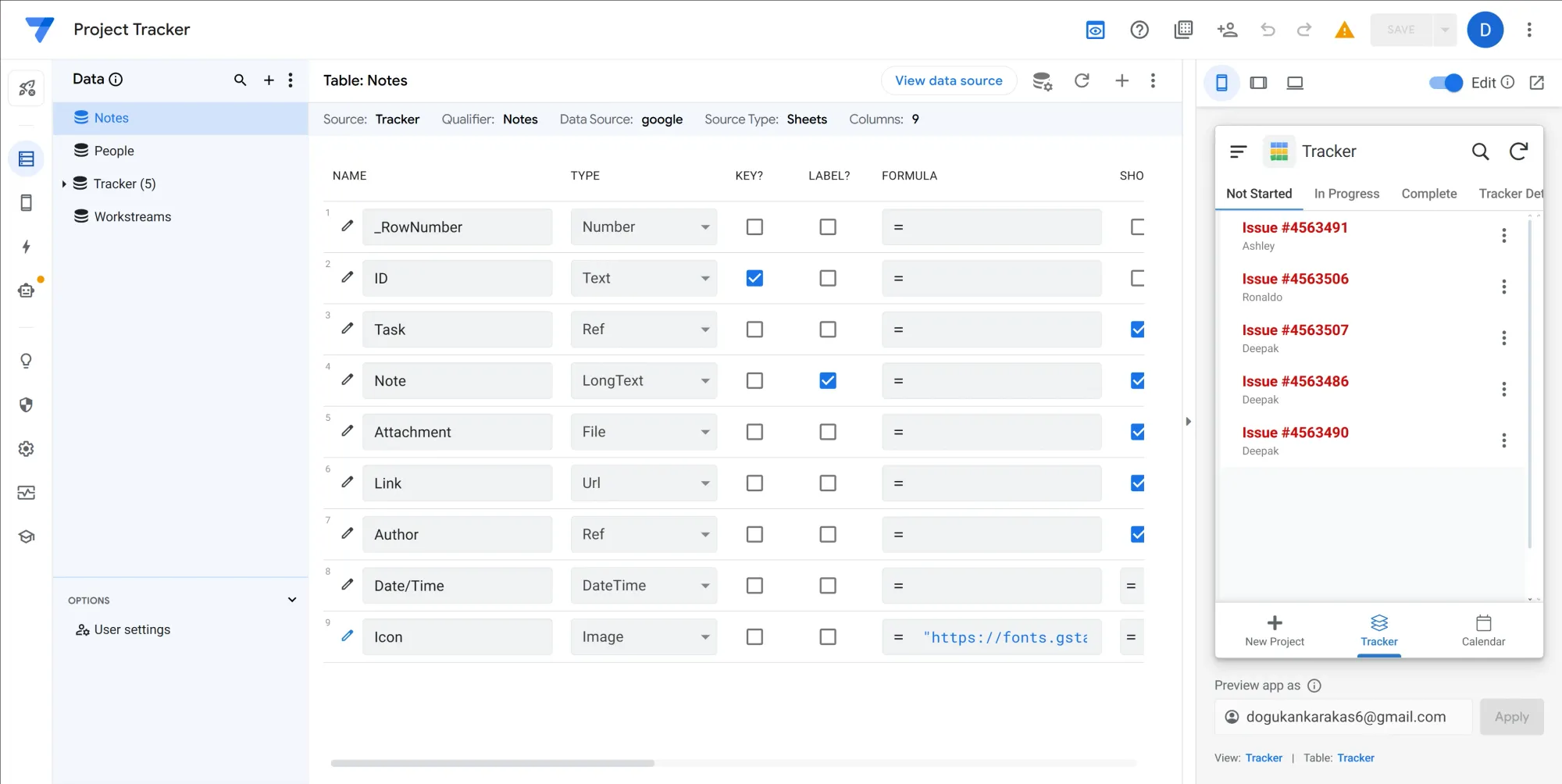
The first in our list, Google AppSheet, is Google's no-code app builder platform that uses spreadsheets and databases to build mobile and web apps. Built in 2014, AppSheet was acquired by Google and was integrated into the Google Cloud ecosystem.
AppSheets isn't built for common web apps with a few functions - it can fully transform manual workflows of businesses into automated systems with apps. Since it can use Google Sheets, other spreadsheet apps, databases, and several other integrations, it's a powerful tool that can work with a lot of data.
If you already use the Google ecosystem for your operations, AppSheet is a perfect option to transform your ideas into apps using its visual builder, easy to use data mapping, and AI assisted development flow.
AppSheet pros
- Works seamlessly with Google apps like Sheets, Drive, Calendar, etc.
- AppSheet assists users on building apps that work without the internet
- Gemini AI integration makes some pain points easily solvable for most people
- You don't have to use third party connectors for your data, you can just use Google Sheets
AppSheet cons
- The apps you build will carry a strong resemblance to the classic look of Google apps
- Usage based pricing can get too expensive in the long run
AppSheet pricing
AppSheet has three membership tiers:
- Starter, $5 per month - allows creating basic apps with automation features and connection to spreadsheets and cloud storage
- Core, $10 per month - allows creating advanced apps with security controls, and email customer support
- Enterprise Plus, $20 per month - allows enterprise data services, enhanced app security and governance controls, machine learning modeling, and priority customer support
2. Bubble
Best for quickly building complex web app prototypes

Bubble is one of the most popular app builders on the market, powering over 3.3 million apps and counting. It’s primarily a web app builder, but you can also use it to create mobile apps.
As a full-stack platform, Bubble supports both frontend and backend development, making it quicker to build complete, fully functional apps.
With its drag-and-drop builder, you can easily piece together components to design your app’s user interface and working logic. It also has an API connector to link your app with external tools.
Bubble works well for designing almost any app, including CRMs, online stores, directories, marketplaces, and social networking apps.
Bubble pros
- Allows you to invite collaborators to view or edit apps
- Integrates with over 6,500 apps, including Figma, Airtable, Zapier, and Make
- Offers comprehensive documentation and a large, active user community
- Provides access to a wide range of free and paid templates to help you get started
Bubble cons
- Locks you into its platform, with no option to export and host your code elsewhere
- Does not support direct mobile app publishing to the Apple App Store and Google Play Store
Bubble pricing
Bubble has a free plan. However, you’ll need to pay to publish apps to the web. Paid plans start at $29/month.
Also, note that Bubble uses a usage-based pricing model, meaning costs can rise quickly if your app handles high traffic, requires significant server resources, or runs complex workflows and database operations.
3. FlutterFlow
Best for technical users looking to building feature-rich mobile apps

While FlutterFlow can be used for web and desktop app development, it’s primarily designed as a no-code solution for creating mobile apps. In fact, it’s earned a reputation for being one of the most powerful mobile app builders in the no-code space.
Unlike full-stack platforms like Bubble, FlutterFlow supports only frontend development. This means you’ll need to connect it to a backend service like Firebase or Supabase for data storage and management.
FlutterFlow comes with 160+ screen and UI component templates for getting started. It also lets you animate UI components, integrate with payment platforms, import custom code, and build complex API calls.
That said, learning to use FlutterFlow takes time, so it’s not the best option for complete beginners. However, if you’ve got some technical experience and are looking to build visually appealing and feature-rich mobile apps, FlutterFlow is a solid option.
FlutterFlow pros
- Allows you to export and deploy your code on external servers
- Includes a built-in AI tool to generate app pages and UI components
- Supports team collaboration with features like commenting on components and task assignments
- Enables direct deployment to the web, Google Play Store, and Apple App Store
FlutterFlow cons
- Has a steep learning curve, especially for non-technical users
- Not well-suited for developing complex web and desktop applications
FlutterFlow pricing
FlutterFlow has a free plan that lets you build mobile, web, and desktop apps and publish to a FlutterFlow subdomain.
However, you’ll need to upgrade if you want to collaborate with your team, download your code, and publish your app to a custom domain. Pricing starts at $30/month.
4. Softr
Best for newbies who want to build web apps for their business

Softr is a no-code frontend builder for creating web apps. It’s one of the easiest platforms to use, thanks to its intuitive interface, extensive template library, and 100+ building blocks, including tables, forms, and maps.
Since Softr doesn’t have a built-in backend for data storage, you’ll need to connect it to an external database.
It connects with 13 database platforms, including Airtable, Google Sheets, Xano, Supabase, and MySQL. If your preferred database isn’t on the list, you can still connect it via Softr’s REST API.
Once connected, Softr transforms your data into a functional web app. A standout feature is its ability to integrate multiple data sources into the same app or even different app pages. The data stays synced in real time, so any updates made in Softr or the original database reflect instantly in both.
These features make Softr a great option for building custom internal tools like CRMs, dashboards, client portals, project management apps, and inventory trackers.
Softr pros
- Embed custom code into your web app
- Use Softr’s AI tool to build full-blown apps from text prompts
- Connect Softr with 30 third-party apps including Stripe, PayPal, Calendly, Mailchimp, Google Analytics, and Zapier
- Access Softr’s community forum and 24/7 live chat on all free and paid plans
Softr cons
- Does not support mobile app development
- Lacks native integration with Microsoft Excel
- Does not allow code export for external hosting
Softr pricing
Softr’s free plan allows you to publish one app, with up to 10 app users and unlimited visitors.
To publish multiple apps, unlock unlimited building blocks and app users, or enable API calls, you'll need a paid plan, starting at $59/month.
5. Glide
Best for non-techies looking to build simple mobile apps for their business

Glide is a data-driven app builder, similar to Softr, for building internal business tools.
When you create a new app, Glide first prompts you to select a data source. It then generates the app using either a pre-built frontend template or the output from its built-in AI assistant.
Unlike Softr, Glide has its own built-in database, Glide Tables. It also supports external data sources like Airtable, Microsoft Excel, Google Sheets, MySQL, and Google Cloud SQL.
Another key difference is that Glide apps are progressive web apps (PWAs). This means they are basically web apps that behave like native mobile apps. They can be installed on mobile phones via a link and work well across all devices.
However, since PWAs don’t have the same capabilities as native apps (e.g., they have limited offline functionality and can’t be published to the app stores), they may not be the best fit for every project.
But if you’re looking for an easy-to-use platform to build mobile-friendly apps for your business, Glide might just be the perfect fit.
Glide pros
- Build aesthetic apps quickly with no coding experience
- Access Glide apps via the web, desktop, and mobile devices
- Choose from 100 customizable templates for CRM, HR, event and project management, and client portals
- Integrate with 40+ third-party apps, including Gmail, Microsoft Outlook, Google Calendar, Microsoft Teams, and ChatGPT
Glide cons
- It can get expensive really quickly
- It doesn’t support custom code injections
- Lacks code export functionality
Glide pricing
Glide’s free plan allows you to publish one app with up to 10 personal users (including app editors). For additional apps, more users, or features like Glide AI, API access, and customer support, you'll need a paid plan starting at $86/month.
Additionally, you may incur extra costs for updates. Glide charges a small fee when your app modifies data in external sources like Google Sheets or Airtable—such as adding, editing, or deleting rows and syncing changes across these platforms. This does not apply if you're using Glide Tables.
You’ll also incur “update costs” if you’re running integrations or making requests through the Glide API.
6. Weweb
Best for designing the front-end of complex web apps

WeWeb is a frontend web app builder, so you’ll need to connect it to a backend—like Airtable, Google Sheets, MySQL, GraphQL, Xano, or Supabase—to build a complete, fully functioning app.
It comes with a drag-and-drop interface and a bunch of ready-to-use components, making it easy to design and customize your app’s UI. While newbies might find its interface to be complex and overwhelming, web designers and developers will feel right at home.
Unlike many no-code platforms that prioritize simplicity, WeWeb strikes a balance between ease of use and advanced customization. It lets you add pre-built components from frameworks like React and Vue.js and even apply custom CSS to tweak the styling of UI components.
This makes it ideal for building both internal tools and consumer web apps with full control over your app’s design, functionality, and scalability.
Weweb pros
- Get started with 60+ app and page templates from WeWeb’s marketplace
- Publish your web apps to a custom domain, deploy to GitHub, or export code for self-hosting
- Access a growing, responsive community and comprehensive documentation for guidance
- Use WeWeb Copilot to generate custom apps and refine them with follow-up prompts
Weweb cons
- It might be complex for people new to no-code platforms
- Doesn’t support native mobile app development
Weweb pricing
WeWeb offers a free plan with full access to development tools, but you can’t publish your app.
There are two sets of pricing tiers:
Project Plans (for individual developers) start at $49/month, allowing you to publish an app to a custom domain with 1GB of file storage and 50,000 monthly visits.
Workspace Plans (for teams) start at $29/month per seat, providing up to three editor seats and access to customer support.
7. Adalo
Best for beginners looking to build native mobile apps

Adalo is a no-code builder for creating and publishing native mobile apps on the Google Play and Apple App Stores. While it supports web apps, its features are better optimized for mobile-first development.
Compared to FlutterFlow, another popular no-code mobile app builder, Adalo is easier to learn, making it a great starting point for beginners.
It comes with a built-in backend, so you don’t need a separate backend tool. But you can still connect it to external databases like Airtable, Google Sheets, Xano, Supabase, and Firebase.
With a wide range of pre-built components and templates, Adalo is a strong choice for building internal tools, client-facing apps, and consumer apps such as chatbots, booking systems, CRMs, ecommerce platforms, social networking sites, and directories.
Adalo pros
- Use any of the 30 app templates to start building your mobile apps
- Prompt Adalo’s AI tool, Magic Start, to generate frontend and backend designs
- Customize your app with free and paid components from Adalo’s component marketplace
- Connect with 5000+ external apps including Slack, Gmail, Slack, Stripe, Zoom, and Zapier
Adalo cons
- There’s no option to export code for self-hosting
- Does not support adding custom code to extend app functionality
Adalo pricing
Adalo’s free plan allows one app editor to create unlimited test apps with unlimited screens. However, publishing apps and adding more editors require a paid plan, starting at $45/month.
8. Webflow
Best for web designers looking to build aesthetic web apps

Webflow is a no-code website builder for creating pixel-perfect, responsive websites with custom HTML, CSS, and JavaScript. It also includes a built-in content management system (CMS), making it a great choice for content-heavy websites.
Even though Webflow has a drag-and-drop interface, there’s a bit of a learning curve—especially if you're not a designer or developer. However, with thousands of templates, components, and integrations, you can speed things up and build a professional-looking frontend without writing any code.
For adding backend functionality, Webflow works with Wized. It lets you set up login systems, handle payments with Stripe, and connect to APIs. You can also link it to backends like Airtable, Xano, and Supabase, giving you full control over your app’s data management and logic. Plus, it works with automation tools like Zapier and Make for even more flexibility.
So, if you want to build highly customized web apps without sacrificing design quality, the Webflow and Wized combo could be just what you’re looking for.
Webflow pros
- Collaborate with your team using Webflow’s view, comment, build, and edit modes
- Design your web app’s frontend with 6,000+ customizable templates
- Save menus, navigation bars, headers, and footers as reusable components for future projects
- Integrate with 5,500+ third-party apps, including Google Analytics, HubSpot, Calendly, and Intercom
Webflow cons
- The Webflow and Wized combo can be complex for beginners
- Websites built with Webflow can be exported, but exporting web apps built with Wized can be tricky
- You can’t build mobile apps with Webflow and Wized
Webflow pricing
Webflow has a free plan that lets you create two static pages (CMS pages, like blog posts don’t count) and publish them on a Webflow subdomain.
Besides the free plan, Webflow has two sets of pricing tiers:
Site Plans (for individual designers) start at $18/month.
Workspace Plans (for teams) start at $28/month for one editor, with an additional cost for each extra editor.
Wized also has a free plan, but it doesn’t allow you to publish web apps. To publish, you'll need a paid plan starting at $12/month.
9. Budibase
Best self-hosted solution for building custom internal apps

Budibase is a full-stack web app builder that combines both frontend and backend development into a single platform.
Since Budibase includes its own backend, there’s one less tool to learn. But if you’d rather use an external database, you can connect it to Airtable, Google Sheets, MySQL, or pretty much any backend via a REST API.
To speed up development, Budibase provides 50+ pre-built templates covering use cases like client portals, HR management, job portals, ticketing systems, and inventory tracking. If none of the templates fit your needs, you can mix and match screens from multiple templates to build a custom app.
Although Budibase is a cloud-hosted solution, it gives you the option to host the platform on your own servers, which is great if you need full control over your data, enhanced security, or compliance with strict industry regulations.
This flexibility makes Budibase an excellent choice for building and managing multiple internal apps while maintaining complete ownership of your infrastructure.
Budibase pros
- Build apps quickly inside Budibase’s intuitive drag-and-drop interface
- Use Budibase AI (powered by OpenAI) to speed up your app design workflows
- Write and tweak JavaScript snippets in one spot, then use them anywhere in your app
- Customize your app with any of the 50+ free components contributed by the Budibase community
Budibase cons
- It doesn’t allow you to build native mobile apps
- You can’t publish apps to a custom domain—but it’s in the works! (though it’ll only be available for Enterprise users)
Budibase pricing
Budibase has three pricing tiers for its cloud-hosted version:
Free plan: Build unlimited apps but with a limit of 5 users and 10 plugins.
Premium plan: $60/month per app creator (who builds and updates apps) and $6/month per app user (who uses the apps). Includes Budibase AI, custom branding, and email support.
Enterprise plan: Unlocks unlimited app users, so you only pay for app creators. Pricing is available upon request.
Whichever plan you choose, you can choose to self-host it.
10. Noodl
Best free and open-source platform for building web apps

Noodl is an open-source, full-stack web app builder for building highly customized and scalable applications. It has its own backend but also connects to Xano, Supabase, or any other backend via API calls.
Unlike many no-code platforms, Noodl uses a visual development system.
So instead of writing lines of code, you create apps by dragging and connecting blocks that represent different functions, data sources, and UI elements. These blocks are connected with lines, forming a flowchart-like structure that visually maps out your app’s logic.
As you build, a live preview updates in real-time, so you can see your app take shape instantly—no need to refresh or deploy changes manually.
For those who want more control, Noodl supports React libraries, custom CSS, and JavaScript, allowing for deep customization and advanced functionality.
Whether you're a beginner or an experienced developer, Noodl gives you the flexibility to create feature-rich web apps—all for free.
Noodl pros
- Design app’s UI with over 100 building blocks
- Create UI elements, images, custom JavaScript functions, and database queries with Noodl AI
- Use the Git-powered version control panel to track changes, authors, and branches for easy collaboration
- Get support through detailed documentation, in-app guides, and a small but active Discord community
Noodl cons
- There are limited starter templates
- It doesn’t support native mobile app development
- As an open-source tool, Noodl lacks a dedicated customer support team
Noodl pricing
Noodl is open-source and completely free to use. You only need to download the editor to your PC or Mac to start using it.
Monetizing apps you build with Whop
No-code builders make it easy to create your dream app. But why stop there? With Whop’s SDK and developer docs, you can connect your app to Whop, lock access, and start monetizing instantly.
Charge however you want — per user, per feature, per install, or with subscription tiers. Then, list your app on the Whop App Store, so creators can find and use it without you fighting for attention in a crowded marketplace.
If your builder lets you access code or push to hosting platforms like Vercel, you can monetize it with Whop. Check our developer docs to get started.
Build and monetize your first no-code community app with Whop
No-code tools have made building apps simple — no coding required. Whether you’re creating an MVP, internal tools, or consumer apps, there’s a builder for you.
And if you’re a solopreneur or founder building a community platform, Whop makes it even easier. Add pre-built apps like forums, chat, courses, bookings, events, and more — all without touching a line of code.
It’s free to get started, Whop only takes 2.7% per sale, and you’ll get full docs plus 24/7 support. That means you can launch and monetize your community right away.
Create your free Whop account today and start building in minutes.