
A practical guide to starting and succeeding in an online career. Learn eight essential lessons on visibility, money management, boundaries, rest, connection, tools, and continuous learning - plus the starter toolkit to build your online career the easy way.
Key takeaways
- Build your work routine around your natural energy peaks and focus patterns, not traditional 9-5 office expectations.
- Visibility drives opportunity—consistently share your work and expertise where your ideal clients already spend time.
- Rest is a productivity tool, not a reward; sustainable work habits prevent burnout and sharpen your output.
I started my online career twelve years ago, and fully committed to remote work eight years ago. Back then, there wasn’t much guidance on how to make it work - no playbooks, TikTok advice, and only a handful of early influencers to follow. You learned by doing, guessing, failing, and trying again.
A lot has changed since then. More people than ever want to build flexible careers, work from anywhere, or earn money online - but the reality is, most of the advice out there still skips the parts that actually matter: how to find clients, set boundaries, manage your time, avoid burnout, and keep growing in an online industry that moves fast.
So here are the eight lessons I learned the hard way. If you’re starting your online career today, these are the foundations that will help you make money online - whether you're working for yourself or someone else.
The eight lessons every online worker should know
1. Routine looks different for everyone
One of the biggest myths about working online is that you need to recreate a traditional office routine at home. You don’t. In fact, trying to force a 9-5 structure into a completely different environment is one of the fastest ways to burn out.
The whole point of online work is that you get to build a routine around the way you think, focus, and create.
For some, this means getting dressed, leaving the house, then walking back into your home office with a focused energy.
For others, this means sitting in their softest loungewear on the comfiest beanbag, laptop balancing on their knees. Some people thrive with strict time blocks. Others work better in deep-focus bursts with long breaks in between.
The trick is figuring out what you need, not what you think you should be doing.
Personally, my day starts slow: coffee, inbox scan, then an ABC list to prioritize tasks. It sounds simple, but it’s what keeps me focused without overwhelm.
How to build a wfh routine
- Record your energy
Track when you naturally feel most productive for a week, then build your work blocks around those peaks. - Choose your start signal
What gets you in a productive mindset? Is it coffee and inbox, a morning walk, a shower, a playlist, or something else that cues your brain it’s time to work? - Pick a daily structure
There are so many ways to structure your day. Try time blocking, deep-focus sprints with movement breaks, and prioritizing tasks. Choose one and commit for 2 weeks. - Test different environments
Not everyone loves a home office. Try working at your desk, but also test out the couch, co-working, library, and café. See where your best work consistently happens.
2. Visibility matters - clients can only hire you if they can find you
If you want to build an online career, you have to learn how to put yourself in front of people. And not in a desperate, cold-DM-everyone-at-2am way, but in a confident, consistent way that shows you know your own value.
When I first started, I charged $5 for a 500-word article on Fiverr. It wasn’t pretty, but it taught me the most important early lesson: clients can’t hire you if they don’t know you exist.
According to Keywords Everywhere, more than 70% of freelancers find work through public marketplaces or gig platforms, proving that visibility is still one of the most effective ways to get clients
Finding clients online means treating your skills like a business, not a hobby. People are busy and algorithms shift, so opportunities come from those who show up, not those who wait quietly hoping to be discovered.
Just check out Lizzie Davey's LinkedIn profile - she posts every few days on her industry, learnings, and projects - and as a result, her calendar is always full.
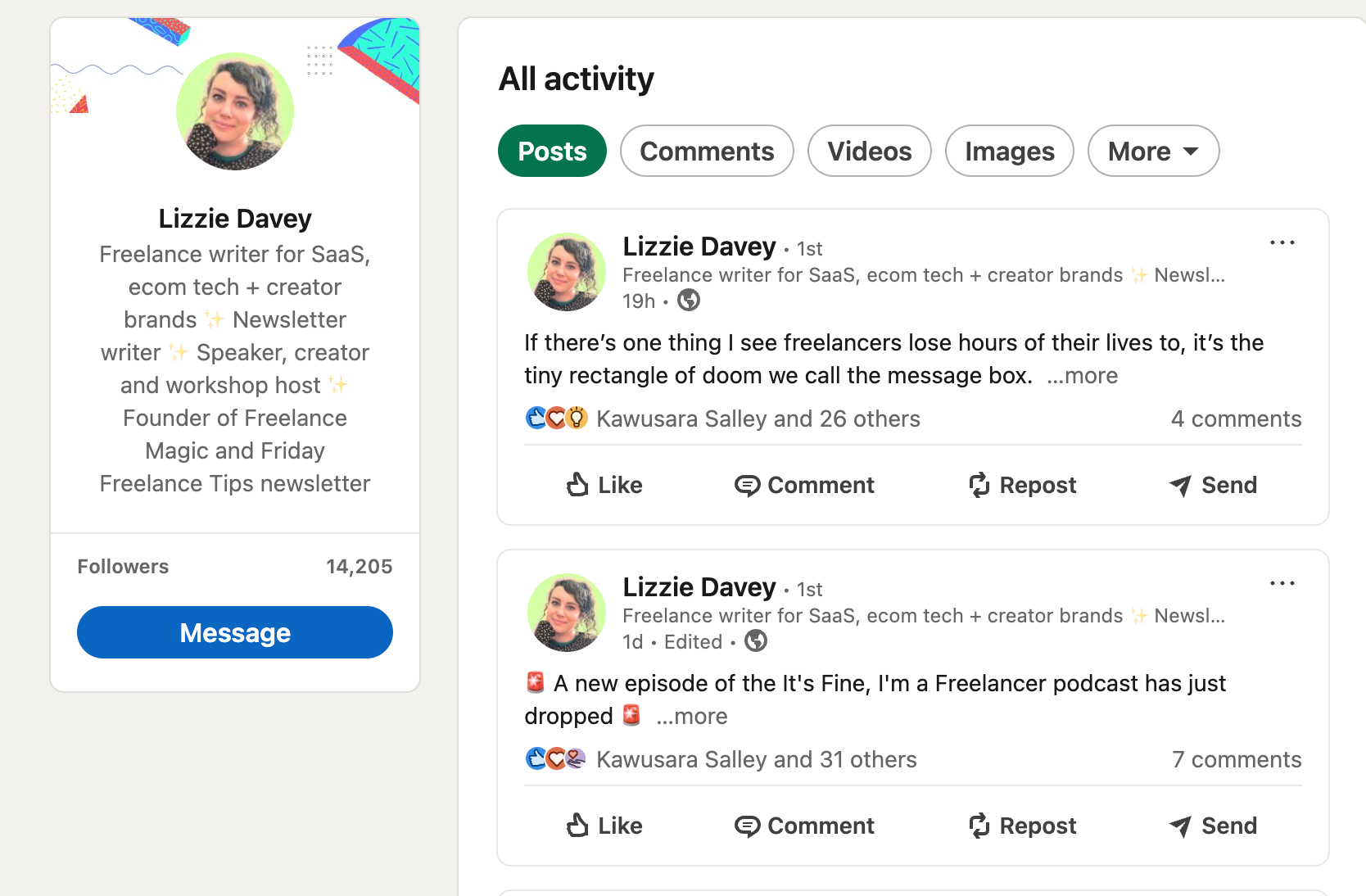
Confidence is also part of the job. You don’t need to be the loudest person online, but you do need to speak about your work clearly, show what you can do, and make it easy for clients to say yes.
Put yourself where your clients already spend their time, and build in public. What do I mean by this? Share your work and talk about your processes - this, in turn, will show your value and expertise.
Steps to find clients
- Pick your platform
Choose one primary place to be visible (LinkedIn, Twitter/X, Instagram, TikTok, or a freelance site). Master your presence here before adding more. - Create a simple portfolio
Potential clients and employers need to see your work before they will even think about working with you. A clean Google Doc, a Notion page, or a basic website. With build-in tools for booking meetings, sharing PDFs and files, and sharing links, a whop makes for a great online portfolio. - Post proof of work
Share mini case studies, quick tips, before/after examples, or your unique approach. This isn't just for freelancers - if you're working for a company, share posts about the impact you've made or goals you have hit. People hire what they can see. - Follow the money
Look where your niche actually hires. This might be Upwork, Fiverr or Reddit for freelancers, Slack groups, LinkedIn, and job boards for companies.
3. Strong money systems early on will save you from major stress later
Nothing will derail an online career faster than messy money management. When you’re working online - whether as a freelancer, contractor, or full-time employee for a company in another country - you need systems that keep you paid on time and protect your rights.
In the early days, I learned this the hard way. Some platforms held my payouts for months. Multiple clients paid late. And one year, I received a $30k tax bill because I didn't set myself up properly from the start.
It’s your responsibility to make sure everything is set up properly: how you get paid, in what currency, by which entity, and on what timeline.
If you’re freelancing, this means choosing the right tools and invoicing systems. Getting paid on time isn’t guaranteed: over half (54%, Free-Work) report having had a client pay them late at least once - and many say they waited a month or more beyond the agreed date before seeing any cash.
If you’re working full-time for a company based in another country, this means making sure you’re paid through the right structure - usually an Employer of Record (EOR) - so you can receive correct benefits, protections, and compliance support in your country.
Getting paid online
- If you’re employed by a company
Make sure your contract includes local benefits, taxes, paid leave, and protections. Ask how payroll works, when you’ll be paid, and in what currency. - If you freelance or contract
Use international-friendly payment systems (Whop Payments, Wise, Stripe, PayPal) to get paid in your currency, and send clear invoices with due dates, terms, and late-fee policies. - For everyone working online
Put aside tax money weekly (20–30%, depending on your income), understand how your local tax rules apply to foreign income, and automate reminders, recurring invoices, and bookkeeping where possible.
4. Clear boundaries are the only way to stay sane
One of the biggest challenges of working online is that the internet never sleeps, so neither do your notifications. Messages can come in at all hours, but that doesn’t mean you’re expected to be available 24/7.
If you don’t set boundaries early, you’ll find yourself half-working all day and setting a standard of replying instantly. It’s an easy trap to fall into, especially when you’re new and eager to prove yourself.
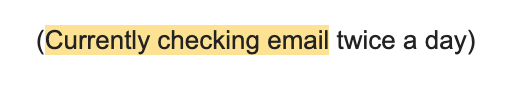
This simple line at the end of an email signature lets the receiver know that they will be replied to - but not instantly.
Now, setting digital boundaries isn’t about being rigid, it’s about being clear. When people know when they can reach you, communication gets smoother and expectations stay realistic.
How to set boundaries
- Define your working hours
Decide your daily window (e.g., 9–4 or 10–6) and stick to it. - Communicate your hours upfront
Include your 'online' hours in onboarding emails, contracts, and your email footer. - Turn off notifications outside work
Create different focus profiles on your phone. During downtime and family hours, silence any work-related notifications. - Use delayed send
Schedule replies to go out during your work hours so you don’t accidentally set a precedent of being available at 11pm. - Set response-time expectations
Let clients know when they can expect to hear back (e.g., 'within 24 hours on weekdays'). - Don’t apologize for boundaries
Saying 'I’ll get to this tomorrow during work hours' is completely acceptable, and much more confident than 'sorry I'll get to this asap!'.
5. Rest is a productivity tool, not a reward
This is almost the same as setting boundaries - but it's for yourself, not others.
When you work online it’s dangerously easy to slip into a cycle of constant productivity. There’s no commute to break up your day, colleagues packing up at 5pm or physical signals that say 'work is over.'
But if you don’t choose to rest, burnout will choose you. It’s not just a gut feeling - 69% of remote workers report that digital communication tools increase their burnout risk (Teamout).

When I first committed to online work, I pushed myself hard. I wanted to prove I could do it, that I was reliable, that I could out-work the doubt in my own head. But the more hours I worked, the less effective I became.
Eventually, I learned the lesson that every long-term remote worker has to learn: productivity is not about doing more, it’s about doing sustainably.
When you give yourself space to reset, your creativity sharpens, your communication improves, and your work becomes easier.
Creating moments of rest
- Schedule breaks like a meeting
Pick your daily and weekly downtime and treat it as non-negotiable. - Take real breaks
Take your breaks seriously. Step away from your screen, go outside, stretch, eat properly, breathe. - Use micro-resets
A 5-minute walk, a change of room, a water break - simple shifts like this can reset your brain. - Take sick days seriously
Being remote doesn’t mean you have to power through. If you’re unwell, rest. - Give your weekends structure
Without an office week as an anchor, your days blur. Plan anchors to protect your off-time. - Stop proving yourself
Let your results - not your constant availability - show your value.
6. Connection is key
Working online gives you the freedom to choose your hours, your environment, and the way you work best. But the part people don’t talk about enough is that it can get lonely if you don’t build connection intentionally.
As an online worker you’re not walking into an office or heading out for lunch with a team. This can feel isolating at first, but loneliness isn’t inevitable.
Online collaboration is incredibly flexible now. You can jump on a call with a teammate in two minutes. You can co-edit documents in real time. You can brainstorm ideas with someone across the world.
I’ve worked with teams in the US, France, and Singapore without ever being in the same room, and our collaboration was still seamless.
And when you crave in-person connection? You can choose it. I have a group of remote-working friends, and we cowork at cafés regularly. We share feedback, talk through projects, and get the social energy we’d never get from a traditional office.
How to connect virtually
- Schedule virtual coworking sessions
Set weekly or monthly focus sessions with friends or colleagues. - Use async tools well
Whop, Google Docs, Notion, Slack threads - use these to collaborate without being on constant calls. - Join communities in your niche
Slack groups, whops and forums all have great online spaces where people share wins and ask questions. - Meet up locally
If you have remote-working friends, schedule casual coworking or lunch days. - Visit your team occasionally
If you work for a company, take advantage of offsites or office visits when available. - Ask for collaboration
Don’t wait for others to invite you - be proactive.
7. Too many tools will slow you down more than they’ll help you
Tools for online work can get messy fast. You might have one for meetings, one for documents, one for invoicing, one for payments, one for scheduling, one for file sharing, one for client communication - and the list goes on.
At first, it feels productive. Then it becomes overwhelming. You end up with constant context-switching, notifications, logins, and the huge admin that comes with scattered systems.
Streamlining your tools protects your focus, your time, and your mental bandwidth. Using an all-in-one platform removes a huge amount of friction, where everything lives in one place - communication, payments, documents, bookings, client management.
For me, the best all-in-one business tool is Whop. With Whop I can create my own whop and manage sales, payments, clients, invoicing, meetings, products, and even analytics - all in one place.
Actionable steps
- Audit your stack
List every tool you currently use and highlight what’s redundant or overlapping. - Cut the 'nice to haves'
If a tool doesn’t save time or make money, it’s optional. - Choose one hub
Pick a platform where most of your work can live - clients, payments, scheduling, docs. - Automate your admin
Use built-in features for reminders, bookings, and follow-ups instead of doing it manually.
8. The people who keep learning are the ones who keep earning
When I started, I was writing $5 Fiverr articles. Now, I’m working in a tech-driven, global ecosystem that didn’t even exist back then. I had to learn new tools, new writing styles, new industries, new platforms, and new ways of working. Every career upgrade I’ve had came from learning something I didn’t know before.
But learning isn’t about collecting certificates or paying for expensive higher-ed units. It’s about learning from others, improving your craft, and paying attention to industry shifts.
Whop is home to thousands of online communities
The best way to keep learning is to stay plugged-in. Join online communities relevant to your sector. Read industry newsletters and blogs. Listen to podcasts, watch videos - and to really upskill, take part in group coaching or mentorship programs.
How to upskill
- Do a quarterly skill check
Identify one skill you need to improve and one new skill you want to learn. - Follow industry leader
Subscribe to newsletters, blogs, and creators who share insights in your niche. - Learn in small bites
10 minutes a day reading, watching a tutorial, or improving a specific skill adds up fast. - Get feedback often
Ask clients, peers, or mentors where you can improve - you’ll learn faster. - Invest wisely: Choose courses or resources only when they directly support your goals.
The online-worker starter checklist
Okay, you’ve got the playbook - now let’s talk tools, because the right setup will save you time and money.
Here’s your starter toolkit for working online.
| What to do | How to do it | Tools |
|---|---|---|
| Build your routine | Pick a start signal, track your energy peaks, choose a simple daily structure | Google Calendar, Notion, Forest |
| Get visible | Set up a portfolio, post “proof of work,” choose one platform to show up on | Whop (portfolio + booking + payments), LinkedIn, Notion |
| Sort your money | Decide how you’ll get paid, set up invoicing/payroll, put aside tax weekly | Whop (payments + invoicing), Wise, Stripe, PayPal |
| Set boundaries | Establish work hours, turn off notifications, communicate clearly | iPhone/Android Focus Modes, Slack settings, Gmail delayed send |
| Rest with intention | Schedule downtime, take real breaks, use micro-resets | Opal, Calm, Google Calendar, Headspace |
| Stay connected | Join communities, schedule coworking sessions, use async tools effectively | Whop communities, Slack, Discord, Google Meet |
| Simplify your tools | Audit your stack, cut friction, choose one main hub | Whop (all-in-one), Notion, Google Workspace |
| Keep learning | Pick one skill per quarter, follow industry leaders, get feedback | Whop communities, YouTube, newsletters, Skillshare |
Ready to build your online career the easy way?
You don’t need to learn these lessons the hard way like I did, with ten different tools, scattered processes, and years of trial and error.
Today, you can run your entire online career from one place - selling your services, managing clients, taking payments, booking meetings, tracking analytics, and even hosting your business.
If you want to build your online career the easy way, start with Whop. It’s the simplest way to launch, manage, and grow everything you do online, all in one platform.