
Paddle gives online sellers a complete MoR billing solution, while Stripe offers a suite of APIs and connective tools to build a customizable payments infrastructure. Find out which is better for your business, and what to use when neither solution works.
Key takeaways
- Paddle handles all tax compliance and legal liability as Merchant of Record, while Stripe leaves you responsible even with Stripe Tax.
- Paddle's bundled simplicity suits early-stage SaaS sellers, but its 5% transaction fees become costly as revenue scales.
- MoR platforms boost customer trust through recognized billing names, which is especially valuable for unknown or creator-led brands.
Paddle is an all-in-one billing solution for global software companies, while Stripe gives you a flexible payment stack you can customise however you want, and layers products for tax, subscriptions, invoicing, and more.
The key difference is in their base model.
Paddle acts as a Merchant of Record (MoR), so it becomes the legal seller to your customer and takes ownership of tax collection, remittance, disputes, and compliance across markets.
Stripe is a payment processor, which means you remain the merchant, and Stripe moves the money for you.
Unless you pay for additional Stripe tools, you’re responsible for tax registration, filings, compliance, and chargeback handling.
I’ve explored both platforms to figure out what each includes, which solution makes sense for different business models, and how pricing differs once you look past headline rates.
I’ll also show you how Whop Payments gives you both MoR protection and Stripe-style checkout flexibility, without the tradeoffs.
The real difference: Merchant of Record vs payment processor
The biggest difference between Paddle and Stripe is who is legally responsible for the sale, and when.
Paddle is always the Merchant of Record (MoR), meaning Paddle becomes the seller of record on every transaction you process through them:
- The charge runs under Paddle’s merchant accounts
- The invoice is Paddle’s
- Paddle collects and remits tax
- Paddle is the party responding to disputes and audits
Stripe is primarily a payment processor: you remain the merchant, and Stripe just moves money from buyer to issuer to your bank account.
That means:
- You collect tax where required
- You register in jurisdictions where you trigger thresholds
- You file returns and respond to authorities
- Chargebacks land on your merchant account, not Stripe’s
The tradeoff is straightforward:
- Paddle reduces your admin work but charges higher fees and limits flexibility.
- Stripe offers lower fees and more control, but it becomes complex if you sell internationally or offer subscriptions.
So, what about Stripe Tax? Well, that's an additional product that automates calculation, collection, and even filings, but it does not change who is legally responsible.
You remain the merchant, the taxpayer, and the party on the hook for compliance outcomes.
Head's up: While Stripe is often touted as one of the fastest ways to get paid, I experienced long wait times, hefty conversion fees, and issues withdrawing funds.
Two handy things to consider are:
- How much tax obligation do I want to take on in my business, and
- How much do I care about customer perception?
I'll explain what I mean.
Tax obligations
With Paddle, tax calculation, filing, and remittance are included because Paddle is the legal seller.
Paddle assumes the liability for sales tax/VAT/GST, even if they pass chargeback fees back to you.
With Stripe, responsibility stays with you – unless you pay extra for Stripe Tax.
Stripe Tax can:
- Detect when you owe tax
- Calculate the right rate
- Add tax to the checkout
- Help you register
- Automate filing through partners
But Stripe doesn't take on liability. You remain the merchant responsible for compliance outcomes. If a tax authority audits, questions, or penalises a transaction? Your business is the one answering.
What about Stripe Managed Payments?
Stripe has built an MoR product, Managed Payments.
However, it's in private preview, limited to specific geographies, and only available for supported digital products.
For most businesses, Stripe still operates as a payment processor where the seller retains tax, compliance, and chargeback liability.
Customer perception
When it comes to your brand image, I’ve seen sellers say that using an MoR actually makes customer charges feel more legitimate.
It's not like selling under your own name will heavily impact your customer experience, but when you list on a platform that acts as an MoR, there's a layer of trust that occurs.
– Derek Wilmer, Whop
I know if I’m paying a random creator, indie SaaS, or a new brand I just found on the internet, seeing a known platform name on my card statement is reassuring.
It tells me there’s an actual company in the middle, not just someone piping my card details into a script, y’know?
- Charges, invoices, and dispute flows all run from Paddle, which makes the transaction feel safer and more official (especially when customers don’t already know or trust you as a seller).
- With Stripe, the customer is billed directly by you. That’s great if you’re an established brand or product. But if you’re early, unknown, or creator-led, being charged directly by “some random name” can actually create hesitation.
That’s why platforms like Patreon work. People are comfortable being billed by Patreon, even though they’re supporting individual creators. The platform acts as a trust layer.
Obviously, the best option depends on who your customer is and how well they already know you.
Now that we have that out of the way, I’ll walk you through both Paddle and Stripe, where they shine, and where they could become tricky.
First, let’s look at pricing and features.
Paddle vs Stripe: Pricing
Paddle and Stripe don't price the same way, so when I tried comparing them line-by-line it was a little confusing.
Paddle charges more per transaction because tax, compliance, and chargebacks are built in.
And Stripe looks cheaper upfront, but I found the costs really stack up as soon as you add potentially necessary features, like subscriptions, tax, invoicing, and reporting.
That's why comparing Stripe's base card fee to Paddle's headline rate doesn't work. They're solving different problems, and they charge for different things.
Here's a table I drew up to help you compare the two:
Paddle vs Stripe: Key features
Both providers cover the basics: payments, subscriptions, refunds, fraud prevention.
But where Paddle bundles most of the operational work into the platform, Stripe gives you the building blocks and expects you to assemble (and maintain) the rest.
| Feature | Paddle | Stripe |
|---|---|---|
| Merchant of Record | ✅ Paddle is MoR (seller of record) | ❌ You remain MoR (Stripe Managed Payments still in limited preview) |
| Tax handling | ✅ Included (collects, remits, files, compliance) | ⚠️ Stripe Tax: 0.5% of transaction — calculates, collects, and can file via partners; merchant remains liable |
| Invoicing | ✅ Included | ⚠️ Stripe Invoicing: 0.4-0.5% per paid invoice |
| Subscriptions | ✅ Included | ⚠️ Stripe Billing: 0.5–0.7% of volume |
| Checkout control | ❌ Limited customization | ✅ Full control (hosted + custom UI / API) |
| Disputes & chargebacks | $15 per card, $20 per PayPal transaction | $15 per dispute + $15 to fight |
| Fraud prevention | ✅ Included | ⚠️ 5¢ per screened transaction for accounts |
You may still be a little confused over whether an MoR (like Paddle) or a simple payment processor (like Stripe) makes more sense for your online business.
Let’s take a deeper look, starting with Paddle.
Paddle overview: Where it shines, where it breaks
I see software sellers choose Paddle (usually) for one reason: they don’t want payments to become a second job.
MoR options like Paddle are great for sellers that want to ship globally without thinking too hard about tax or compliance.
So, if your product fits Paddle’s lane (software companies) it takes a ton of mental overhead and ops off your plate.
Speaking of which – I asked Derek Wilmer (Creator Partnerships Lead at Whop) where he'd recommend Paddle, and where Stripe is a better fit:
It's worth noting: Paddle's own docs stats they onboard software companies (including B2B SaaS, consumer apps and software, and games).
They also don't recommend using Paddle for the sale of physical goods, or human services (think consultation, coaching, support, or design).
However, when I signed up, it said some of these businesses (human services, for example), could sign up for Paddle.
This was sort of confusing, as it was in direct contradiction to their documentation.
It seems Paddle’s strengths are also the reason some businesses eventually feel… Boxed in.
So let’s walk through the key features together.
Tax handling and filing
Paddle shines when your business looks like what it was designed for: a relatively straightforward SaaS or digital product, sold to customers around the world, with predictable pricing and billing.
Because tax handling is automatic by default, you don’t have to figure out where you need to register, what rate applies in which country, or how filings work.
Paddle collects your tax, remits it, and deals with the compliance side because it’s legally responsible for the sale. That’s a big deal early on. You don’t need a patchwork of tax tools or an accountant just to get off the ground.
Sometimes, for SaaS founders and solo operators, simplicity is worth a premium.
Added MoR protection
Paddle’s core product is the Merchant of Record layer.
That’s why onboarding can feel more involved than Stripe, and why Paddle is selective about what it supports.
From Paddle’s perspective, every product you sell is something they’re legally standing behind.
That model creates safety and simplicity, but it also means Paddle has to standardise a lot of things that other platforms leave flexible in order to protect itself.
Checkout and control limits
Early on, most sellers don’t care much about checkout control. You just want customers to pay successfully.
But over time, some businesses start to feel the constraints.
Paddle’s checkout and billing flows are designed to work well across all kinds of sellers (not to be deeply customized per seller).
For businesses where payments are tightly coupled to brand, community, or user experience, that can feel limiting.
This is the tradeoff. Paddle optimizes for consistency and compliance, not bespoke payment design.
Compounding pricing
While Paddle’s pricing usually feels acceptable early, it becomes increasingly noticeable as you grow.
Paddle takes a percentage of every transaction, so fees scale directly with sales. At lower volume, that’s the cost of convenience. At higher volume, it becomes a line item you start paying attention to.
Whop Payments offers enterprise discounts for businesses processing above $50k/month.
Once a business reaches meaningful scale, some teams start asking whether they still want to pay that premium.
My honest takeaway on Paddle:
Paddle is great when:
- You’re new
- Your product fits neatly into their model
- You want to minimise tax and compliance work
- You’re happy to trade flexibility for simplicity
Paddle unfortunately starts to feel restrictive when:
- Your pricing or billing model gets more complex
- Fees become material at scale
- You want deeper control over checkout and payment flows
- Your business scales beyond solopreneur
Stripe overview: Control, flexibility, and hidden costs
When people choose Stripe, it’s usually because they want more control and customization over their payments.
And Stripe feels like a solid option. It’s everywhere. It’s flexible. And if you’re even slightly technical, you can set it up according to your own needs.
That appeal is real, but it’s also where the tradeoffs start, depending on how much admin you’re willing to take on.
Here’s what you need to know about using Stripe for payments.
Highly flexible
Stripe gives sellers fine-grained control over how money moves, how checkout looks, how pricing is structured, and how payments integrate into your product.
If you want to build something custom (think different pricing tiers, usage-based billing, or complex subscriptions) Stripe gives you the ability to do it.
It doesn’t impose a business model on you. It just gives you the tools and gets out of the way.
However: if you’re not technical, or you don’t have ongoing dev support? That same flexibility can turn into friction.
Things that look simple on the surface (retries, edge cases, reporting) often require custom logic, ongoing maintenance, or external help to keep working cleanly.
Stripe makes a lot possible, sure. But it also expects you to own whatever you build on top of it.
Modular pricing
Stripe looks cheap on paper because the headline numbers are low.
But Stripe isn’t a single product, it’s a stack of products. And while that includes a strong core stack, advanced billing, invoicing, tax, reporting, and recovery features are modular (and carry additional fees).
Stripe's invoicing fees start at 0.4% per invoice. Whop Payments has no additional invoicing charge.
None of this is hidden or deceptive. Love it or hate it, it’s just how modular platforms work.
The issue is that people often compare Stripe’s base processing fee to an all-in-one platform like Paddle and assume they’re comparing like-for-like.
They’re not.
The more complex your business becomes, the more likely it is that Stripe quietly turns into three additional tools, higher fees, and a bunch of internal glue.
- Stripe Connect: how it works, what it costs, and top alternatives
- Stripe Connect alternatives for platforms and marketplaces
Tax ≠ compliance
Don’t get me wrong, Stripe Tax is useful. It can calculate tax rates and apply them at checkout. But because Stripe still isn't an MoR, you're still liable for taxation faults and outcomes.
This is one of the biggest misunderstandings I see. Sellers hear Stripe Tax as a product, and assume their compliance problems are solved. They aren’t.
For some teams, that’s fine. They have accountants. They have finance ops. They want to stay in control. For others, it’s where Stripe starts to feel heavier than expected.
One of the drawbacks of moving from Paddle to Stripe would be the handling of sales tax/GST/VAT.
Stripe offers Stripe Tax, which can take care collecting taxes, but they charge about 0.5% of the taxable revenue.
– Piyush Agrawal, Galvix
Customization at a cost
Stripe doesn’t force complexity on you upfront. It accumulates.
At first, it’s just payments. Then subscriptions. Then retries and dunning. Then tax edge cases. Then reporting that finance wants structured differently.
Each step is reasonable on its own. Over time, payments become something you actively maintain instead of something that just runs.
That’s not Stripe’s fault, it’s the cost of flexibility. But it’s also why Stripe-based setups tend to sprawl unless someone is actively owning the system.
My honest takeaway on Stripe:
Stripe is great when:
- You want full control over payments
- You have engineering resources
- You’re comfortable managing tax and compliance
- Payments are a core part of your product experience
Stripe starts to feel heavy when:
- You’re selling globally without a finance ops function
- You need to support multiple parties getting paid
- Your payments setup grows faster than your team
Which payment platform should I choose?
The right choice between Paddle and Stripe depends on how much complexity you want to own, how many parties are involved in getting paid, and how much flexibility you need as you scale.
If you want a simple way to sanity-check your decision, here’s how I’d break it down.
Choose Paddle if:
- You’re selling a straightforward SaaS or digital product
- You want tax, compliance, and chargebacks handled automatically
- You don’t need deep checkout customisation
- You’re happy to trade flexibility for simplicity
Choose Stripe if:
- You want full control over how payments work
- You have engineering resources (or a dev on call)
- You’re comfortable managing tax, compliance, and disputes
- Payments are tightly integrated into your product logic
Paddle and Stripe both solve real problems, just for different types of businesses.
But what if your business sits somewhere in between?
Yeah, we kept seeing that. It's why Whop Payments gives you the protection of a Merchant of Record with the flexibility of a fully custom checkout.
Get Merchant of Record benefits without giving up checkout control
Sure, Paddle gives you Merchant of Record coverage, but it also limits how much you can customize payments.
And Stripe gives you full control over checkout, but costs creep up fast as invoicing, subscription billing, and tax are all additional products.
Whop Payments keeps it simple.
We act as your Merchant of Record (handling tax, compliance, fraud, and chargebacks), while still letting you fully control how checkout works, how payments are embedded, and how money flows through your business.
Through thousands of conversations, we’ve learned our customers really only care about two things: getting paid and paying out. Our mission is to be the best in the world at solving those problems.
– Hunter Dickinson, Whop
You don’t have to choose between protection and flexibility. Keep things simple, or go fully custom:
- Embedded checkout and APIs
- Automated revenue sharing and payouts
- 100+ payment methods, including BNPL and crypto
- Global payouts across 240+ territories
- Payment orchestration that routes transactions to maximise acceptance
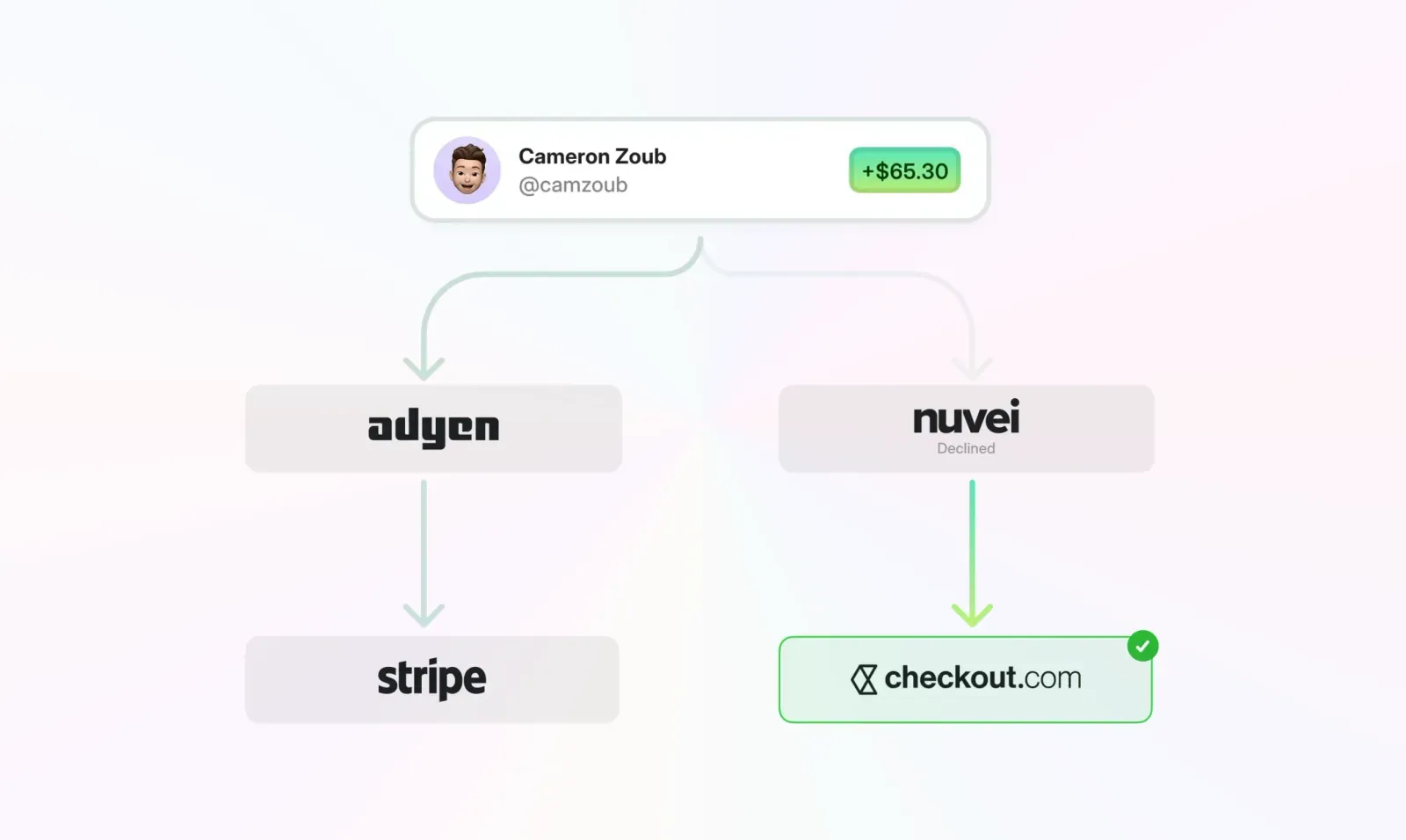
However you set it up, the Merchant of Record layer stays in place.
| Whop | Stripe | Paddle | |
| Merchant of Record |
Yes |
No |
Yes |
| Fully custom checkout |
Yes |
Yes |
No |
| Included subscriptions |
Yes |
No |
Yes |
| Crypto payments |
Yes |
No |
No |
| Invoicing (global, tax-handled) |
Yes |
Paid extra |
Limited capabilities |
| Revenue share / affiliates |
Built in |
Custom build |
Limited |
| Payment orchestration |
Built in |
Custom build |
No |
| Flat pricing |
Yes |
No |
No |
Power your online payments with Whop
Paddle is for businesses seeking maximum protection with minimal configuration. Stripe gives you maximum flexibility, so long as you’re willing to own everything that comes with it.
Most sellers sit somewhere between either extreme.
If you’re selling globally, layering subscriptions, providing invoicing, managing affiliates and revenue splits, or offering crypto and BNPL? You need an all-in-one provider.
Whop is the only solution I know of that gives businesses real-time chargeback alerts, fraud screening, and a full resolution center by default from day one. We built them into the foundation for every business.
— Derek Wilmer, Whop
Get a secure infrastructure designed for modern, multi-seller, global businesses, where Merchant of Record protection, customization, flat pricing, global payment rails, and flexibility are all equally important.
If you want payments to run smoothly as your business grows, choose a stack that was built for complexity.
Paddle vs. Stripe FAQs
What is the main difference between Paddle and Stripe?
Paddle is a Merchant of Record that becomes the seller to your customer and handles tax, compliance and disputes. Stripe is a payment processor where you stay the seller and manage tax, filings and chargebacks yourself (unless you add extra paid products).
Whop Payments sits in between, offering MoR protection with full checkout control.
Is Paddle or Stripe a better option for me?
It depends on how you run your business. Paddle is better if you want a bundled solution where tax, compliance, and chargebacks are handled for you. Stripe is better if you want full control over checkout, pricing, and payment flows and have the budget to add on additional products and services as needed.
Does Paddle handle sales tax and VAT?
Yes. Paddle collects, files, and remits taxes on your behalf in supported countries.
Sellers don’t have to register or file individually in most jurisdictions because Paddle is the Merchant of Record.
Does Stripe handle sales tax and VAT?
Yes, if you pay extra for Stripe Tax, which calculates and collects tax, monitors thresholds, can handle global registrations, and can automate filing through Stripe’s partners. However, you're still the legal seller, so liability stays with you.
Which platform is better for subscriptions?
Paddle includes subscriptions, upgrades, prorations and dunning by default. Stripe offers these through Stripe Billing, which is a separate paid add-on. Whop gives you a storefront with subscriptions built in, and a seamless way to process recurring payments.
Is Paddle or Stripe better for selling internationally?
Paddle simplifies international selling because it assumes cross-border compliance obligations – but their guidelines are narrow on the businesses they support (software companies including B2B SaaS, consumer software, and games).
Stripe supports global currencies and payment methods but pushes tax, registration, and filing back onto the seller unless you add Stripe Tax.
How do chargebacks and disputes work on Paddle vs Stripe?
Paddle handles the dispute process because the charge is on Paddle’s merchant accounts, sellers just pay the fee. Stripe disputes hit your merchant account, and the seller handles representment.
What if neither Paddle nor Stripe fits my needs?
If Paddle feels too rigid and Stripe is too expensive, you're not stuck. Whop Payments also acts as a Merchant of Record (with far more flexibility). You get tax, chargebacks, fraud and global compliance handled for you, while keeping control over checkout, subscriptions and storefront. Plus, access to a huge marketplace and 24/7 support.



