Klarna is a Buy Now, Pay Later (BNPL) service that lets shoppers split purchases into flexible instalments while businesses get paid upfront. Learn how Klarna works, its fees, key features, and how to offer it through Whop Payments for a higher-converting checkout.
Key takeaways
- Klarna eliminates seller risk by paying merchants upfront while handling all credit checks, collections, and payment reminders.
- BNPL options like Klarna boost conversions significantly, with users showing 36% higher purchase frequency and 45% larger orders.
- Klarna works best for higher-ticket digital products where payment flexibility removes buyer hesitation at checkout.
Klarna is a Buy Now, Pay Later (BNPL) service that lets shoppers pay for purchases over time, while you get paid in full upfront.
I've seen firsthand how it a) gives customers more breathing room at checkout, and b) gives your business a higher chance of turning browsers into buyers.
Unlike basic BNPL providers like Zip and Afterpay, Klarna offers multiple ways to split payments, works online and in-store, and comes with built-in credit checks, reminders, and risk management.
The key reason I decided to move over to Whop was that they had access to amazing buy-now-pay-later options, which I couldn't secure on my previous platform. It's been a game-changer.
- Coach Carl Parnell
I'll explain below how Klarna works, the benefits of adding it to your store, the top features for merchants, how to set it up, and how you can pair Klarna with Whop Payments to create a smoother checkout experience.
How does Klarna work?
Klarna works by letting shoppers split their purchase into instalments while paying you (the seller) the full sales amount upfront.
The best thing (in my opinion) about financing providers like Klarna is that they take on the credit risk, manage the repayment schedule, and handle reminders, which gives customers flexibility without slowing down your cash flow.
Here’s a better look at how it works from both a buyer's and seller’s perspective:
How Klarna works for shoppers
Shoppers use Klarna as a simple way to split purchases into smaller payments instead of paying everything up front.
Depending on the order size, I've seen customers choose between short-term instalments or longer monthly financing, all managed through the Klarna app.
Here’s how it works step-by-step:
- Choose Klarna at checkout: Customers select Klarna as their payment method on your product page, cart, or checkout.
- Pick payment plan: Klarna offers several instalment options depending on region and order size - pay in 4, pay in 30 days, pay monthly, or pay now.
- Get approved (in seconds): Klarna runs a quick soft credit check (this doesn’t affect the shopper’s credit score, but helps to mitigate risky loans).
- Repayments are automatically handled: Shoppers get automatic reminders and can manage everything in the Klarna app. If they miss a payment, Klarna steps in, not you (huge win).
Klarna works on most major ecommerce platforms, but it can also be used via Klarna’s virtual card in any store that accepts Visa.
The result: shoppers get transparency, control, and less pressure at checkout – which is how Klarna’s BNPL lifts conversion rates.
Here’s how it works from your perspective:
How Klarna works for sellers
For merchants, Klarna is a plug-and-play BNPL option that increases conversion, lifts average order value, and guarantees upfront payouts.
Sellers never wait for instalments, either. Klarna assumes the risk and handles the backend work:
- Your customer checks out: The order appears in your dashboard instantly, just like any regular payment.
- You get paid in full upfront: Klarna sends the entire order amount to you (minus their merchant fee). No instalment tracking. No collections. No added admin.
- Klarna manages customer repayments: All billing, reminders, and repayment issues are handled directly by Klarna.
- Refunds are simple: You refund the customer through your platform, and Klarna adjusts the instalments on their end automatically.
- Insights and performance tracking: You can monitor Klarna orders, payouts, approval rates, and customer behaviour in the Klarna Merchant Portal.
- Works alongside your existing payment methods: You don’t have to replace anything; Klarna automatically appears as an additional option at checkout. This gives your customers more ways to pay while keeping your operations the same.
TL;DR: Klarna gives sellers a low-friction way to offer instalments without taking on risk or slowing down payouts.
Offer Klarna through Whop Payments, and it becomes even easier to manage. Klarna sits alongside cards, wallets, crypto, and other BNPL options in one simple dashboard.
Klarna’s top features for merchants
I've found that Klarna comes with a set of tools that make Buy Now, Pay Later easy to offer and even easier to manage.
Here are the features merchants rely on most:
- Multiple BNPL options: Offer multiple financing periods to meet different budgets and boost conversions.
- Upfront payouts: You receive the full order value immediately; Klarna handles the instalments.
- Built-in credit and risk check: Klarna approves customers, manages payouts, and handles missed instalments so you take on less risk.
- Simple refunds: Issue a refund once, and Klarna adjusts the shopper's instalment plan automatically.
- Merchant analytics: Track approval rates, order volume, customer behaviour, and payouts from the Klarna portal.
- Stacks with other payment methods: Klarna works with cards, digital wallets, and other BNPL providers, so there's no need to replace anything you already offer.
How to set up Klarna for your online store
It's pretty easy to set up Klarna through your ecommerce platform (like Shopify or WooCommerce), or through Whop Payments if you want BNPL built directly into your Whop checkout.
The steps differ slightly depending on where you’re selling, so here’s how both options work.
If you’re using Shopify, WooCommerce, BigCommerce, or another ecommerce platform:
- Create a Klarna merchant account: Go to the Klarna merchant portal and sign up. You’ll need business details, banking information, and tax info (EIN or SSN in the US).
- Install Klarna on your platform: Klarna offers plug-and-play integrations for major platforms, including Shopify, WooCommerce, BigCommerce, Wix, Magento, or on custom sites via an API key.
- Enable Klarna at checkout: Turn on your preferred BNPL options (Pay in 4, Pay in 30 days, or monthly financing).
- Customize how Klarna appears on your site: Add Klarna badges, messaging, and on-page price breakdowns to improve conversion.
- Set payout preferences: Klarna pays merchants in full upfront, according to their contract terms. Delays from payout to settlement are expected. You can select your preferred payout schedule inside the Klarna dashboard.
If you’re using Whop Payments
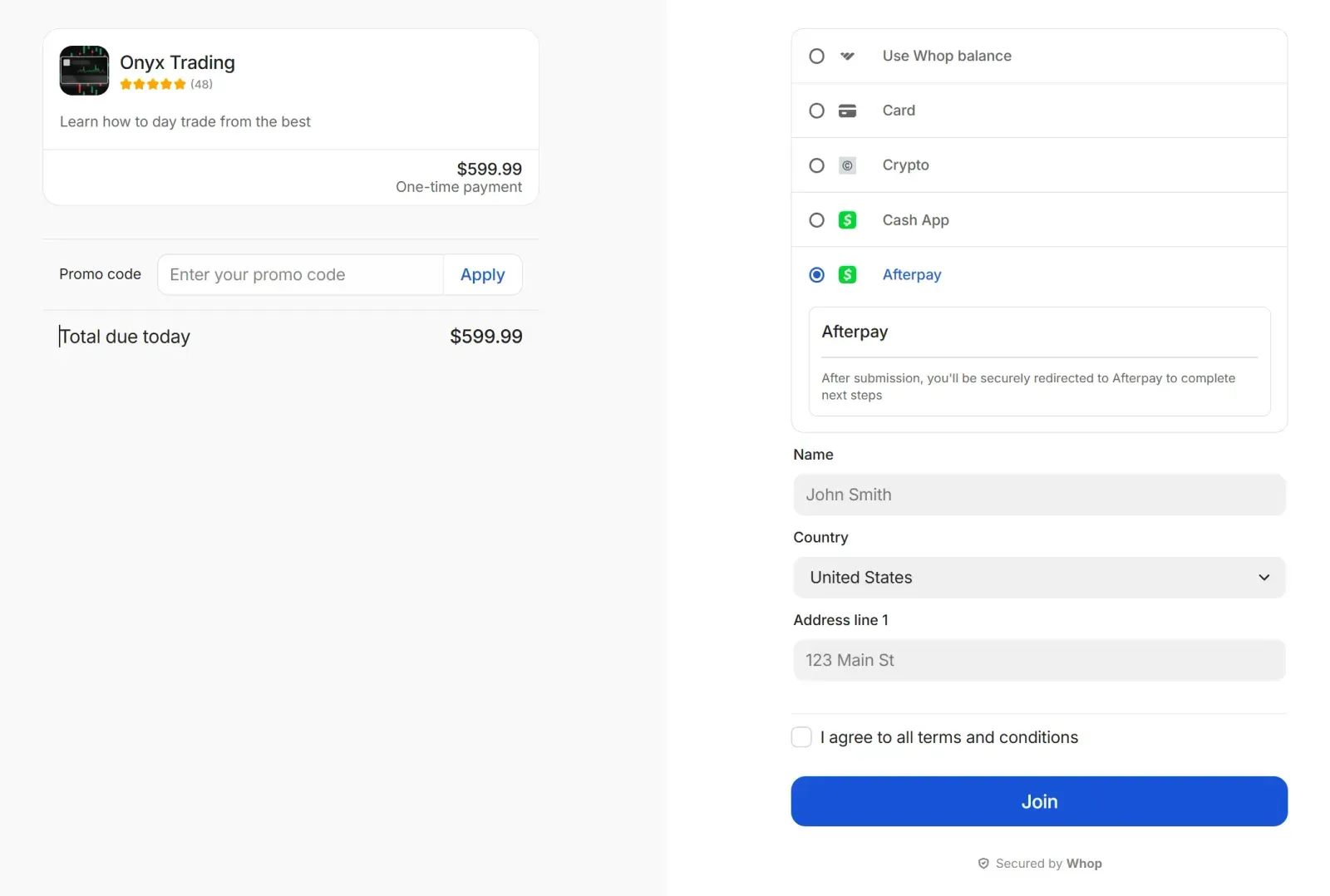
Whop lets you activate Klarna from Checkout Links with no external setup required.
- Go to Checkout Links: In your Whop dashboard, open Checkout Links.
- Create a new checkout link: Click ‘+ Create checkout link’ and choose ‘One-time pricing’.
- Apply for BNPL financing: Under Payment methods, select Apply for financing and complete the application. This covers Klarna, along with any other BNPL providers you qualify for.
- Get approved: A Whop team member will DM you once Klarna is active for your store.
- Klarna automatically appears at checkout: No plugins, no external accounts, no maintenance.
Whop handles routing, payouts, and reporting behind the scenes, while Klarna shows up as another payment option your customers can use.
We’re laser focused on structuring how people actually make money on the internet to ensure a sustainable income for everybody.
- Hunter Dickinson, Head of Partnerships at Whop
Eligibility: who can use Klarna?
Klarna has two sets of requirements depending on where you’re enabling it.
If you’re integrating Klarna directly:
Requirements depend on your country, but generally you must have:
- A legally registered business
- A compliant product category
- A linked bank account
- Basic KYC verification (business ID, address, tax info)
If you’re enabling Klarna through Whop Payments:
You’ll need to meet Whop’s BNPL financing criteria:
- Verified Whop Payments account
- Dispute rate under 1% (for Klarna specifically)
- $30,000+ processed volume across at least 10 customers in the last 90 days
- Low-risk business category
- Clear, detailed store page
Klarna’s supported limits and regions
In my opinion, Klarna stacks up pretty well as a BNPL provider, offering higher limits and servicing more regions than other alternatives.
Here’s how it measures against the other BNPL options available through Whop Payments:
| Provider | Limit | Available regions |
| Klarna | Up to $10,000 | US customers (via Whop) / broader global availability via direct integration |
| Sezzle | Up to $2,500 | US only |
| Afterpay | Up to $4,000 | US, CA, AU, NZ |
| Zip Pay | Up to $1,500 | Region varies |
| Splitit | Up to $20,000 | Global (with 15% hold) |
What are Klarna’s merchant fees?
Based on my research, Klarna charges merchants a per-transaction fee that varies by country, payment method, and order size – typically ranging from 3.29% + $0.30 to 5.99% + $0.30 (which is standard for most merchants).
There are usually no setup or monthly charges, but your exact rate depends on your region, contract, and sales volume.
Here’s a rough guide:
| Region | Typical Klarna merchant fee | Details |
| United States | 5.99% + $0.30 | The most common rates for Pay in 4 and Pay in 30. Fees vary by industry and volume. |
| Canada | 5.99% + CA$0.30 | Similar to US pricing, it varies by product type. |
| United Kingdom | 4.99% + £0.35 | Rates differ between Pay in 30 and instalment plans. |
| European Union | 2.99% + €0.40 | Some of Klarna's lowest fees; exact cost depends on country. |
| Australia | 4.99% + AU$0.55 | Applies to most instalment products; long-term financing may differ. |
| New Zealand | 4.99% + NZ$0.55 | Similar structure to AU; slight variation by sector. |
Other Klarna fee considerations
- Refunds: Klarna doesn't usually return processing fees on refunded orders.
- Chargebacks: Merchants pay a dispute fee (varies by country, typically ~$15 in the United States).
- Financing products: Long-term financing may carry different merchant rates.
- Volume discounts: High-volume merchants may negotiate custom pricing.
Is offering Klarna at checkout worth it? Pros and cons
I think due to its brand awareness, Klarna is one of the most conversion-boosting BNPL tools you can add to your checkout. However, its higher fees and regional limits mean it isn’t perfect for every business.
Here’s an overview of the main advantages and disadvantages of the BNPL platform:
| Pros | Cons |
| Boosts conversion and average order value | Higher merchant fees than standard card payments |
| You get paid in full upfront (Klarna takes the risk) | Not available in all countries or regions |
| Multiple instalment options (Pay in 4, Pay in 30, financing) | Processing fees aren't returned on refunds |
| Works online and in-store (via Klarna's virtual card) | Klarna controls approval decisions, not the merchant |
| Strong brand trust that increases checkout confidence |
Is Klarna right for my business?
My opinion? Klarna is a solid choice if you sell higher-ticket offers that people often hesitate to buy upfront.
Why? Giving shoppers a Pay in 4 or financing option removes that “I’ll come back later” moment and turns more views into sales.
According to stats from Tinuiti, Klarna shoppers have a higher purchase frequency (36%), and their average order values (AOV) are 45% larger than non-Klarna users.
BNPL has been proven to lift conversions on:
- Online courses and digital learning
- Coaching programs and masterminds
- Memberships and community access
- Mid to high-ticket offers where customers want flexibility
And because Klarna is already familiar to most buyers, showing it at checkout builds trust and reduces drop-off (even if your audience has never bought from you before).
However, Klarna might not be ideal for you if:
- Your audience is outside supported regions
- Your pricing is very low-ticket
- Your offer relies on subscriptions (Klarna is one-time only)
The good news? Whop Payments lets you offer Klarna alongside cards, wallets, crypto, and other BNPL options all in one place.
Bottom line: If your customers want flexibility, Klarna is an easy yes. Plus, offering it through Whop makes the whole checkout flow even smoother.
Give your customers more ways to pay with Klarna x Whop Payments
Klarna can lift your conversions on its own, but pairing it with Whop Payments gives you the whole package: cards, wallets, crypto, and multiple BNPL options in one seamless checkout.
Whop handles routing, payouts, and reporting behind the scenes so you can stay focused on selling, not fixing payment issues.
And your customers get the flexibility they expect, whether that’s Pay in 4, Pay in 30, or funding a higher-ticket offer over time.
If you want a checkout that converts better, feels smoother, and works globally, Whop Payments is the easiest upgrade you can make.
Ready to offer Klarna, crypto, and more? Start getting paid with Whop.
Klarna FAQs
What is Klarna, and how does it work?
Klarna is a Buy Now, Pay Later (BNPL) service that lets shoppers split a purchase into interest-free instalments while merchants get paid in full upfront. Klarna approves the customer, covers the payment, and handles all collections and reminders for the remaining instalments.
Does Klarna use a credit check?
Yes, Klarna uses a soft credit check for Pay in 4 and Pay in 30, which doesn’t affect a shopper’s credit score. Longer-term financing plans may require a hard check, depending on the region and order amount.
How much does Klarna charge merchants?
Klarna charges merchants a percentage fee plus a small fixed fee per transaction, usually between 3-6% + $0.30, depending on risk, industry, and volume. There are no monthly fees or setup costs. Klarna does not refund processing fees on returned orders.
Does Klarna increase conversion rates?
Yes, Klarna typically increases conversion because shoppers can pay over time instead of up front. Most merchants see higher checkout completion, bigger average order value, and fewer abandoned carts once Klarna appears on product pages and at checkout.
Is Klarna safe for online sellers?
Yes, Klarna is safe for merchants – you always get paid upfront, even if the customer pays later. Klarna also takes on the repayment risk, approval decisions, reminders, and any missed instalments, not the seller.
Can I use Klarna for digital products or online programs?
Klarna works well for high-ticket offers, coaching programs, courses, and other online offers – as long as they are one-time payments. Klarna cannot be used for subscriptions or recurring billing.
What countries support Klarna Pay in 4 and Klarna BNPL?
Klarna is available in 26+ countries, including the US, UK, Australia, New Zealand, Canada, Japan, Mexico, and most of Europe. Availability varies by plan (Pay in 4, Pay in 30, and monthly financing), so sellers should confirm regional support before enabling Klarna.
How do I offer Klarna through Whop Payments?
You can offer Klarna on Whop by applying for BNPL financing inside your Whop Payments dashboard. If eligible, Klarna appears automatically at checkout, giving your customers more ways to pay in one unified flow.



