Zip Pay is a Buy Now, Pay Later service that lets customers split purchases into 4, 8, or 2 biweekly installments while sellers get paid upfront. Learn how Zip Pay works in the US, what it costs (including origination fees), and how it compares to other BNPL options for online businesses.
Key takeaways
- Zip Pay lets merchants get paid upfront while shifting all repayment risk and collections to Zip.
- BNPL services like Zip Pay lift conversions 20–40% by removing affordability barriers on mid-ticket purchases.
- Sellers should stack multiple BNPL providers alongside Zip to cover global audiences and maximize approval rates.
Zip Pay is a Buy Now, Pay Later (BNPL) service I see used a lot that lets customers split their purchase into equal repayments.
For sellers, it's a low-friction way to increase sales without taking on repayment risk or waiting longer to get paid. For buyers, it adds flexibility at checkout — which is often all they need to commit.
BNPL consistently lifts conversions and average order value (by 20–40% depending on the industry), and I've seen that play out in real offers: launches, coaching, courses, and other mid- to high-ticket products where installments make the decision much easier.
Below, I'll break down how Zip Pay works, who can use it, the fees, and its key advantages and limitations. I'll also cover how Zip compares to other BNPL providers like Afterpay, Klarna, Sezzle, Splitit, and Affirm.
What is Zip Pay?
Zip Pay is a `Buy Now, Pay Later provider` that lets customers split a purchase into 4 or 8 equal payments, made every two weeks. In the US, Zip also offers a Pay-in-2 option for smaller purchases.
If you're selling online, Zip Pay gives you a simple way to offer financing at checkout.
You get paid in full upfront (minus transaction fees), and Zip manages the repayment plan, approval checks, and customer collection on their side.
This means there's no added admin, you avoid the lending risk, and you don't have to sit around waiting for your funds to clear.
I see Zip Pay works best for mid-ticket, one-time purchases: courses, coaching programs, masterclasses, event passes. Y'know, the type of things people have buyer's uncertainty over only because of affordability.
I started getting payments that I ordinarily couldn't make or couldn't accept because people just couldn't afford my fee up front.
– `Carl Parnell`, Whop coach and creator
Zip Pay plans: Pay in 4, Pay in 8, and Pay in 2
In the US, Zip offers multiple installment plans under its Pay in Z platform:
- Pay in 4: The standard option. Customers split their purchase into 4 equal payments made every two weeks over 6 weeks. An origination fee applies (more on that below).
- Pay in 8: For larger purchases, customers can split the cost into 8 biweekly payments. This extends the repayment window while keeping individual payments smaller.
- Pay in 2: A newer option for smaller purchases, where customers split the cost into 2 biweekly payments.
All plans follow a fixed biweekly schedule — there's no option to choose weekly or monthly repayments.
How Zip Pay works
Zip Pay is designed to keep checkout simple for both sides of the transaction. At checkout, customers either sign in to their existing Zip account or create one on the spot.
Once Zip confirms their eligibility, the customer completes the purchase and repays the balance over time.
Meanwhile, you get paid in full upfront, and Zip handles the rest.
Let me run through how the checkout process looks for both customers and sellers.
For customers:
- Select Zip Pay at checkout: Customers choose Zip Pay when they're ready to buy.
- Sign in or create an account: Returning customers simply log in. New customers can create an account directly from the checkout flow.
- Complete a quick eligibility check: Zip runs a fast assessment based on the shopper's repayment history, account activity, and risk profile. Most returning customers are approved instantly.
- Choose a payment plan: Depending on the purchase amount and the customer's risk profile, Zip may offer Pay in 4, Pay in 8, or Pay in 2. All plans follow a fixed biweekly repayment schedule.
- Repayments through the Zip app: Payments are made in the Zip app by card or bank account. Customers can pay the full balance early with no penalty.
- Origination fees apply: Zip charges an origination fee on each purchase, which varies based on the order amount and plan selected. For example, a $400 purchase on Pay in 4 may include an ~$8 origination fee. While Zip doesn't charge traditional interest, these fees can result in a meaningful APR, so it's worth being aware of the cost structure.
For merchants:
For merchants, the process is pretty straightforward and hands-off:
- Add Zip Pay to your checkout flow: You can do this through your payment processor, your merchant platform (like Whop), a plugin, or a direct integration.
- Zip approves the customer: Approval is handled entirely by Zip and usually happens instantly for returning users.
- You get paid upfront: Once the order is confirmed, Zip pays you the full transaction amount (minus fees), regardless of the customer's repayment schedule.
- Zip handles the admin: You don't chase installments, manage credit risk, or deal with late payments. Zip takes care of everything.
- Zip takes the risk on: If the customer misses payments or defaults entirely, you're not asked to return funds, cover the outstanding balance, or participate in collections. This is one of the core benefits of BNPL compared to offering in-house payment plans.
- Disputes: If the dispute is resolved in your favor, your payout is reinstated. If the dispute is resolved in the customer's favor, Zip refunds the shopper and deducts that amount from your next payout. Transaction fees are not refunded.
How to install Zip at your checkout in 6 steps
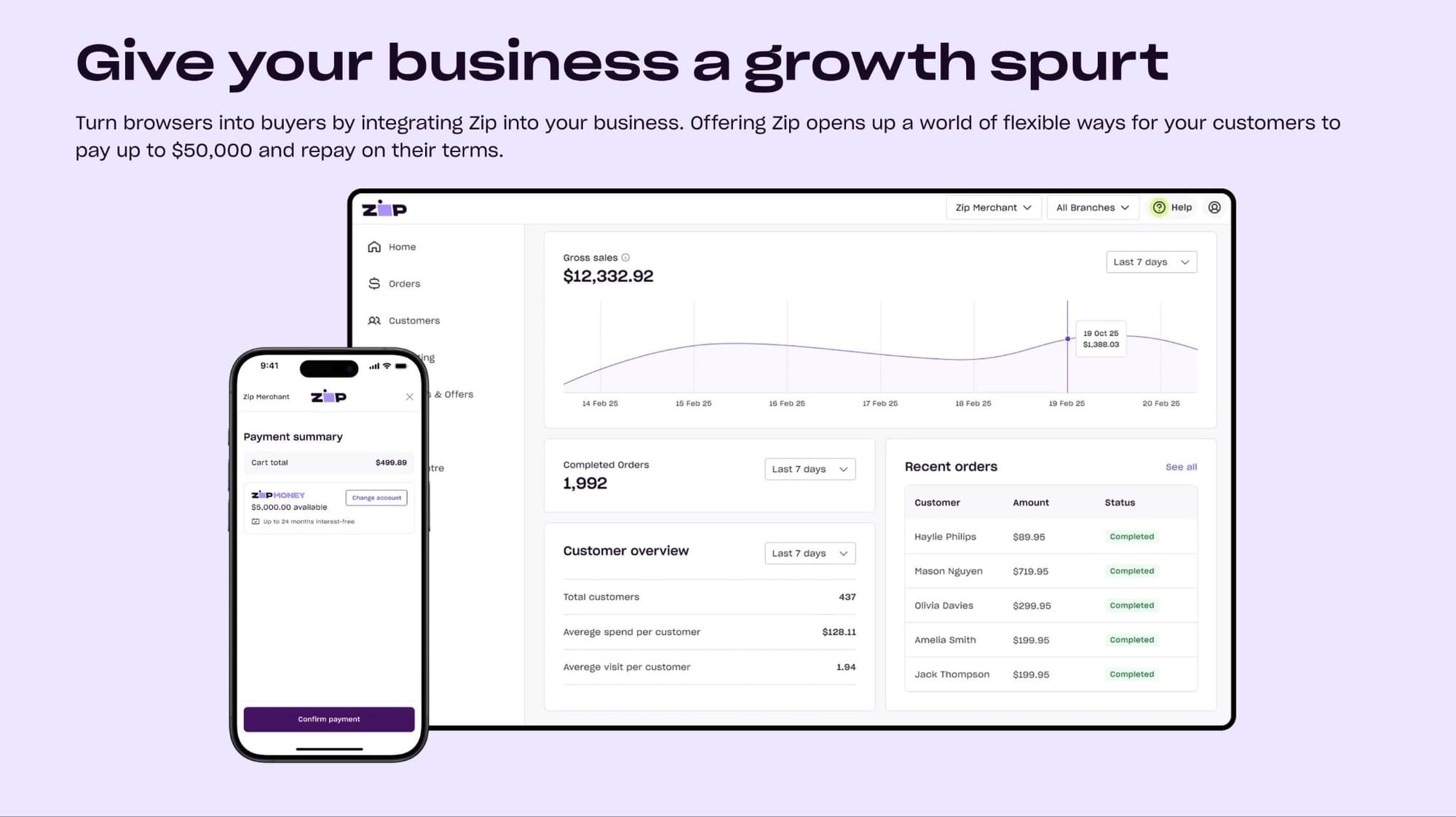
Setting up Zip at checkout is straightforward, especially if your platform already supports BNPL providers.
Here's the simple process I've seen sellers follow:
1. Create your Zip merchant account
Start by applying for a Zip merchant account. You'll submit basic business information, product details, and your operational history so Zip can run its initial checks. They use this to confirm your business fits within their supported categories.
2. Complete Zip's onboarding review
After you apply, Zip may request extra information (things like identity documents, proof of business registration, or details about your product catalog). Don't worry, this is normal – it helps them confirm you're compliant and able to handle refunds or disputes.
3. Choose how you want to integrate Zip
If you're using Whop, Zip is already built into the payment flow so that you can enable it directly from your Payments settings. Win.
If you're using another platform, you can connect Zip through:
- A native plugin
- Your payment processor
- A custom API integration
Most sellers don't need a developer unless they're running a fully custom checkout.
4. Configure your Zip settings
Once approved, you can configure things like:
- Which offers/products should show Zip
- Your refund rules
- Your reporting preferences
Zip handles the installment logic on their side; you don't set repayment plans manually.
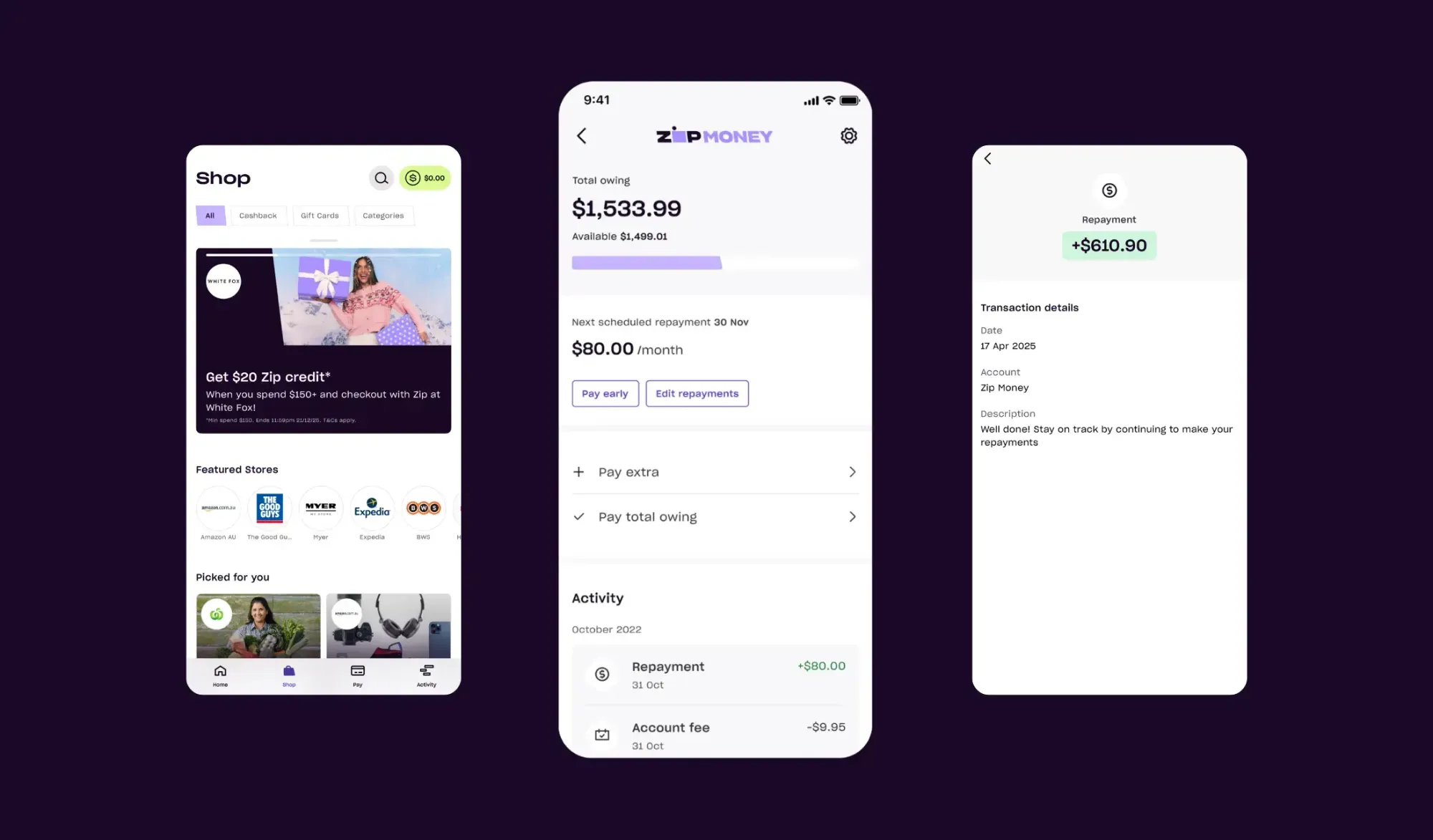
5. Test your checkout flow
Something I've seen most sellers suggest is to run a few test transactions to make sure the Zip button displays correctly and the authorization flow works. This helps you avoid surprise drop-offs once you go live.
6. Activate Zip for your customers
Once everything checks out, you can enable Zip at checkout.
Remember, only shoppers in supported regions (US, Australia, New Zealand, and Canada) will see Zip as a payment option, so it's worth pairing it with other BNPL tools if your audience is global.
Who can use Zip?
Zip works in the United States, Australia, New Zealand, and Canada. If your customers are in any of these regions, they'll be able to pay with Zip at checkout.
I've confirmed that customers browsing from outside these supported regions won't see Zip appear whatsoever, which is why most businesses pair it with other BNPL providers to widen their reach.
Whop offers sellers native access to 5 BNPL providers, maximizing your ability to finance customers globally with one stack.
Eligibility requirements for sellers:
To offer Zip, you'll need to:
- Operate in a supported region (US, Australia, New Zealand, or Canada)
- Sell within Zip's approved categories (they block higher-risk industries)
- Pass Zip's basic risk and compliance checks
- Use a platform (like Whop) or payment processor (like Stripe) that supports Zip
Note: Zip isn’t impossible to get approved for, but it’s not a guaranteed yes either. They can decline businesses based on industry type, chargeback risk, or compliance requirements, which is why most merchants don’t rely on a single BNPL provider.
Zip Pay fees for merchants
Zip charges merchants a fee every time a customer checks out using BNPL — which lines up with what I've seen across most BNPL providers.
But, there are no setup fees or monthly costs – so you only pay when a Zip transaction is successfully processed.
The exact fee you pay depends on your region, industry, product type, and risk profile, but here's the general breakdown.
- Transaction fees: Zip charges a percentage of the order amount, plus a fixed fee. Rates vary by merchant and by region, but you can expect something in a similar range to other BNPL providers. If you sell higher-risk products or see a lot of disputes or refunds, Zip may price your transactions higher.
- Plan-dependent pricing: Your fee stays the same regardless of how a customer pays. You pay one merchant fee per approved transaction.
- Refunds and disputes: If you issue a refund or lose a dispute, Zip returns the money to the customer, but you don't get your original transaction fee back. This is standard for most BNPL providers.
- Origination fees (customer-facing): Unlike some BNPL providers that are completely free for customers, Zip charges an origination fee on each purchase. This fee is paid by the customer (not the merchant), but it's worth knowing about because it affects how customers perceive the total cost. Origination fees can range from $4 to $62 depending on the purchase amount.
Pros and cons of offering Zip Pay at your checkout
While I've seen Zip Pay consistently be a strong conversion tool for online businesses (it's definitely nudged me towards purchases in the past), it can come with trade-offs, depending on your business model and product/offer.
Let me run through the pros and cons of having Zip as (one of) your BNPL provider(s).
Pros
- Higher conversions on mid-ticket offers: When customers can split a purchase into smaller repayments, they stop fixating on the full upfront cost. In my experience, that usually leads to more completed checkouts.
- Fast approval experience: Most returning Zip users get an instant yes. New users move through the flow quickly, too, so you're not losing people to a long application process.
- A familiar BNPL brand: Zip is well-known in the US, Australia, New Zealand, and Canada. If your customers already use it elsewhere, they tend to trust the process and convert with less hesitation.
- Multiple installment options: Zip offers Pay in 4, Pay in 8, and Pay in 2, giving customers flexibility based on the purchase size.
- Upfront payouts for you: You get paid in full when the order is placed. Zip takes on the repayment risk (not you), which makes cash flow predictable.
Cons
- It only works in specific regions: Zip is limited to the US, Australia, New Zealand, and Canada. If you sell globally, large parts of your audience won't see Zip at checkout.
- Origination fees for customers: Unlike Afterpay or Klarna's Pay-in-4, Zip charges customers an origination fee on every purchase. This can make the total cost higher than competing BNPL options and may cause some customers to choose a different provider at checkout.
- Approval rates vary: Some customers who are approved by Zip might get declined by Klarna or Afterpay, and the reverse is also true.
- Not suitable for subscriptions: Zip Pay only works for one-time purchases, so you can't use it for monthly memberships or recurring billing.
- Fees aren't returned: If you refund an order or lose a dispute, the original Zip fee isn't refunded. This is normal for BNPL providers, but still something to factor in.
Top BNPL providers to stack with Zip Pay
| Provider | Whop limit | Regions | Approval | Best for |
| Zip Pay | Up to $1,500 | US, AU, NZ | Fast, behavioral scoring | Mid-ticket, one-time purchases |
| Klarna | Up to $10,000 | US customers only | Flexible underwriting | Mid-high-ticket digital programs |
| Afterpay | Up to $4,000 | US customers only | Instant Pay-in-4 | Impulse-to-mid-ticket offers |
| Sezzle | Up to $2,500 | US customers only | More forgiving for thin credit files | Younger buyers and accessible pricing |
| Splitit | Up to $20,000 (15% reserve for 180 days) | Global | Uses existing credit card balance (no credit check) | High-ticket coaching and premium offers |
While Zip Pay is a great option in the regions it’s available, you’ll almost always need more than one BNPL provider if you’re selling to a global audience (or you want higher approval rates).
Below, I’ve listed complementary BNPL providers I recommend pairing with Zip, and why they work well together.
Klarna
Klarna is one of the BNPL providers shoppers recognise the most.
It has a massive global footprint and a marketplace, which means customers often arrive at checkout already logged in, already pre-approved, and already familiar with the experience. That alone tends to lift conversion.
Klarna offers Pay-in-4, Pay-in-30, and longer-term financing, and they dynamically decide which option a shopper gets based on their history and spending behaviour.
They also approve higher limits than most Pay-in-4 providers, which makes the service a good fit for mid to high-ticket digital programs.
- Why I like it: Huge customer trust, high approval rates, and flexible financing.
- Considerations: Lower approval rates for very young customers, thin credit files.
Afterpay
Afterpay is the most instant BNPL option.
Their whole value prop is speed and simplicity: four interest-free payments, no surprises, no complex underwriting. Customers know exactly what they’re getting, which reduces hesitation at checkout.
In my experience, Afterpay performs best for impulse-adjacent purchases (oops) – I’m talking about the $50 to $600 range (where customers just need a small psychological nudge to move forward).
It’s also one of the most trusted BNPL brands in the US, Australia and New Zealand, so customers convert quickly when they see it as an option.
- Why I like it: Ultra-fast approvals, high trust, clean Pay-in-4 structure.
- Considerations: Not ideal for higher-ticket programs; lower limits than Klarna or Splitit.
Sezzle
Sezzle is more forgiving on approvals, especially for customers with thinner credit profiles, limited history, or inconsistent income. That makes it a strong option for creators, coaches, and education-focused businesses with younger audiences.
Sezzle also offers payment rescheduling, which reduces failed repayments and helps prevent disputes. Customers can reschedule payments without instantly triggering a decline or penalty (something that Zip, Afterpay, and Klarna don’t offer in the same way).
That feature helps reduce failed payments and churn, which is why Sezzle performs well in communities with younger or budget-conscious buyers.
- Why I like it: Strong fit for younger audiences, flexible structure, fewer declines.
- Considerations: Lower spending limits; not ideal for high-ticket offers.
Splitit
Splitit is different from traditional BNPL: there’s no new line of credit, no credit checks, and no risk scoring. Instead, Splitit uses the customer’s existing credit card and simply splits the charge into instalments.
Because the credit line already exists, approval rates are dramatically higher (especially for high-ticket products where traditional BNPL providers start declining people).
On Whop, Splitit can go up to $20,000, which opens the door for premium coaching, masterminds, certification programs, and done-for-you services.
I got introduced to Whop a couple of months ago and the key reason I decided to move over was because they had access to amazing Buy Now, Pay Later options.
In the last couple months, I've done $124,000 in sales and again, the key reason was BNPL.
– Carl Parnell, Whop coach and creator
Splitit does place a temporary authorization hold on the customer’s card for the full amount, and it retains 15% for 180 days as a reserve for sellers. I guess that’s the trade-off for having near-universal approval rates.
- Why I like it: Perfect for high-ticket offers; nearly frictionless approvals.
- Considerations: Requires the customer to have available credit; not suitable for lower-income or debit-card-only users.
How to use BNPL to increase checkout conversions
BNPL isn’t just a way for customers to pay; it’s one of the strongest conversion levers you can add to a sales page.
When people stop seeing the full price and start seeing smaller instalments, the decision becomes a lot easier.
I’ve seen countless sellers lift AOV, reduce drop-off, and move customers through the funnel faster just by positioning BNPL the right way.
According to the creators I've spoken to, these are the approaches that consistently work.
Show instalments early, not just at checkout
If you only reveal BNPL at the final step, you’ve missed the moment where customers are debating the price. Put instalment amounts on your product page, sales page, and even inside your pricing tables.
Use more than one BNPL provider
No single lender approves every customer. When Zip doesn’t approve someone, Klarna or Splitit might (and vice versa). The broader your BNPL coverage, the fewer unnecessary declines you get.
Match the provider to the price point
Pay-in-4 (Zip, Afterpay, Sezzle) works best for mid-ticket offers. Splitit shines when you’re selling something expensive. Klarna fills the middle ground when customers need more flexibility. You get the idea.
Call out instalment pricing everywhere
People don’t know what they don’t know, and buyers don’t realise a $600 program can be $150 x 4 until you tell them. So, feature instalment pricing in ads, landing pages, emails, and checkout summaries.
Use BNPL to reduce the 'risk gap'
Add testimonials, screenshots, or simple results near instalment messaging. When customers feel safer about the purchase, BNPL becomes the final push rather than the only reassurance.
Highlight the speed and simplicity
Most shoppers don’t want another long application process. Make it clear that approvals are fast, interest-free (when applicable), and handled by the BNPL provider (not you).
Bring BNPL into your launches and enrolments
Live cohorts, product drops, coaching enrolments, and seasonal promos all convert better when you highlight instalments early in the launch window. For higher-ticket offers, present the instalment amount more prominently than the full price. People anchor on the smaller number.
Follow these tips, and you’ll only see sales go up from introducing BNPL at your checkout.
Get multiple BNPL options under one seamless checkout with Whop
BNPL moves the needle, but relying on a single provider leads to slower sales.
Each BNPL option has its own limits, approval logic, and customer base – which is why Zip Pay works well for some buyers, while Klarna, Afterpay, Sezzle, or Splitit convert the rest.
On Whop, you don’t have to choose. You can offer all five BNPL providers inside one unified checkout, and we’ll automatically show customers the options they’re eligible for.
That means you get more sales approvals, fewer abandoned carts, and a higher average order value, all without configuring a handful of integrations.
Instead of stitching together page builders, storefronts, and third-party payment tools, you get a single platform that handles the whole customer journey.
Build, host, and sell your entire business: SaaS, communities, courses, coaching, memberships (and everything in between).
Start selling on Whop and give your customers more ways to buy through one seamless checkout.
Zip Pay FAQs
What is Zip Pay?
Zip Pay is a Buy Now, Pay Later option that lets customers split a purchase into 4, 8, or 2 equal biweekly installments. You get paid upfront, and Zip manages the repayments directly with the customer.
Where does Zip Pay work?
Zip Pay works for customers in the United States, Australia, New Zealand, and Canada. Only shoppers in these regions will see Zip as a payment option.
Does Zip Pay charge interest?
Zip doesn't charge traditional interest, but it does add an origination fee to every purchase. These fees vary based on the order amount and can range from $4 to $62. While not technically interest, the origination fee increases the total cost of the purchase for customers.
Can I use Zip Pay for subscriptions or recurring billing?
No. Zip Pay only supports one-time purchases. If you run a subscription or membership product, customers can use BNPL for the initial fee, but ongoing billing must use a standard payment method.
What happens if a customer doesn't repay Zip?
You're protected. Zip handles collections and absorbs the risk. You're never asked to return funds or chase repayments. Customers who miss a payment may be charged a late fee of up to $7.
Are Zip Pay fees refunded if I issue a refund?
No. If you refund an order or lose a dispute, Zip returns the money to the customer but keeps the original transaction fee. This is standard across BNPL providers.
How do I offer Zip Pay through Whop?
Activate Whop Payments, apply for BNPL inside your dashboard, and once approved, Zip Pay will automatically appear at checkout for eligible customers. No plugins or integrations needed.
Is Zip Pay enough on its own?
Zip can be used on its own, but most sellers see the best results when they offer multiple BNPL options at checkout. This reduces declines and gives customers more flexibility.



