
I tested Wise with real money to see how its fees, exchange rates, and 'get paid' features actually work for freelancers and businesses getting paid internationally.
Key takeaways
- Wise shows real exchange rates with upfront fees, unlike PayPal which hides costs in poor conversion rates.
- Wise avoids expensive SWIFT middlemen by using local banking rails for faster and cheaper international transfers.
- The Wise card lets you hold multiple currencies and spend directly without repeated conversion fees.
Wise is a platform designed to make international payments cheaper, faster, and more transparent than banks or PayPal. It promises real exchange rates, upfront fees, and fewer middlemen - and if you’ve ever been paid across borders, you already know how much that matters.
I’ve been getting paid online by international clients for over a decade, and I’ve experienced slow bank wires, confusing fees, and money disappearing in conversion. At one point, I waited seven months to get paid for a small invoice.
So I decided to test Wise properly.
I signed up for real accounts (both business and personal), ran real international transfers with my own money, compared Wise’s rates to PayPal, and documented every step.
If you’re a creator, freelancer, or business getting paid internationally - or paying people overseas - this review will show you everything you need to know about Wise.
Let’s start with what Wise actually is, and how it works.
What is Wise (previously TransferWise) and how does it work?
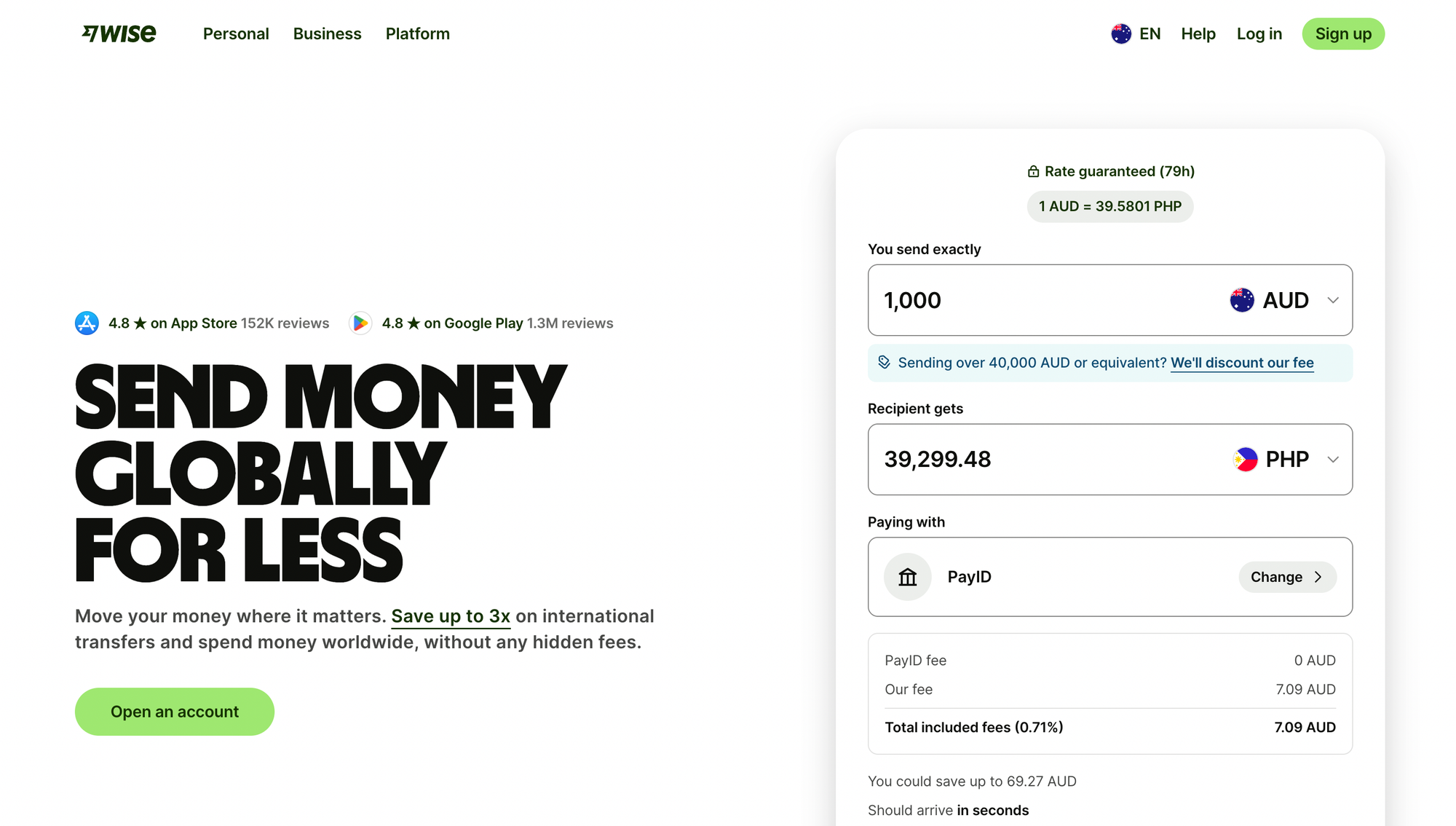
Wise is a cross-border payment platform that helps you hold multiple currencies, convert between them, and send or receive international payments.
The main reason Wise can be cheaper than banks (and usually clearer than PayPal) is how it moves money.
Instead of routing transfers through the traditional SWIFT wire system, Wise uses local banking rails on both ends wherever possible.
Why that matters
Wire transfers (think Western Union) are slow, expensive, and stacked with middlemen - your money can pass through multiple intermediary (correspondent) banks between the sending and receiving banks, with each middleman adding fees and delays.
Wise avoids a lot of that complexity by moving funds locally in each country, which usually means:
- Lower fees
- Faster transfers
- Clearer pricing
Wise also isn’t a Stripe replacement. It doesn’t run checkout pages, subscription billing, or payment forms. It sits underneath those tools, handling the movement and conversion of money once a payment already exists.
How Wise works
Wise offers both personal and business accounts, and they’re not interchangeable:
- Personal accounts are built for holding, converting, and sending money
- Business accounts are built for getting paid, paying others, and operating as a company
The difference between the two matters a lot if you’re a freelancer or small business owner expecting to invoice clients quickly after signing up (as I soon found out).
Now that the basics are clear, here’s what it actually looked like when I set up Wise and tried to use it to get paid.
Creating a Wise account (my real experience)
Wise Business vs personal
The first thing Wise makes you do is pick an account type: personal or business.
Because I wanted to invoice international clients and send payments to contractors, I chose Wise Business. Wise then asked where my business was based (I selected Australia), and it immediately showed me what I’d be able to do with a business account here, including:
- Send money abroad from 32 currencies to 82 currencies
- Spend and withdraw in local currency with a Wise card, in over 190 countries
- Hold and convert money in 40+ currencies
- Receive money in 20+ currencies
- Earn variable returns rates on currencies
- Give multi-user access
- Create and send invoices
- Integrate accounting software like Quickbooks and Xero
This is all promising, and I'm excited to get into my Wise account and play around with the features.
Now it's onto the boring part - more verification.
Wise security features: verification, verification, and more verification
After choosing a business account, Wise moves straight into verification. Wise is regulated in multiple countries, so they have to follow KYC (know your customer) and AML (anti-money laundering) requirements.
In my case, verification included:
- Verifying my phone number via SMS
- Confirming my business role (I chose self-employed)
- Entering business details like ABN, business name, address, and industry
The process itself wasn’t difficult, but it was long. By the time I’d entered the same information across multiple screens, my brain was already running on fumes.
This is the kind of flow where a little more guidance (or even a small 'prefill / generate' option) would make a big difference.
After this, I add my website link and confirm my trading address.
Which brings me to my first Wise hurdle.
My first friction point: Wise's UX issues
The first real hurdle came when Wise asked for my personal details (country, full name, DOB, phone number - again).
Easy, right? Apparently not.
I hit 'save and continue' and got a loading spinner for 43 seconds, followed by a generic 'something went wrong' message.
We are deeply spoiled when it comes to modern software, but waiting nearly a minute for a basic form submission in 2026 feels aggressive.
After a moment (and a deep breath), I realized the issue was my own fault: I hadn’t included my middle name.
Yes, that’s technically on me. Full skill issue.
But it’s also a UX miss. Wise clearly knows what fields are required; it just doesn’t explain what’s missing when the flow breaks. If you’re onboarding new users (especially nervous ones moving money internationally), this is where you need to be extremely clear.
Finally, I reach the 'choose your plan' page.
Wise 'Essential' vs 'Advanced'
There are two Wise plans to choose from: Essential and Advanced.
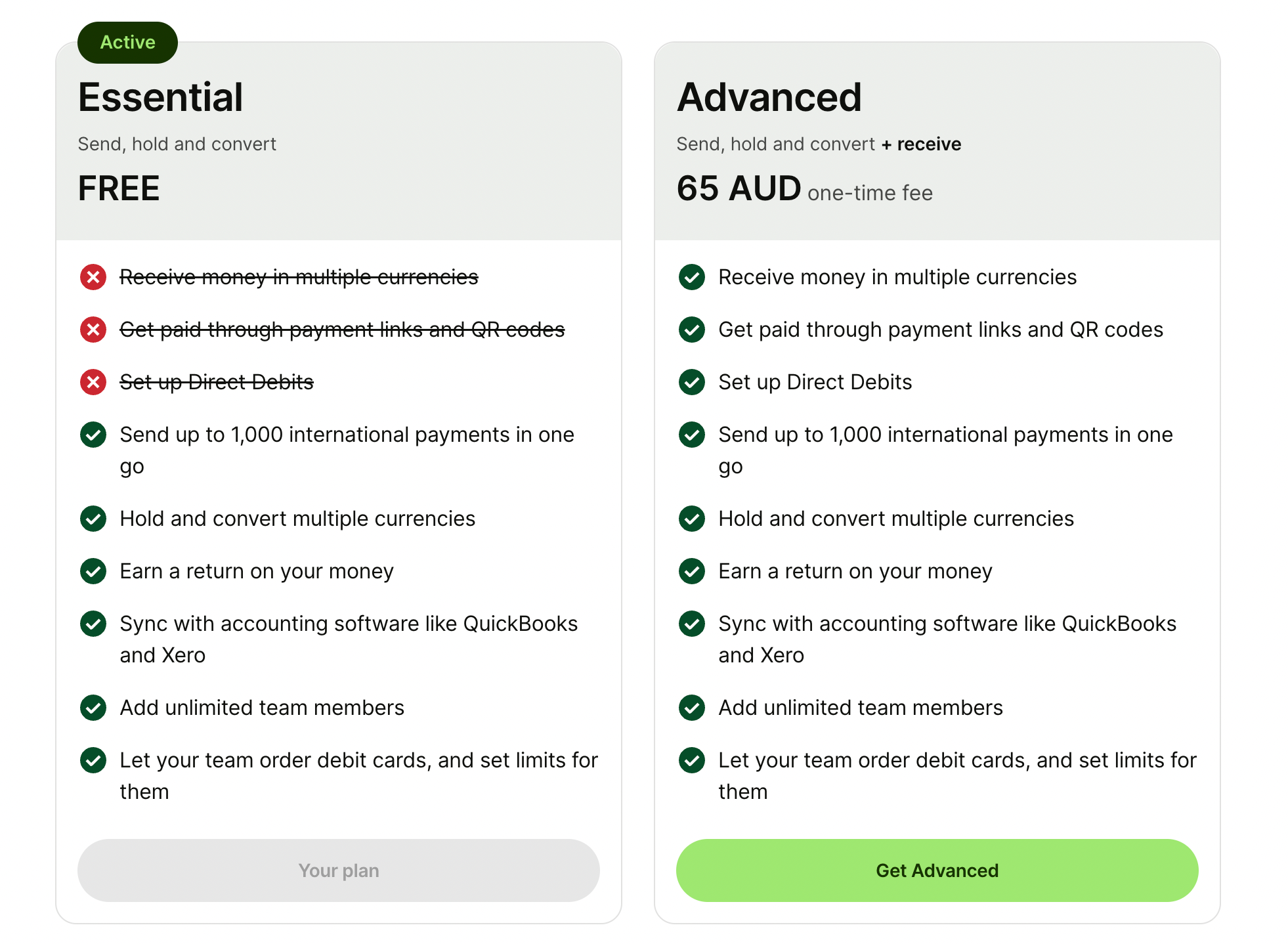
The Essential plan is free, and with it you can:
- Send up to 1000 international payments in one go
- Hold and convert multiple currencies
- Earn a return on your money
- Sync with accounting software
- Add unlimited team members and let them order debit cards, with limits set by me
The Advanced plan is $65 AUD ($31 USD) and includes all of that, plus the ability to:
- Receive money in multiple currencies
- Get paid through payment links and QR codes
- Set up direct debits
Wise’s pricing model is built around two things: low FX margins and paid access to 'get paid' infrastructure. In other words, Wise makes less money on exchange rates than PayPal, and more money on account unlocks and usage.
I'm not sure how much I'm going to use Wise at this point, so I've decided to go for the free account - aka the Essential plan.
Rochi Zalani is a freelancer in India, and she has this to say:
“I can receive payments as an individual, but my business account has taken forever to get approved. It's still in the "we're reviewing your information stage" and support says it takes time, that's all. I have no information on the holdup, process, or what I can do to fast track this.
I can't do a lot of things without a business account like sending payment links to my clients. Everything else is great!”
What you get on Wise essentials (dashboard walkthrough)
Once my Wise Business account was live on the Essentials plan, I wanted to answer the only question that really matters:
How much does Wise actually cost when you send money internationally?
Wise exchange rates + fee comparison (Wise vs PayPal)
This is where Wise’s dashboard is strong. Instead of hiding fees in the exchange rate, Wise shows you the math upfront - including the fee, the rate, and the final amount the recipient gets.
I tested a few scenarios I actually deal with in real life. My family lives in the UK, and I work with teams in the US, Türkiye, and Asia, so these aren’t hypothetical currencies for me; they’re what I use regularly.
Here’s what Wise showed me:
- Sending $100 AUD to the UK results in £49.07 GBP, with $1.53 AUD in fees
- Sending $100 AUD to the US results in $65.37 USD, with $2.33 AUD in fees
- Sending $100 USD to the UK results in £73.40 GBP, with $1.42 USD in fees
To check this, I compared those numbers against the mid-market exchange rates, which are rates you see on Google or XE. At today’s rates, $100 AUD should convert to roughly £49.9 GBP, and $100 USD should land around £74 GBP.
Wise’s final amounts come in slightly below those figures, which makes sense: the difference you’re seeing is the explicit fee, not a hidden markup baked into the exchange rate. With Wise, you can see exactly where the cost is coming from before you send anything.
Then I ran the same scenarios through PayPal.
Here’s what PayPal returned for the same transfers:
- $100 AUD to GBP - £47.76 GBP
- $100 AUD to USD - $64.04 USD
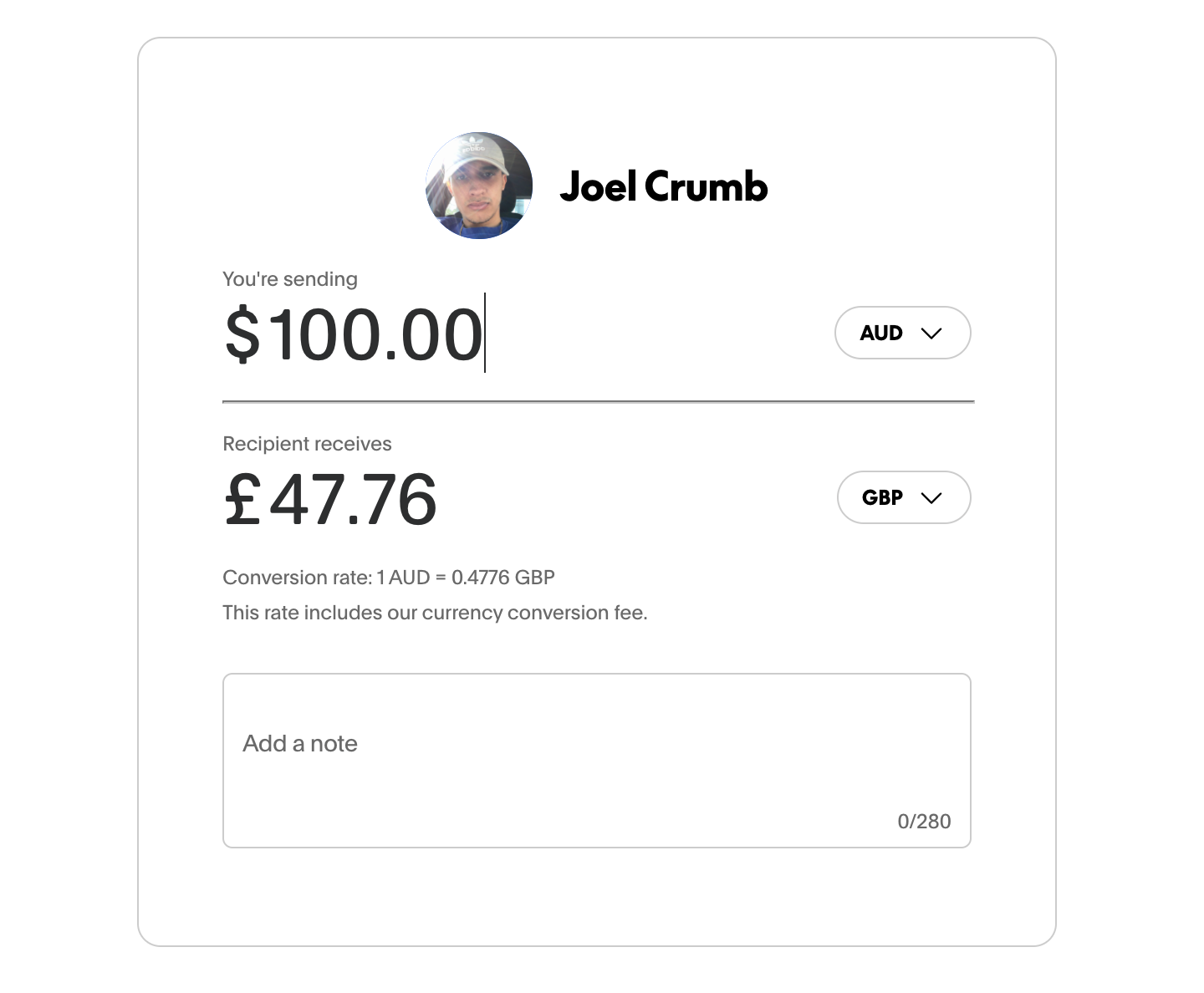
And that’s before PayPal’s transaction fees, which ranged from $4.99 to $8.07 AUD per transfer depending on the route.
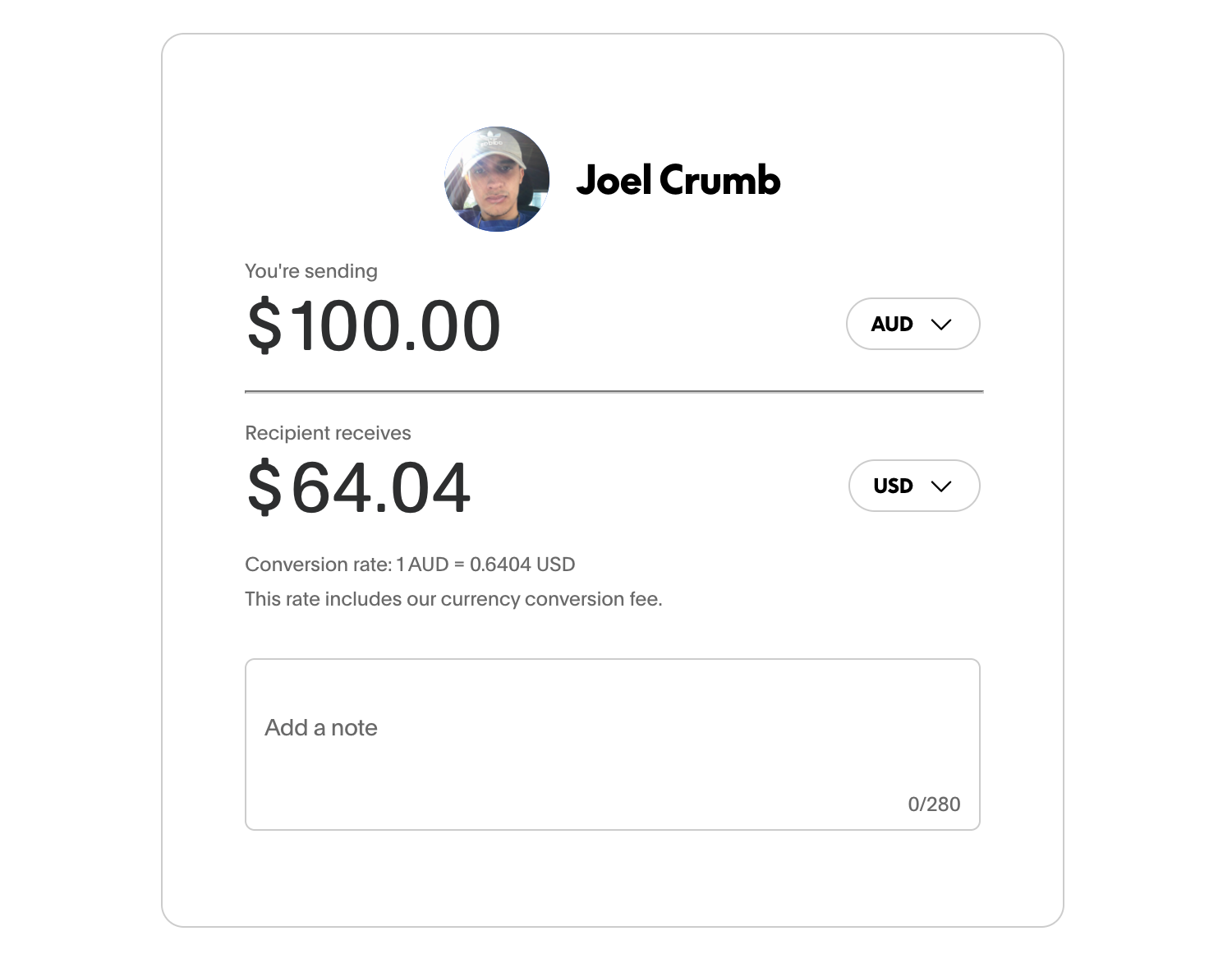
I knew that PayPal had high fees, but seeing this comparison still surprised me.
PayPal’s exchange rate is worse and you’re paying an additional transaction fee on top. Much of the cost is hidden in the FX spread, which makes it harder to understand what you’re actually being charged.
By comparison, Wise’s rates are much closer to the real mid-market rate, with fees clearly separated and shown upfront.
My experience with PayPal’s FX fees wasn’t unique. Tammy Danan, a freelance writer in the Philippines, told me:
I switched to Wise because PayPal's conversion rate from USD to PHP is too low and their fees are too high. I really noticed the change in the money I was getting when I was using PayPal and when I shifted to Wise.
Also, Wise does it so much faster. I think when I was using PayPal I had to wait for 5 days? With Wise, it's in my bank account in 24hrs! Well, sometimes 2-3 days if the amount is much higher. Still, that's a lot better than PayPal.
And Georgie Darling, a business coach, also echoed this experience, saying, “I always tell everyone to avoid PayPal because their international transaction fees are criminally high and I recommend wise to everyone because I think it has the best rate on the market”
From there, I clicked through the rest of the dashboard using the left-hand navigation.
Everything loaded quickly and behaved exactly as I expected, each section opened cleanly in the main panel with clear explanations of what the feature did and how it worked.
That ease is a big reason a lot of freelancers stick with Wise once they start using it.
Lizzie Davey, a freelance writer and strategist who gets paid in both USD and GBP by clients across the UK, US, and Europe, told me she switched to Wise because it was the simplest way to get paid internationally without losing money to fees:
I started using Wise because I needed a way to get paid by international clients without high charges. One of my clients actually suggested it - they paid all their international freelancers that way.
I’d recommend Wise to freelancers getting paid by multiple clients in different countries. For me, it just made sense because that’s what my clients were already using.
Wise spending card
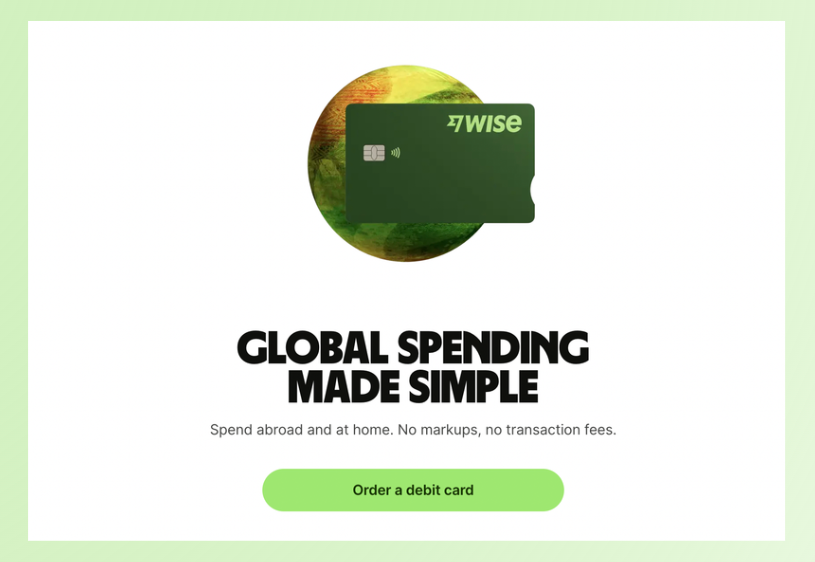
One of the most underrated parts of Wise is the Wise card.
If you travel or work remotely you know how this goes: you get paid in one currency, spend in another, and the bank's foreign transaction fees start to add up.
Wise’s card solves that by letting you hold money in multiple currencies and spend from that balance directly. So if you’re getting paid in euros and spending in euros, you can keep the money in euros instead of converting back and forth.
Amy Collins, an SEO translator and copywriter who spent two years travelling full-time while getting paid by international clients, told me Wise became her default setup for exactly that reason: "I have the Wise card in my Apple Pay Wallet and was using it for both personal and business expenses. Because I was in Europe, with Wise I could get paid in Euros, hold the money in Euros, and then spend in Euros, meaning I didn't lose any money exchanging back and forth from euros-pounds."
Georgie Darling backed this up, telling me that the Wise card was one of the biggest reasons she stuck with it while moving constantly:
I also found it far easier to freeze my card temporarily when I was in a place where the ATMs were a bit more sketchy!
This is where Wise starts to feel less like a transfer tool and more like a multi-currency operating system, especially if you’re getting paid in one region and living in another.
(That said: I didn’t personally test cash withdrawals or in-person card limits during this review - I focused on sending, receiving, and the cost of FX - but the card is absolutely one of Wise’s strongest features on paper and in real user feedback.)
Setting up payments and receiving on Wise
At this point, I’d explored the dashboard, checked the FX rates, and confirmed that Wise’s pricing is actually competitive.
So now it was time to do the thing most freelancers and businesses sign up for in the first place:
Getting paid.
Invoices, payment links, and Quick Pay
I first clicked on 'invoices' - remember, I signed up for a business account, so I assumed that I would be able to send an invoice.
Wrong.
Clicking into Invoices immediately took me to an 'upgrade to use this feature' screen. The same thing happened when I clicked Payment links and Quick Pay.
Now, I expected some limitations - Wise clearly outlines an Essentials vs Advanced breakdown during signup. But invoicing wasn’t mentioned in that overview at all.
There was no clear signpost that something as fundamental as sending an invoice would be locked behind a paywall.
To actually receive payments, Wise requires a paid business account, which costs $65 AUD as a one-off fee (approx $31 in the US).
That genuinely surprised me.
There’s something that feels off about being able to sign up for a business account for free, only to realise you can’t actually accept any payments without upgrading.
I went digging through Wise’s documentation to double-check this, and the fine print does back it up.
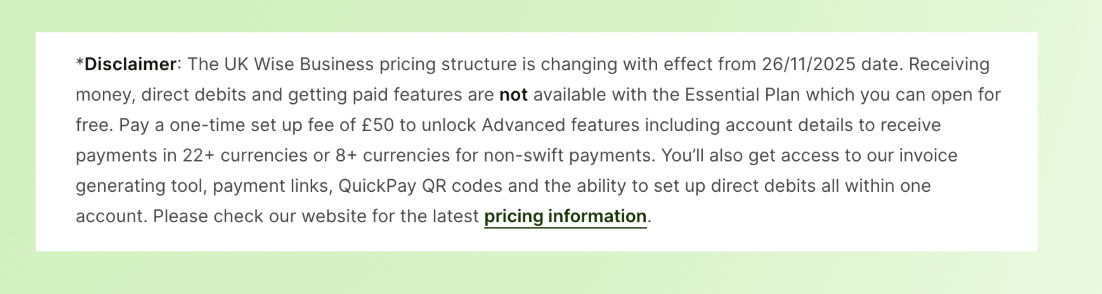
I found similar documentation for the US Wise accounts.
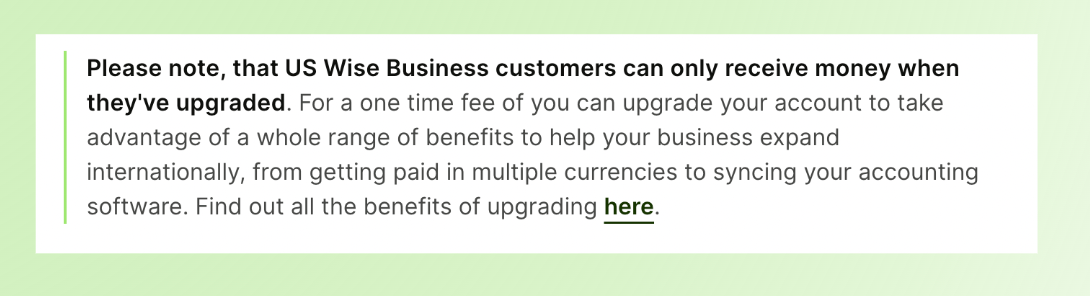
Wise Business accounts can receive international payments, and in regions like the US and Australia, this includes local account details and invoicing tools - but many of those 'get paid' features are tied to the paid / Advanced tier, not available by default on Business Essentials.
This feels shady to me. Why let me sign up for a business account if I can't actually send invoices or accept any payments?
Yes, $65 AUD isn’t a huge amount in the grand scheme of things. But it does matter if you're:
- A new freelancer sending your first invoice
- Testing Wise as a backup to PayPal or bank transfers
- Doing a one-off international project
- Getting paid in smaller amounts where every fee matters
I actually double-checked this multiple times because it felt so unintuitive. I kept thinking I’d missed a toggle or skipped a step.
For context, not everyone sees Wise’s pricing as a dealbreaker. Georgie Darling told me she wasn’t surprised by the business fees:
“I’ve done a lot of research into the best business bank accounts and Wise has always come out on top. Obviously there are some fees attached but I am yet to find a business bank account that doesn’t charge some kind of fees.”
Once I realized that Wise wasn’t going to let me invoice or accept payments without paying upfront, I tested the obvious workaround:
Could a personal Wise account receive payments without upgrading?
Creating a personal Wise account
I headed to Account details to see if there was any obvious way to view or switch to a personal account. There wasn’t.
I could see an 'open another account' option, but because I was currently inside a business account, it wasn’t clear whether that would create a personal account or just another business one.
That meant a detour to the Help centre.
After a bit of searching and scrolling, I found the answer: if you open a business account first (like I did), you can still add a personal account later. Wise allows one personal account and multiple business accounts under the same login.
Good to know, but not exactly surfaced upfront.
Once I knew what to do, setting up the personal account was easy. I clicked 'open another account,' selected personal, confirmed a few details, and the account was ready to use within minutes.
Generating Wise personal account details
Now that I had a personal account set up, it was time to try getting paid again.
For a very low-stakes test, I decided to request money from my younger brother, who owed me $40. I selected my currency, clicked through to generate my account details… and immediately hit another paywall.
To actually generate my personal account details, Wise required me to add $30 AUD to the account first.
To be perfectly clear: this isn’t a fee. This is my own money. But I still had to put money into Wise before I could get the details needed to receive money out. I had to pay to get paid.
I understand why Wise does this (it’s a way to verify accounts and reduce misuse) but from a real user perspective, it’s another hurdle you don’t expect until you hit it.
And if you’re someone who’s:
- Cash-tight
- Waiting on an incoming payment
- Trying to receive a small invoice
- Relying on family support while travelling
then being told you need to preload $30 just to access receiving details is not the warmest onboarding experience.
At this point, a clear pattern was emerging: Wise does let you get paid - and very well, if we listen to user reviews - but almost every path to doing so comes with a prerequisite that isn’t obvious until you hit it head-on.
Opening a Wise balance
At this point, I decided to bite the bullet and add my own money so I could actually request a payment.
When I went to add funds, Wise gave me four options:
- Debit card - $0.09 AUD in fees
- PayID - no fees
- Manual bank transfer - no fees
- Credit card - $0.29 AUD in fees
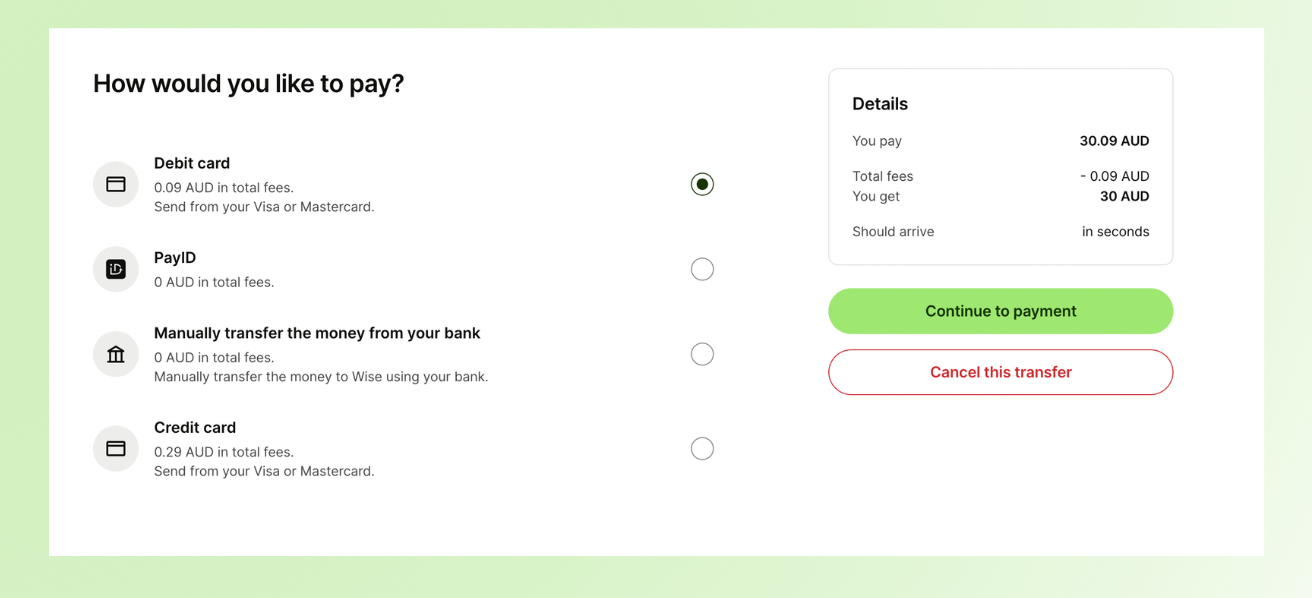
For speed, I chose debit card and accepted the $0.09 fee.
I clicked 'continue to payment,' entered my card details, completed SMS verification, and thought I was done.
I was not.
First, I saw a reassuring message saying Wise was verifying my documents and that the money should appear in my account within seconds. Great.
Then I checked my account overview and saw the transfer marked as 'adding paused.' Less great.
I clicked into it and saw a vague message saying 'we need more details.' This wasn’t unreasonable - up until now, I hadn’t actually uploaded any ID - but the way Wise surfaced this was clunky.
There was no clear prompt explaining what to do next. A simple pop-up or guided next step here would have gone a long way.
I clicked 'fix my transfer' and was taken to a verification screen where I could either scan a QR code to upload documents and a face scan, or send myself a verification link by email. I chose the QR code and completed the checks on my phone.
Before you can transfer money, Wise puts you through several verification steps. It honestly felt a bit overkill - but at the same time, it made me feel safe.
- Ashley Cummings, Writer
Once that was done, I was asked to confirm my reason for using Wise. I selected 'sending money to friends and family', which technically fits - I was about to ask my brother to send me $40.
But the next screen told me verification could take up to four days. At this point, my patience was thin.
But when I refreshed my account (once, then again), the money was already there. Success!
Doing my first real international transfer (the receipts)
At this stage, here’s what I had:
- A Wise business account
- A Wise personal account
- $30 AUD sitting in my Wise balance
Which meant I could finally request a payment.
This was still a personal account, and I was requesting money from my brother, but the same flow applies if you’re requesting money from anyone overseas.
I selected AUD as the currency, chose 'receiving financial support from family' as the purpose, and generated a payment request.
Wise instantly gave me both a payment link and a QR code, which was really handy. I could also add a note explaining what the payment was for.
I copied the link, sent it to my brother, and that was it. The payment request was officially sent.
Now all I have to do is wait and see how long it takes my little brother to pay me back (I'm not holding my breath).
Other Wise features (what else you get beyond transfers)
At this point, I’d tested the core thing I came for: exchange rates, fees, and what it takes to send and receive money internationally.
But Wise is more than just a transfer app. Once you’re inside the dashboard, there are a bunch of extra features that are worth mentioning (even though I didn’t personally use every single one during my testing).
Wise personal account features (free)
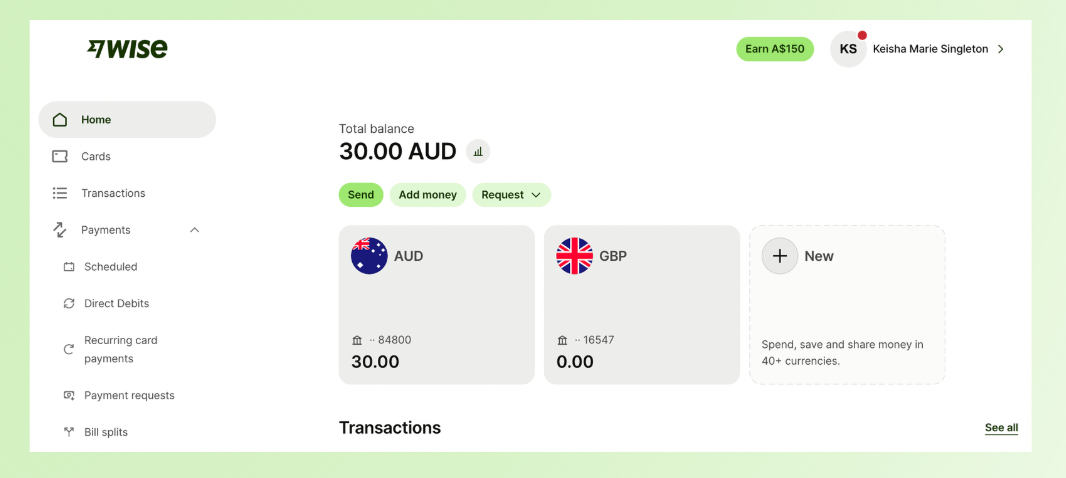
If you’re using Wise as an individual, the personal account includes more functionality than you might expect, including:
- Earn a return on eligible balances (depending on your currency and country)
- Scheduled payments, so you can automate transfers instead of manually sending them each time
- Direct debits, which lets you pay bills automatically from your Wise balance
- Recurring card payments, for subscriptions and repeat purchases (same way a normal debit card works)
- Bill splits, which makes it easier to share expenses with friends, roommates, or travel groups
The personal account can function like a lightweight multi-currency bank setup, especially if you travel or get paid in different currencies.
Wise business account features (some free, some paid)
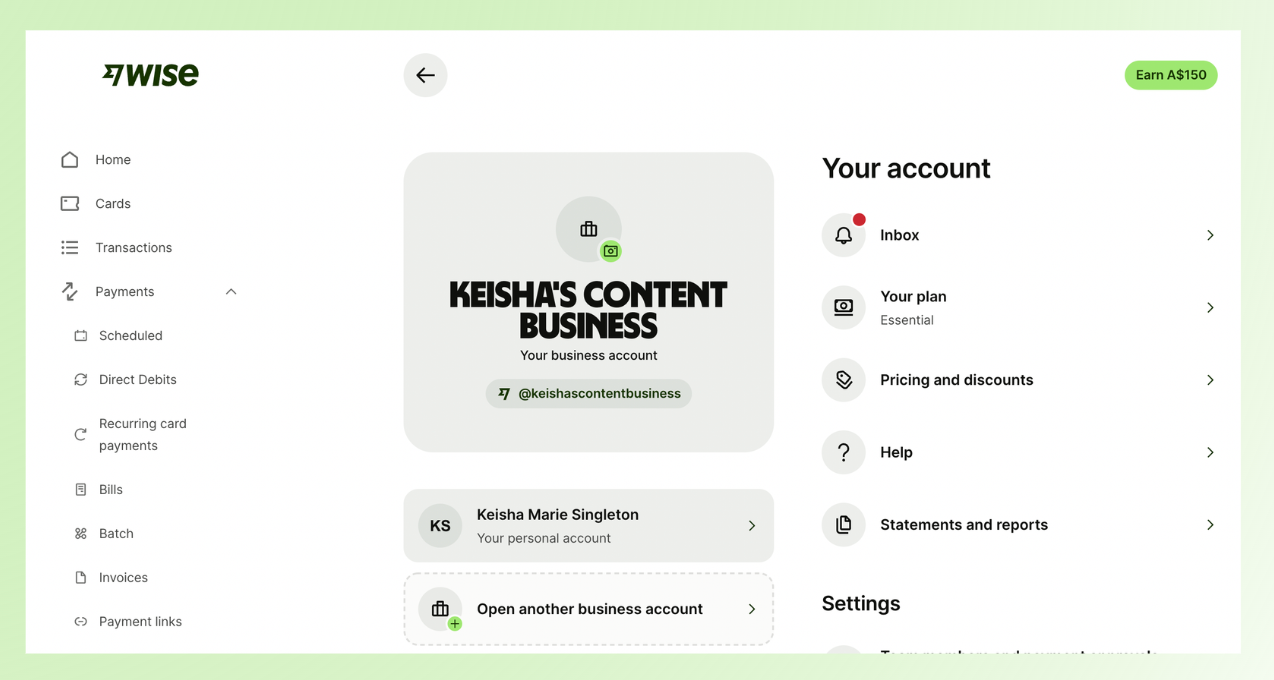
Wise Business is built more for paying teams and managing business cash flow - but this is also where Wise’s tiering starts to matter.
Free business features (Essentials)
Even on the free plan, Wise includes a few useful tools for businesses, like:
- Batch payments, so you can pay multiple contractors or suppliers at once
- Paying bills via Quick Pay, which makes business payments faster to send once things are set up
Paid business features (Advanced)
On the paid tier, Wise unlocks the 'get paid' tools most freelancers and businesses actually care about, including:
- Invoices
- Payment links
- Quick Pay receiving tools (tied to being able to accept payments more easily)
So while Wise can absolutely support receiving money as a business, a lot of those features are treated as premium. which is important to know if you’re signing up specifically to invoice international clients.
My experience with Wise
Overall, my experience with Wise was a mix of strong fundamentals and frustrating setup friction.
On the one hand, Wise does exactly what it promises when it comes to exchange rates and transparency. Fees are shown upfront, conversions are close to the real mid-market rate, and once you’re past setup, the product itself is intuitive and fast.
Compared to PayPal or traditional bank wires, the cost difference is immediately noticeable.
On the other hand, getting to that point took more effort than I expected. Between unclear paywalls, repeated verification steps, and having to preload money just to unlock basic receiving features, the early experience felt more complicated than it needed to be, especially for someone testing Wise for the first time or sending their very first international invoice.
That said, not everyone runs into the same friction.
Ankit Vora, a freelancer who works with international clients, had a much smoother experience:
I didn’t run into any major issues with setup or verification. Everything worked as expected, and the knowledge base was solid whenever I had questions.
I’d recommend Wise to freelancers just starting out. It’s reliable, simple to use, and cost-efficient for international payments.
Wise clearly works well for many people - especially once accounts are fully set up and verified. But if you’re new, cash-constrained, or just experimenting with different payment options, the upfront hurdles can feel heavier than expected.
For me, Wise isn’t a bad product. It’s a powerful one, but not a frictionless one.
Where Wise wins (and where it fails)
After testing Wise end-to-end, from signup to sending a payment request, a clear pattern emerged. Wise is excellent at a few specific things, and noticeably weaker at others.
Here’s where it wins, and where it falls short.
Wise is great for:
- Getting paid internationally using local account details
- Paying contractors and teams abroad
- Converting currencies with clear, upfront pricing
- Operating across countries without bank wire delays or hidden FX spreads
Wise is not:
- A Stripe replacement for checkout flows or subscriptions
- An invoicing-first tool (invoices and payment links sit behind a paid business account)
- A zero-friction option if you expect to start receiving money instantly on a free business account
Alternatives to Wise for online money transfers and international payments
If Wise isn’t the right fit for your business or payment needs, here are five strong alternatives - each with different strengths, typical fees, and best-use cases.
Whop
Best for: creators, businesses, and platform-native checkout and payouts
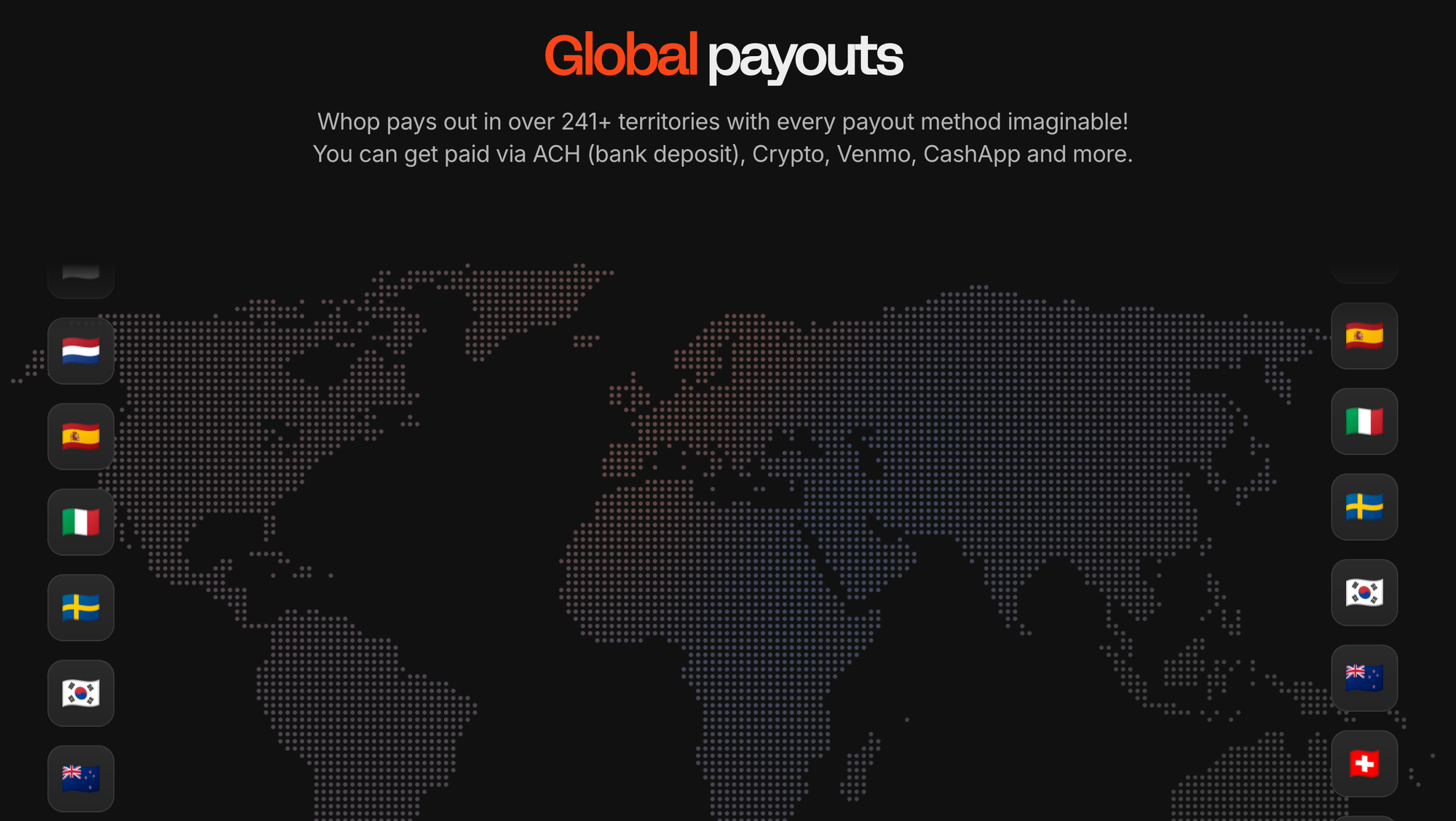
Whop is an all-in-one platform that combines payment acceptance and global payouts in one platform. It is especially strong for creators selling online products and subscriptions.
Key features:
- Full payment stack including checkout, embedded links, and global payouts
- Smart routing that retries failed payments across processors to maximize approvals
- Supports over 241 territories with diverse payout options including local bank rails, crypto, and wallets
- 99.9% uptime and 24/7 support
Fees:
- No monthly fees: you pay only on transactions
- Standard processing: 2.7% + $0.30 per transaction
- Additional: 1.5% for international cards + 1% currency conversion fee
PayPal

Best for: simple online payments and acceptances, familiar to most users
PayPal (or PayPal Open) is extremely familiar and easy to use for most clients and customers, and works for small businesses and freelancers with simple needs. But, fees tend to be higher than Wise for cross-border money movement and PayPal is not as transparent on FX as specialist platforms.
Key features:
- Global reach in 200+ countries, multiple ways to pay (cards, balances, Venmo in the US)
- Ready-made checkout buttons and integrations
- Buyer and seller protection tools
Fees:
- Domestic and international transaction fees vary widely (often ~2.9% + fixed fee domestically; plus extra for international and currency conversion)
- Currency conversion fees can be 3–4% or more above the mid-market rate
Payoneer
Best for: freelancers, marketplaces, and SMBs needing cross-border local accounts
Payoneer powers efficient local receiving in many regions, and is a good fit for freelancers and SMBs with regular global payouts. However, it's not as feature-rich for checkout or subscription billing as alternatives like Stripe.
Key features:
- Local receiving accounts in multiple currencies
- Multi-currency support and mass payments for businesses and contractors
- Integrates with marketplaces and platforms
Fees:
- Free Payoneer-to-Payoneer transfers
- Incoming payments from non-Payoneer sources: ~1–3% depending on method
- Withdrawals to local bank: ~ $1.50; currency conversion fee ~2% above mid-market
- Potential annual account maintenance fees
Stripe
Best for: online businesses needing full payment infrastructure (checkout, APIs)
Stripe is an excellent choice if your business needs a checkout experience, recurring billing, or full payments stack. Still, it's not designed primarily for person-to-person bank transfers or local receiving accounts like Wise.
Key features:
- Accepts credit/debit cards, ACH, digital wallets, and more
- Highly customisable checkout and recurring billing/subscriptions
- Strong API and developer ecosystem
- Advanced fraud protection tools
Fees:
- Standard: ~2.9% + $0.30 per transaction (domestic) + ~1% for international cards; varies by region
- Additional fees for certain features (billing, Radar fraud screening, etc.)
Revolut

Best for: multi-currency wallets and spend across countries
Revolut is great for holding and spending in multiple currencies, and cross-border travel spend. However, business payout and receiving features are more limited than Wise or Whop.
Key features:
- Multi-currency accounts and competitive FX
- Integrated spending tools and business debit cards
- Business plans with advanced features (varies by region)
Fees:
- Pricing tiers vary from basic free to premium plans with additional features
- Transaction and FX fees depend on plan and usage
Whop: international payments and more
After testing Wise end to end, my takeaway is this: Wise is strong infrastructure for moving money internationally, and it does a great job on exchange rates and transparency once you’re fully set up.
But if you’re a freelancer or business owner who needs a complete payment system (checkout, subscriptions, invoicing, payouts, and more), Wise isn’t really built to be that.
That’s why, if I were starting fresh today - or running an online business where payments are the core of how I make money - I’d choose Whop.
Whop isn’t just a way to transfer money internationally. It’s a full platform that lets you build businesses, accept payments, manage subscriptions, and handle payouts in one place.
You don’t need to stitch together Stripe, PayPal, Apple Pay, or local payment methods yourself - Whop handles the payment setup, routing, and recurring billing automatically, so you can sell globally without having to think about payment rails at all.
If what you want is the simplest way to sell online and get paid worldwide without extra tools or extra setup, Whop is the one for you.
Wise FAQs
1. Is Wise actually cheaper than PayPal?
In most cases, yes. Wise uses the real mid-market exchange rate and shows its fees upfront, whereas PayPal often hides costs inside a marked-up exchange rate and adds transaction fees on top. In my testing, Wise consistently delivered better final amounts than PayPal for the same transfers.
That said, Wise isn’t always 'free' - especially if you’re using a business account. So it’s cheaper on FX, but not zero-cost overall.
2. Can you get paid with a Wise business account for free?
Not really.
While you can create a Wise business account for free, many 'get paid' features, like invoicing, payment links, and receiving money in multiple currencies, require upgrading to a paid plan (around $65 AUD as a one-off fee). This isn’t always obvious during signup, so it can catch new users off guard.
3. Can a Wise personal account receive international payments?
Yes, but with caveats.
Personal accounts can receive money, but you may need to add money to the account first to unlock account details. In my case, I had to preload $30 AUD before I could generate details to receive a payment. It’s not a fee, but it is an upfront requirement that can feel unintuitive.
4. How long do Wise transfers usually take?
It depends on the currencies and payment method, but many Wise transfers are fast - often same-day or within 1–2 business days. In my experience (and from others I spoke to), Wise was significantly faster than PayPal or traditional bank wires, which can take several days or longer.
5. Is Wise safe to use?
Yes. Wise is regulated in multiple countries and follows strict KYC and AML requirements, which is why the verification process can feel heavy at times. While some of the UX around verification could be clearer, the underlying security and compliance standards are solid.
6 How can I put money into my Wise account?
You can add money to your Wise account in a few different ways, depending on your country. Common options include bank transfer, debit card, PayID (in Australia), and in some cases credit card. Fees vary by method - bank transfers and PayID are often free, while card payments usually come with a small fee.
Wise shows you the fee before you confirm anything, so you can choose the cheapest or fastest option based on your situation.
6. Can I take money out of my Wise account?
Yes. You can withdraw money from Wise by transferring it to a local bank account in your home country or another supported country. You can also spend directly from your Wise balance using the Wise debit card, which avoids unnecessary currency conversions if you’re spending in the same currency you’re holding.
Withdrawals typically arrive faster than traditional international bank transfers.