Invoicing, card checkout, and recurring billing all have a place in an agency's billing strategy. Learn how to evaluate the options and choose the best approach for each engagement.
Invoicing gives you flexibility over payment terms, while card checkout makes it easier to collect payments upfront. For ongoing retainers, recurring billing automates the collection process.
Key takeaways
- How your client pays matters more than the billing method: on a $5,000 monthly retainer, ACH costs $60 to $480 a year in fees, compared with roughly $1,600 to $2,200 by card.
- Match the method to the engagement: card checkout for fixed-fee work paid upfront, invoicing for staged or procurement-led projects, and recurring billing for fixed monthly retainers.
- Invoicing is the most flexible option but the slowest to pay, with net-30 or net-60 terms often stretched further by late payment.
- Card checkout lets clients pay right away, but they still have to complete it, and fees typically run 2.7% to 3.3% plus a fixed fee per transaction.
- Recurring billing cuts the most admin work, but adds billing fees and needs retries and dunning emails to recover failed payments.
So which method should you use? Ultimately, it comes down to the type of work you're charging your client for.
Cash flow is the lifeblood of any agency. When clients pay promptly, you have the funds you need to cover expenses, pay your team, and invest in growing your business. When they don't, the resulting disruption to your cash flow can put significant pressure on your finances and create uncertainty about the future.
So how do you get clients to pay on time? Your method of payment acceptance can make a real difference to how quickly they pay and how much time your team spends chasing late payments.
Here's everything you need to know to choose the right billing method for each engagement.
Invoicing vs. card checkout vs. recurring billing at a glance
Invoicing, card checkout, and recurring billing offer different ways for agencies to request and collect payments.
Before we compare them in more detail, let's take a quick look at how each method works.
| Invoicing | Card checkout | Recurring billing | |
|---|---|---|---|
| What it is | A formal request for payment for services provided or agreed. | An online checkout that allows clients to pay by credit card, debit card, or digital wallet. | A way to collect payments automatically at agreed intervals. |
| What the agency does | Issues an invoice specifying the amount the client owes and when payment is due. | Provides a link to an online checkout or payment page. | Arranges automatic payments with the client's authorization. |
| How the client pays | The client pays the invoice by card, bank transfer, or another accepted payment method. | The client enters or selects their payment details and authorizes the transaction. | The agency automatically charges the client's authorized payment method at agreed intervals, without requiring the client to approve each transaction. |
All three methods have a role to play in an agency's billing strategy, but that doesn't mean each one is suitable for every engagement. Let’s take a look at when you would use each one, and why.
Agency billing methods compared: invoicing, card checkout, and recurring billing
For agencies, payment speed, flexibility, cost, and reliability should all be part of the picture when it comes to evaluating billing methods.
So how do invoicing, card checkout, and recurring billing compare?
Invoicing for agencies: flexible terms, slower payments
Invoicing gives agencies flexibility over how and when they request payment from clients. Agencies can issue invoices for deposits before work begins or for payments due at agreed project milestones.
It's also an important option when working with larger organizations whose finance or procurement teams require formal invoices before authorizing payment.

Your agency can set its own payment terms or agree to those requested by a client. For example, an invoice with net-30 terms gives the client 30 days from the invoice date to pay. Other common arrangements include net-15 and net-60 terms.
You can also invoice once the work is complete.
The biggest drawback of invoicing is the potential for delayed payments. According to Atradius research, 43% of the value of credit-based B2B sales among surveyed US businesses was overdue in 2025.
Why is this so common? Because clients may need to obtain internal approval or resolve queries about the amount charged before authorizing payment.
And sometimes, especially in bigger companies, invoices can get lost in busy inboxes and simply fail to reach the right contact.
Top tip: Want to avoid invoicing payment delays? Make sure every invoice includes:
- Accurate client details: The correct billing contact, company information, and any purchase order or reference number the client requires.
- Clear payment information: The amount owed, invoice date, due date, payment terms, and accepted payment methods.
- A clear description of the work: Enough detail for the client to identify the services provided and confirm that the invoice matches the agreed scope.
These delays can create additional administrative work for your team, including tracking outstanding invoices, following up with clients, and resolving payment issues.
And for agencies offering net-30 or net-60 terms, late payments can extend an already lengthy wait and add to the administrative workload.
Business tools and invoicing software can save your agency time spent on generating, sending, and following up on invoices. Clients are usually able to pay these invoices through Automated Clearing House (ACH) – a US electronic bank payment network – or by card.
Here’s how four popular providers compare:
| Provider | US ACH payment fee | Standard US card payment fee |
|---|---|---|
| QuickBooks | 1% | 2.99% |
| Xero |
|
2.9% + $0.30
|
| FreshBooks | 1% | 2.9% + $0.30 |
| Whop | 1.5%, capped at $5 | 2.7% + $0.30* |
*Fees are indicative for standard US transactions. Additional charges, subscription costs, and eligibility requirements may apply. Processing fees on Whop can be brought down to 0% with Whop Levels.
These tools can also help your agency reduce its manual workload through recurring invoices and automated payment reminders. Depending on the available features, agencies can schedule regular invoices and follow up on overdue payments without handling every task themselves.
For example, Daniel Petrovskiy, owner of home remodeling business Pinnacle North West Kitchen & Bath, uses Whop to send invoices to clients. Whop sends automatic follow-up reminders when clients are slow to pay, saving Daniel the trouble of chasing them himself.

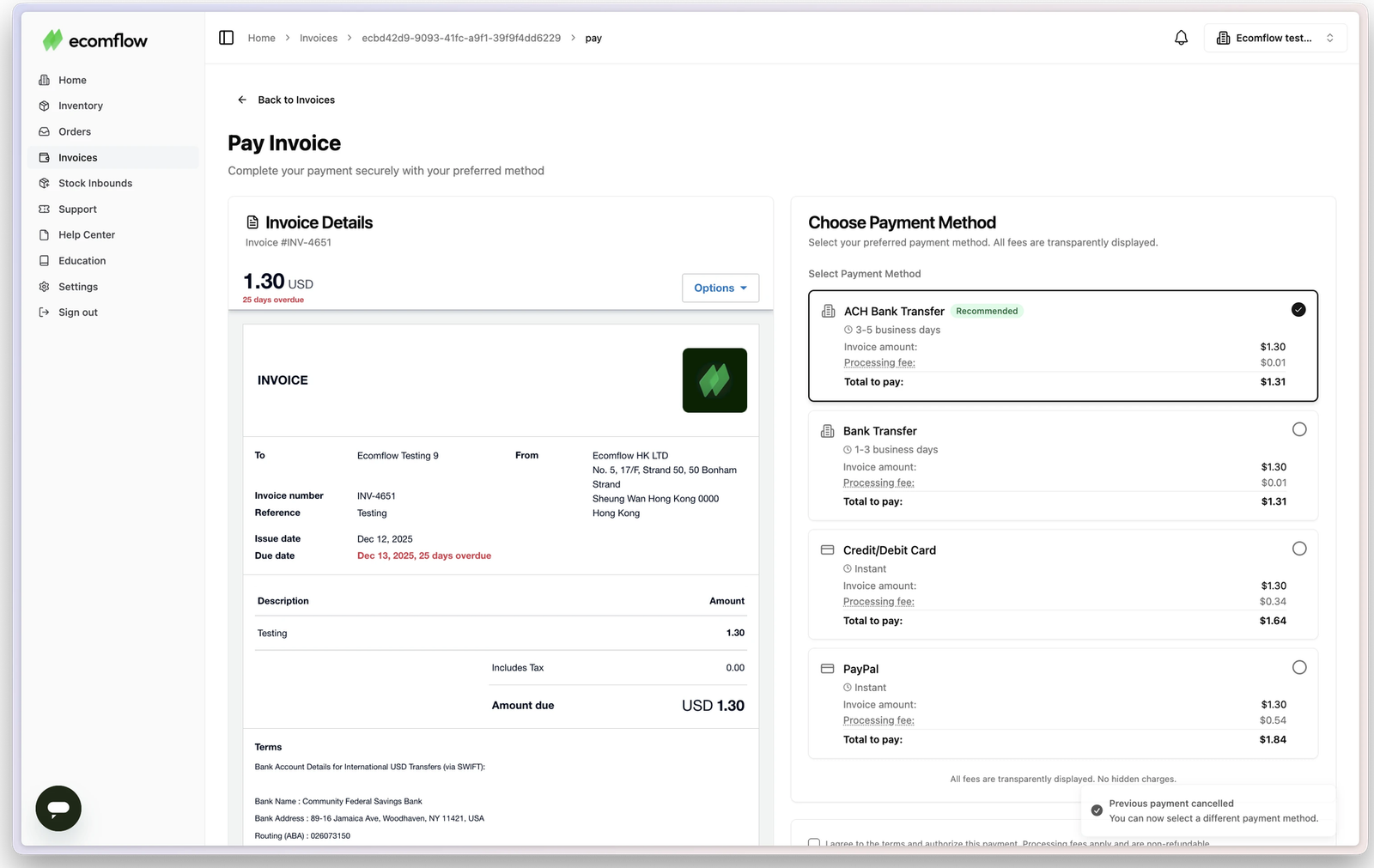
For agencies with more complex billing needs, Whop’s API lets you build invoicing into your own systems. For example, fulfillment company ecomflow, which works with more than 300 brands across 100+ markets, automates its client invoicing using Whop’s API.
Clients used to send payments that didn’t match any single invoice, such as transferring $5,000 against a $10,000 balance made up of several invoices, so reconciliation was a constant headache. Now ecomflow attaches the invoice ID and client name to every payment, so payments and invoices match automatically. Clients can also pay using local payment methods, such as iDEAL in the Netherlands.
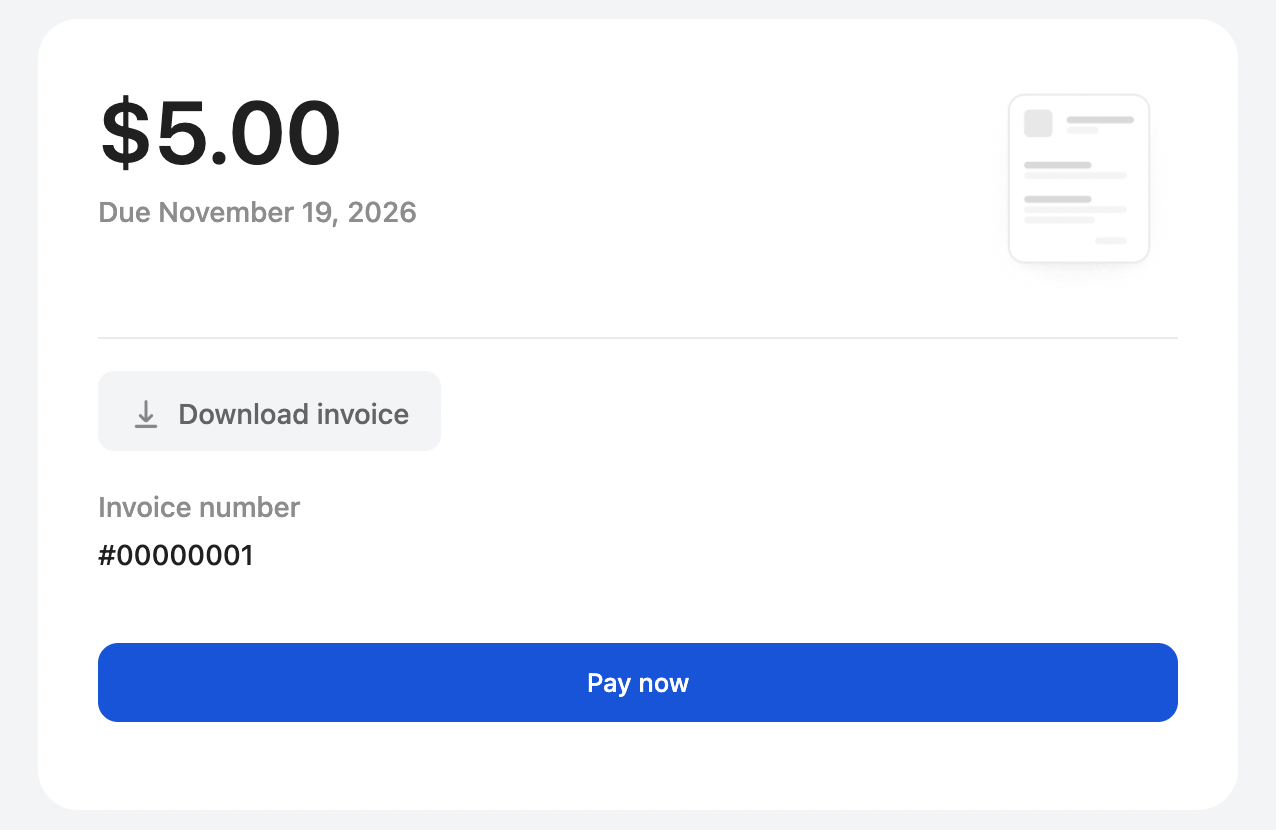
To see how Whop's standard invoicing works in practice, I created and sent a test invoice on Whop. Using my existing Whop account, it took less than a minute. (If you’re new to Whop, you’ll just need to verify your identity before you can send an invoice.)
I could add line items, my business details such as my address, and a range of payment options, then set the due date. Once the invoice was sent, I had the option to copy a payment link or download it as a PDF, and it arrived in the client’s inbox in under a minute.
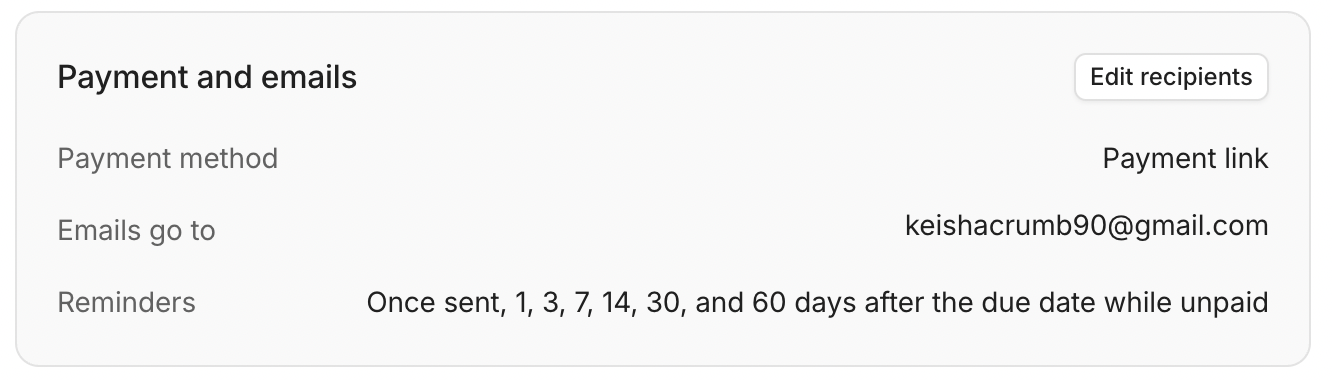
Whop then schedules automatic reminders 1, 3, 7, 14, 30, and 60 days after the due date while the invoice remains unpaid.
Invoicing gives agencies flexibility over payment arrangements, along with the ability to work with clients who require formal invoices.
But remember, extended payment terms and late payments can put pressure on cash flow, with the burden of chasing outstanding invoices adding to the administrative workload.
Taking card payments: quicker payments, a fee on every transaction
Card checkout allows agencies to collect payments directly from clients, often without the delays associated with traditional invoicing. Instead of sending an invoice and waiting for payment, you can share a checkout link or direct the client to a payment page where they can pay for the service immediately.
For example, iTK9, a dog training academy, uses Whop checkout links to accept payments online following individual client assessment calls. Once the business has agreed on a program with a customer, it can send a payment link straight away, reducing the delay between securing the agreement and collecting payment.
When I tested this on Whop, setting up a checkout link took 44 seconds, including changing the branding colors to match my business.
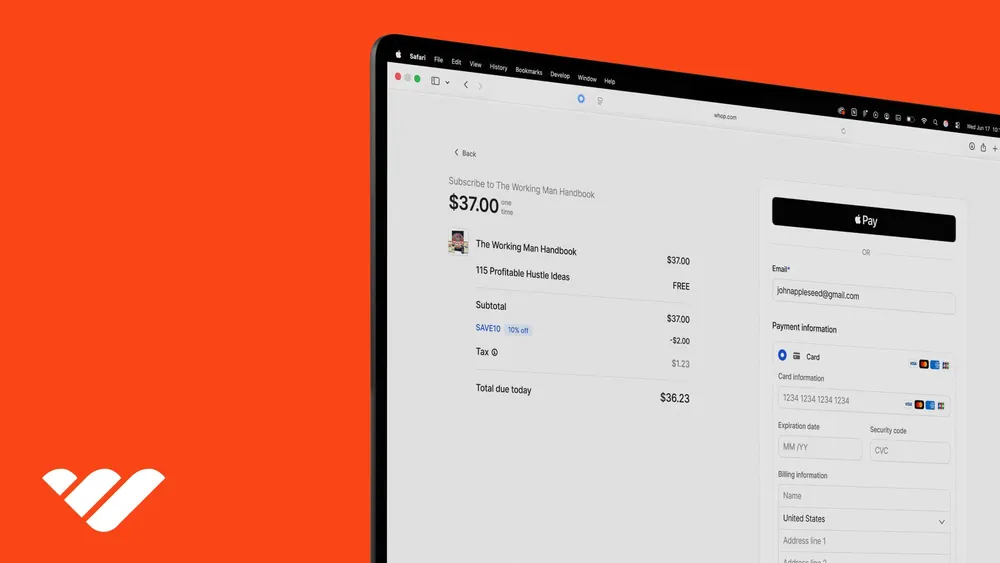
Here’s what the client sees when they open the link:
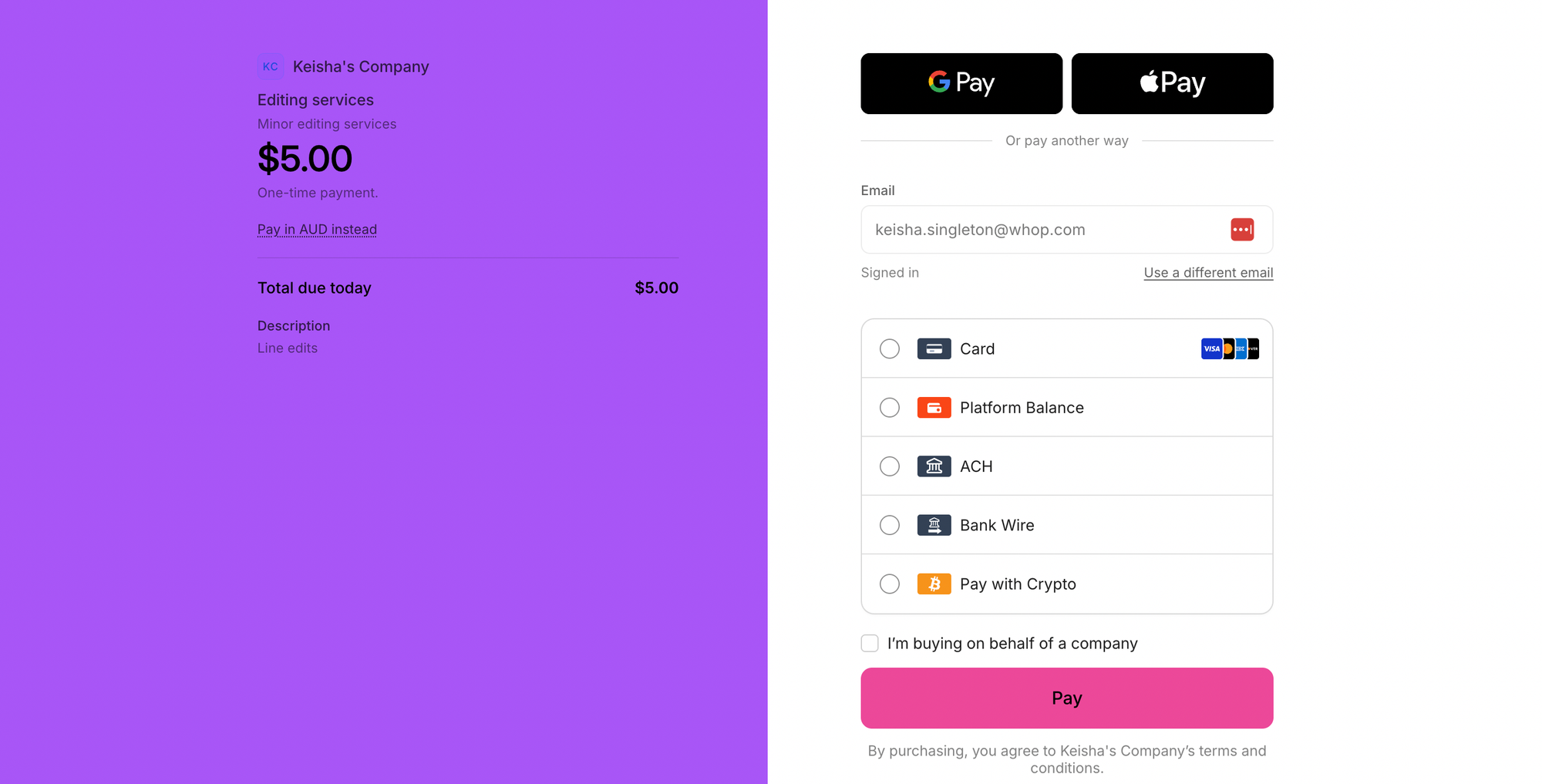
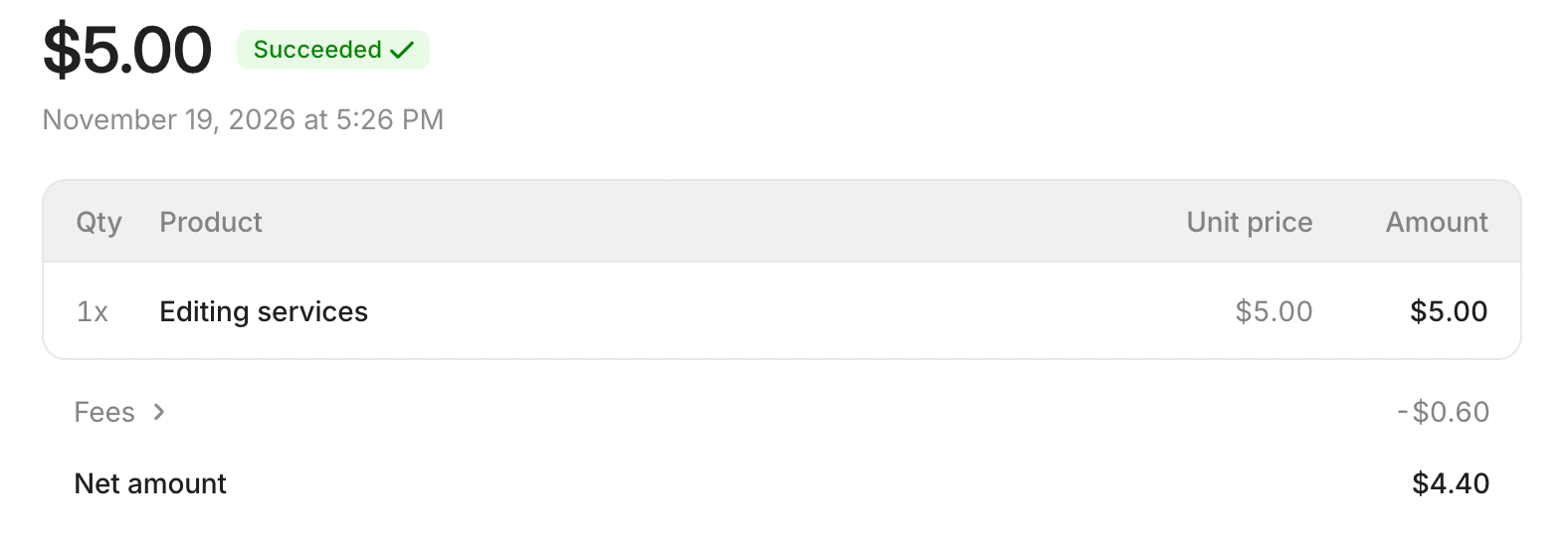
My client paid the $5.00 test charge straight away. Of the $0.60 in fees, $0.44 was card processing, matching Whop’s standard 2.7% + $0.30 rate. The rest was made up of a $0.07 Radar fraud detection fee, a $0.04 orchestration fee, and a $0.05 currency conversion fee, leaving a net amount of $4.40.
Not all of these fees will apply to every payment. Orchestration is an optional add-on that routes payments through multiple providers, and you’ll only pay it if you turn it on. The currency conversion fee applies only when a transaction requires conversion between currencies, and Whop’s adaptive pricing feature can bill these payments at domestic rates instead.
There are several providers offering checkout links that your agency can use to collect card payments, typically charging a percentage of each transaction plus a fixed fee.
Here's how four leading options compare:
- Stripe Payment Links: 2.9% + $0.30 per standard US online card transaction. Supports digital wallets and eligible local payment methods.
- PayPal Payment Links: 2.99% + $0.10 per transaction. Supports PayPal, Venmo, Apple Pay, and Pay Later, where available.
- Square Payment Links: 3.3% + $0.30 per standard online transaction on Square Free. Supports Apple Pay, Google Pay, Cash App Pay, and other eligible payment options.
- Whop checkout links: 2.7% + $0.30 per standard US domestic card transaction. Supports local payment methods, including eligible bank payment options.
Note: Fees and payment options vary by provider, transaction type, and location. Confirm current rates and availability before choosing a service.
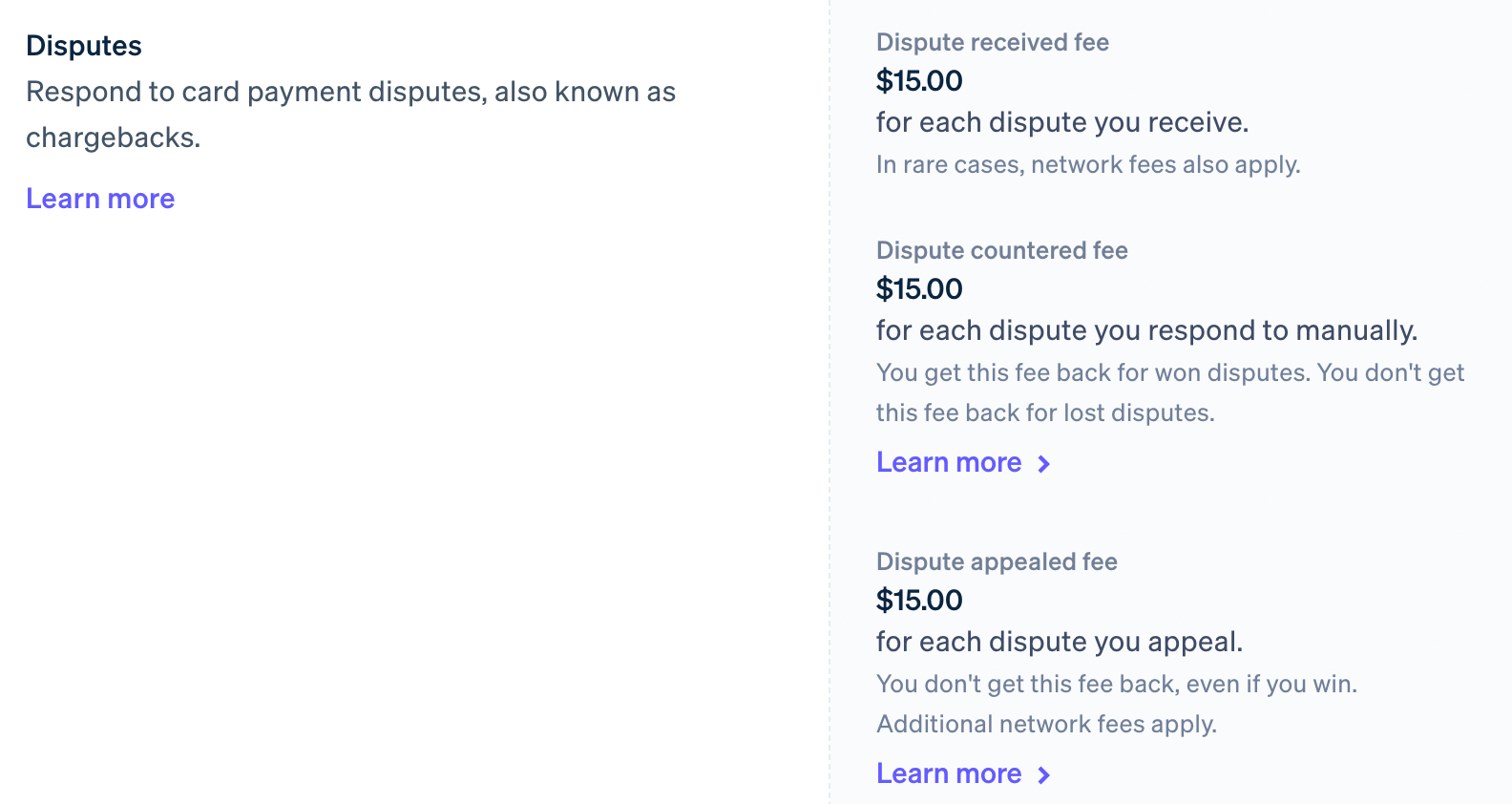
When evaluating providers, remember to factor in the cost of potential extra charges, including international processing fees, currency conversion fees, and chargeback fees if a client disputes a transaction. For example, Stripe’s dispute fees start at $15, with additional charges in some circumstances.
Payment timing is another consideration. Although card checkout allows clients to pay immediately, the client still needs to take action to complete the transaction – and this may not happen right away.
Even after a successful payment, it can take time for funds to reach your agency's bank account. Payout schedules vary by provider, and new accounts may face additional verification checks or temporary holds.
Card checkout gives agencies a convenient way to request immediate payment. However, processing fees, potential payment delays, and payout times can all affect how well it works for each engagement.
Recurring billing for retainers: automatic monthly payments
Recurring billing allows agencies to collect payments automatically at agreed intervals, saving them the work of sending payment requests and chasing routine payments each month. It’s particularly useful for ongoing retainer arrangements, where clients pay a regular fee for an agreed scope of work.
However, recurring billing isn't suitable for every engagement. One-off projects, irregular assignments, or work with frequently changing payment requirements may be better suited to invoicing or card checkout.
When I tested this on Whop myself, creating a basic subscription plan took about 30 seconds.
Alongside the price and billing interval, I could add a free trial, an initial fee, or a discount offer for clients who try to cancel, and choose which payment methods to accept. Cards, Apple Pay, Google Pay, and ACH were all available for recurring payments, while many other local payment methods were limited to one-time plans.
I asked Whop AI what happens if a payment fails. The subscription is marked as past due, the client is emailed to update their payment details, and Whop retries the charge over five days before canceling. You can choose in your settings whether clients keep access in the meantime.
Although automatic collection can make payments more predictable, transactions can still fail because of expired cards, bank declines, or insufficient funds.
With this in mind, your agency should have robust processes in place to recover failed payments. These might include automatic payment retries and “dunning” emails, which notify clients when payments fail and prompt them to update their details.
These processes can make a significant difference. According to Recurly's 2026 State of Subscriptions research, 53% of failed monthly subscription payments were recovered.
Pro tip: Moving existing retainer clients to autopay
If you currently invoice a client for a monthly retainer, consider proposing automatic payments when your agreement with them comes up for renewal.
Explain how this would simplify the payment process for your client: they’d no longer have to pay your agency’s invoice manually each month. One less thing on their to-do list!
There are plenty of recurring payment tools that your agency can choose from. Here's how four popular options compare:
| Stripe Billing | GoCardless | Chargebee | Whop | |
|---|---|---|---|---|
| Billing or collection fee | 0.7% of billing volume (Pay-as-you-go plan) | 0.5% + $0.05 per US ACH transaction, capped at $5 (Standard plan) | 0.8% of billing volume (Flow plan) | 0.5% per transaction when Billing is enabled |
| Card and bank payment options | Cards and ACH through supported Stripe payment methods | ACH bank debit; no card collection | Cards and ACH through supported payment gateways | Cards and supported bank methods, including ACH |
| Failed-payment handling | Automated retries and recovery workflows | Intelligent retries on eligible higher-tier plans | Automated dunning and recovery features | Automated retries and customer notifications |
Fees and features depend on the provider, plan, and payment method. Stripe Billing, Chargebee, and Whop may charge billing fees in addition to payment processing fees. GoCardless's quoted fee covers ACH collection, so it isn't directly comparable with the other rates.
Before setting up automatic payments, be sure to obtain the client's authorization and explain the billing schedule and cancellation arrangements to them clearly.
For ongoing engagements, recurring billing can reduce administrative work and make payment collection more predictable. However, you'll need to ensure that your clients agree to the arrangement and have processes in place to deal with unsuccessful payments.
Which billing method should your agency use for each engagement?
Ultimately, the best billing method depends on the terms of each engagement. How much the client is paying, when payment is due, and how frequently you plan to collect payments are all relevant factors.
Here are some common engagement scenarios and the billing methods that may be most suitable:
| Engagement characteristics | Recommended method | Why? |
|---|---|---|
| One-off engagement with a fixed fee, payable upfront | Card checkout | Clients can pay as soon as they agree to the work, without waiting for an invoice to become due. |
| Larger engagement with staged payments | Invoicing | You can issue formal payment requests for deposits and project milestones, accommodating clients' invoicing requirements where necessary. |
| Ongoing engagement with a fixed monthly fee | Recurring billing | Payments can be collected automatically each month, reducing manual administration. |
| Ongoing retainer with additional ad-hoc work | Recurring billing plus invoicing or card checkout | You can automate the regular retainer payment while collecting additional fees separately. |
Rebecca Blair, founder of Spacey Digital, a digital marketing agency with more than 10 years of experience, shares how her agency approaches client payments:
“We now invoice one month in advance, with 14-day payment terms. We accept card payments on any invoice, small or very large, for the client’s convenience. Even with the fees involved, being paid and making it easy for clients to pay instantly is really valuable.
To move a client from net-30, we’d frame it as a systems and process update: instead of invoicing in arrears, all invoices are now paid in full at the start of each billing cycle. In our experience, a client has never disputed a card payment or the work delivered, and if we ever need to refund a payment, we can do it straight back to the client’s card.”

To see how the choice can vary from one engagement to another, let's take a closer look at two examples.
- Example 1: A $1,500 one-off project
An agency agrees to deliver a defined scope of work for $1,500, with payment due upfront. The client is ready to proceed and doesn't need a formal invoice. Card checkout makes sense here because it allows the client to pay online right away, without introducing any unnecessary extra steps. - Example 2: A $7,500 project with milestone payments
An agency agrees to a $7,500 engagement, with a deposit due before work begins and two further payments linked to agreed milestones. Because the client's finance team requires formal invoices to approve payments, invoicing is the obvious choice for this engagement.
What does retainer billing cost with each method?
Several factors can affect the cost of collecting payment for an agency engagement, including transaction fees and administrative work. Payment timing is another important consideration, as delays can affect your agency's cash flow.
Let's take a $5,000 monthly retainer, worth $60,000 over 12 months*. Your choice of billing method makes some difference to your fees, but how your client pays makes a much bigger one. Here’s what each combination would cost in processing fees over a year:
| Billing method | Stripe: card | Stripe: ACH | Whop: card | Whop: ACH |
|---|---|---|---|---|
| Invoice | $1,983.60 | $300 | $1,623.60† | $60† |
| Checkout link | $1,743.60 | $60 | $1,623.60 | $60 |
| Recurring billing | $2,163.60 | $480 | $1,923.60 | $360 |
†Plus 0.5% ($300 a year on this retainer) if Whop Billing is enabled.
*Illustrative assumptions: 12 monthly payments of $5,000 at standard US domestic rates. Card: Stripe 2.9% + $0.30, Whop 2.7% + $0.30. ACH: Stripe 0.8%, Whop 1.5%, both capped at $5. Billing and invoicing fees (Stripe 0.4%–0.7%, Whop 0.5%) are included where they apply. International card, currency conversion, fraud and authentication fees, and optional add-ons such as orchestration are excluded.
The comparison above highlights some important trade-offs.
The biggest difference isn’t the billing method, but how your client pays. Collecting the same retainer by ACH costs between $60 and $480 a year, compared with roughly $1,600 to $2,200 by card.
Among card payments, checkout links have some of the lowest fees, but rely on clients completing checkout every time they need to pay. Recurring billing costs a little more, but payments arrive automatically on schedule. Invoicing involves the longest wait for payment.
The key point to remember is that the lowest processing fees won’t necessarily mean the lowest overall cost for your agency. A method that costs more per transaction may still be worthwhile if it helps you collect payments sooner and more reliably.
So choose your billing method based on the engagement, then encourage clients to pay by ACH wherever possible, especially for larger or recurring payments.
Lower your payment fees as you grow with Whop Levels
As your agency grows, Whop Levels can help you keep more of what you earn. Every business starts at level 0 with standard rates. You earn points throughout the month, and each new level unlocks lower payment acceptance rates.
Every dollar your agency spends with Whop Cards or on Whop Ads earns 10 points, and every dollar you trade earns 1 point. Reach 5,000 points to hit level 1. At level 10 (100 million points), processing fees drop to 0% for cards issued in regions including the US, Canada, the EU, the UK, and Australia.
That means the money you’re already spending to run your agency, whether that’s business expenses on a Whop Card or advertising on Whop Ads, can also bring down the cost of getting paid. You can see your current level, plus each level’s threshold and rate, in your business dashboard. Learn more about Whop Levels
Run all three billing methods from one place with Whop

Whop lets you manage payments for your agency through invoicing, card checkout, and recurring billing, all in one place. Choose the most suitable method for each engagement while managing all your client payments through a single dashboard.
Here's how to get started:
- Send invoices: Create an invoice in your Whop dashboard, enter the amount the client owes and payment terms, and send it. You can set up one-time or recurring invoices.
- Accept payments through checkout links: Set up a one-time payment for a service or deposit, generate a checkout link, and share it with your client.
- Automate recurring payments: Create a subscription with your agreed price and billing interval. Your client authorizes payment through checkout, allowing you to collect future payments automatically.
Whop supports more than 100 payment methods globally, helping agencies accept payments from international clients who prefer familiar payment methods. Track transactions across all your agency’s engagements through the Whop dashboard.
Ready to simplify how your agency gets paid? Start accepting payments with Whop, and unlock lower fees as you grow with Whop Levels.
Agency billing: FAQs
1. Can an agency use different payment acceptance methods for different engagements?
Yes. Agencies can offer invoicing, card checkout, and recurring billing without committing to a single method for every client. Whop supports all three billing methods in one place, allowing agencies to manage different payment arrangements through a single account.
2. How can agencies reduce the time they spend chasing client payments?
Agencies can reduce the time they spend chasing payments by giving clients easier ways to pay and using automation to take care of follow-up tasks. Card checkout allows clients to pay online upfront, while recurring billing collects payments automatically on an agreed schedule. Agencies using invoicing can include online payment links and use automated reminders to follow up on overdue invoices.
3. Do agencies need a website to accept online payments?
No. Agencies can use tools like Whop, Stripe, and PayPal to create checkout links for agreed payment amounts and send them directly to clients by email or message. Clients can then follow the link and pay through a secure, hosted checkout page without visiting the agency's website.
4. Can agencies use invoicing, card checkout, and recurring billing for international clients?
Agencies may be able to use any of the three methods to collect payments from international clients, depending on the countries, currencies, and payment options their provider supports. It’s important to note that cross-border transactions and currency conversion can incur additional fees, which vary by provider and payment method.
5. What happens when a client's recurring payment fails?
When a recurring payment fails, the billing provider may automatically retry the charge or notify the client about the payment failure. Some providers also send automated reminders and prompt clients to update their payment details when necessary. If the payment remains unsuccessful, the agency may need to contact the client directly, arrange an alternative payment method, or take further action under the agreed terms of their contract.