You can pay sellers in 187+ countries using Next.js and the Whop infrastructure, without ever building a payout form or storing bank details. Learn how to in this guide.
Key takeaways
- Whop's connected accounts let you pay sellers in 187+ countries without building payout forms or storing bank details.
- Follow the four-step order: create the account, verify the seller, save a payout method, then send the payout.
- Empty payout options with a 200 response means unfinished verification, not an unsupported country.
You can pay your sellers directly on your website without building a payout form, storing bank details, or writing country-specific code. Whop helps you pay out to over 187 countries, and you don't have to build the complex payout backend.
Global payout APIs let platforms send money to people all over the world with a single integration. For platforms that want to do this, the best global payouts API onboards and verifies each seller as well as paying them because to be paid they need to complete a KYC.
Whop's global payouts API works that way. Each seller gets a connected account. Whop's onboarding screens collect their identity and payout details and you can send money with a single call.
In this tutorial we're going to take a look at creating an account for a seller in another country, letting them prove who they are and choose how they want to be paid, sending them their money with one call, and following that payment until it lands.
You can walk the whole flow in our companion demo here and read its repository here.
Prerequisites
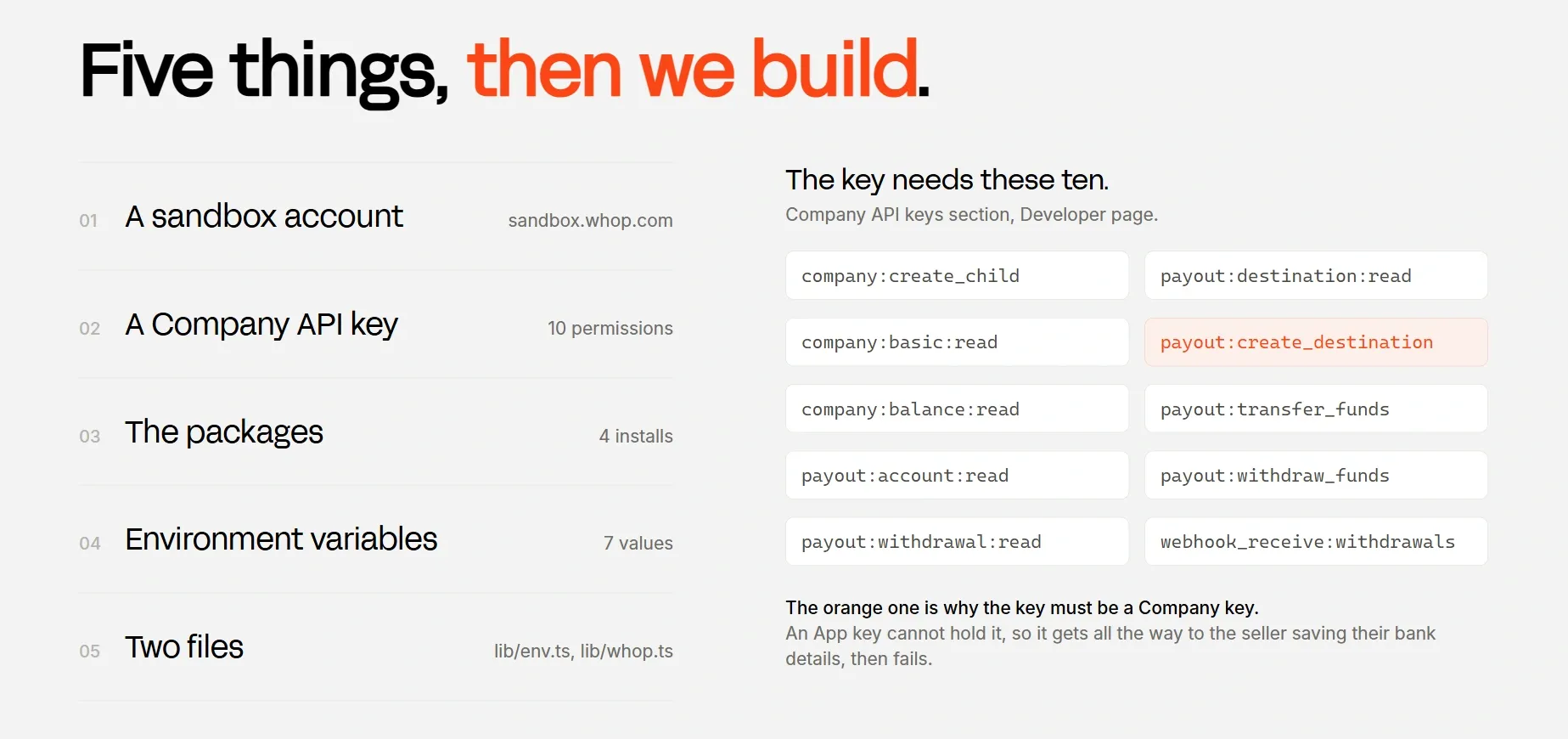
We're going to work on an existing Next.js app and add files under lib/, constants/ and app/api/, plus one line in next.config.ts. Although code is TypeScript, nothing here depends on using it.
Set up a sandbox account
Until the end of this tutorial, we're going to use the Whop sandbox. This will allow us to simulate how the payout would work without moving real money.
Now, you should go to Sandbox.Whop.com, create an account, then create a business with the Start a business button in the sidebar and open its dashboard. We'll cover the switch to production at the end of the tutorial.
Get an API key
Once you're on your new whop's dashboard, open the Developer page and find the Company API keys section. Create a key there using the Create button with the permissions:
company:create_childcompany:basic:readcompany:balance:readpayout:account:readpayout:destination:readpayout:create_destinationpayout:transfer_fundspayout:withdraw_fundspayout:withdrawal:readwebhook_receive:withdrawals
Install the packages
Then, let's install the packages we'll use with the command:
npm install @whop/sdk@2.4.0 @whop/embedded-components-react-js@^1 @whop/embedded-components-vanilla-js@^1 zod@^4@whop/sdk allows our server to talk to Whop. The two embedded-components packages are the screens Whop adds for us, and the React one needs the vanilla one beside it. zod checks that things arriving from outside are shaped the way we expect.
Environment variables
Create or open .env.local in the project root:
| Variable | Example | Where it comes from |
|---|---|---|
WHOP_COMPANY_API_KEY |
apik_... |
The key we just made |
WHOP_PLATFORM_ACCOUNT_ID |
biz_... |
The business ID, can be found in the dashboard URL |
WHOP_WEBHOOK_SECRET |
ws_... |
Shown when we create the webhook, later |
DEMO_SELLER_EMAIL |
you@example.com |
A mailbox you own, standing in for a seller's own address |
WHOP_SANDBOX |
true |
Typed by hand. Remove it or set false for production |
SESSION_PASSWORD |
32 random characters | Typed by hand. Encrypts our own cookie |
APP_URL |
http://localhost:3000 |
Our app's own address |
Check them on startup
Create lib/env.ts:
import { z } from "zod";

const schema = z.object({
  WHOP_COMPANY_API_KEY: z.string().min(1, "WHOP_COMPANY_API_KEY is missing"),
  WHOP_PLATFORM_ACCOUNT_ID: z
    .string()
    .startsWith("biz_", "WHOP_PLATFORM_ACCOUNT_ID must start with biz_"),
  WHOP_WEBHOOK_SECRET: z.string().optional(),
  DEMO_SELLER_EMAIL: z.string().email("DEMO_SELLER_EMAIL must be an email address"),
  WHOP_SANDBOX: z
    .string()
    .optional()
    .transform((value) => value === "true"),
  SESSION_PASSWORD: z
    .string()
    .min(32, "SESSION_PASSWORD must be at least 32 characters"),
  APP_URL: z.string().url("APP_URL must be a full URL"),
});

export type Env = z.infer<typeof schema>;

let cached: Env | undefined;

export function getEnv(): Env {
  if (cached) return cached;

  const raw: Record<string, string | undefined> = { ...process.env };
  for (const key of Object.keys(raw)) {
    if (raw[key] === "") delete raw[key];
  }

  const parsed = schema.safeParse(raw);

  if (!parsed.success) {
    const problems = parsed.error.issues
      .map((issue) => `${issue.path.join(".")}: ${issue.message}`)
      .join("\n");
    throw new Error(`Environment is not configured.\n${problems}`);
  }

  cached = parsed.data;
  return cached;
}
The client
Keep in mind that the environment option is what points the client at sandbox. Leave it out and every call goes to production instead.
The SDK already knows the sandbox and production addresses, so we don't type any URL. Now, create lib/whop.ts:
import { WhopClient, WhopEnvironment } from "@whop/sdk";
import { getEnv } from "@/lib/env";

let cached: WhopClient | undefined;

export function whop(): WhopClient {
  if (cached) return cached;

  const env = getEnv();

  cached = new WhopClient({
    token: env.WHOP_COMPANY_API_KEY,
    environment: env.WHOP_SANDBOX
      ? WhopEnvironment.Sandbox
      : WhopEnvironment.Production,
  });

  return cached;
}
How paying a seller works
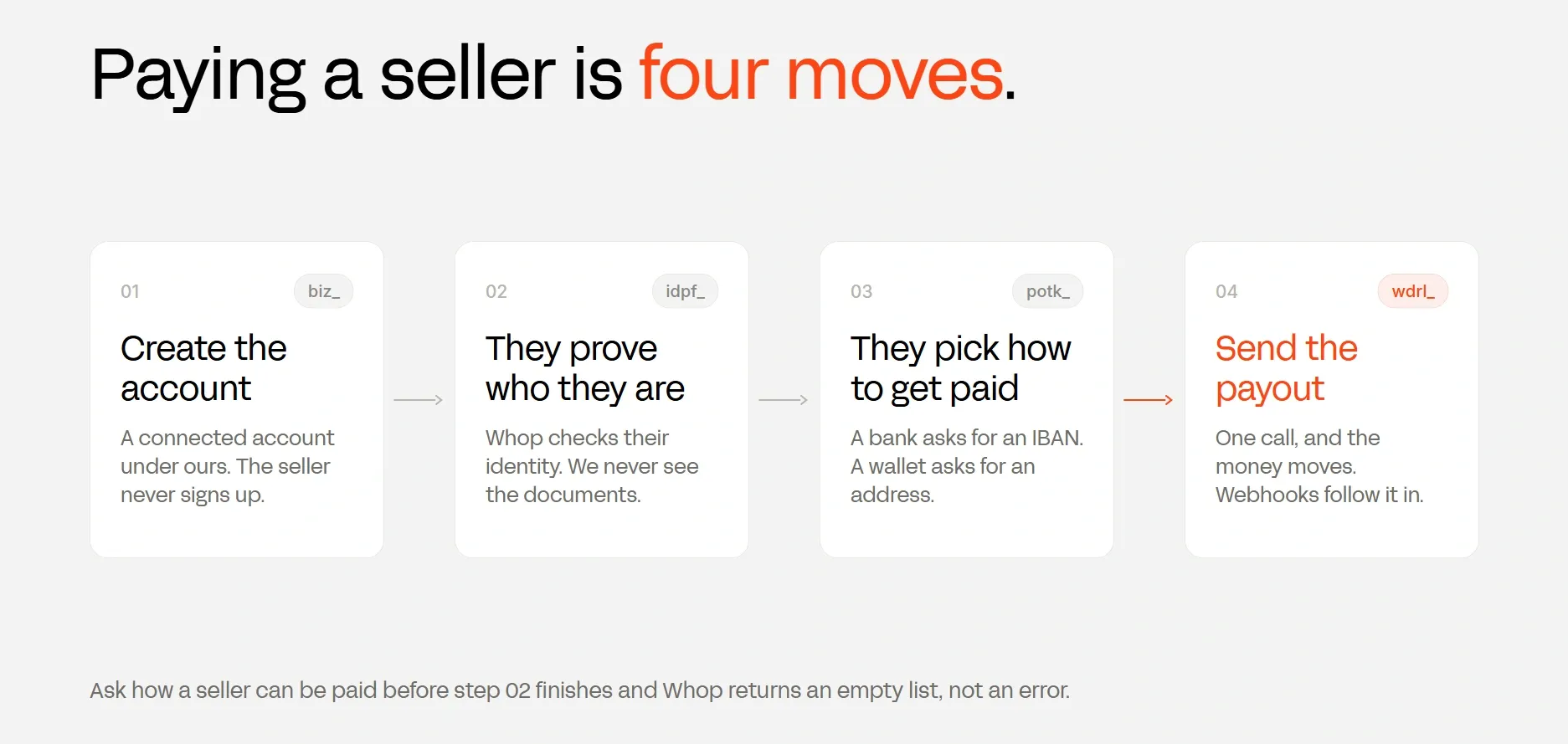
To understand how paying a seller works, we need to understand four concepts: accounts, connected accounts, payout methods, and payouts.
An account is a business or a person on Whop, their IDs start with biz_. A connected account is what we create as a child to our business, sellers get their own without signing up and manually creating a company on Whop.
A payout method is an individual's saved method of receiving money, and payout is the money actually moving.
This is also the order of payouts: we create the account, the seller proves who they are, the seller saves a payout method, we send a payout against it.
Turn on payouts
Payouts are not available until Whop has checked our own business, and the fastest way to see where we stand is the CLI. You can download it by running the command:
npm install -g @whop/cliThen, point it at sandbox and sign in with the company API key we made. That environment variable is not remembered between shells, so it goes on every command:
export WHOP_API_BASE_URL="https://sandbox-api.whop.com/api/v1"
whop auth login --method api-key --apiKey apik_your_keyThen read the account back using the command:
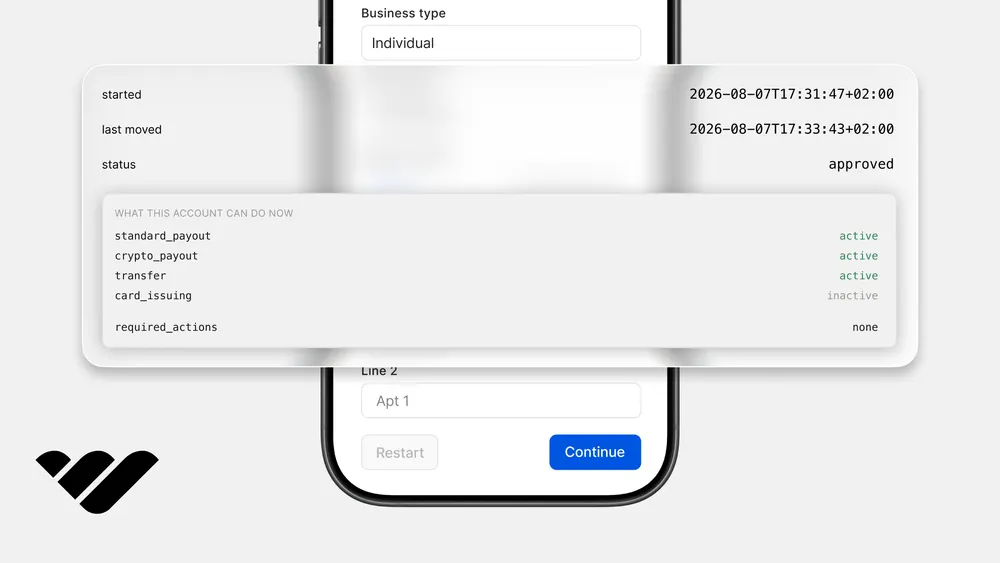
whop accounts get biz_your_account --format jsonIn the response we get, capabilities.standard_payout tells us whether we have payouts enabled, and required_actions lists what we still need to do. Each entry comes with a cta link to the dashboard page that clears it.
Create an account for the seller
A seller joins the marketplace, so we make them an account. Create app/api/seller/route.ts:
import { NextResponse } from "next/server";
import { z } from "zod";
import { whop } from "@/lib/whop";
import { getEnv } from "@/lib/env";
import { getVisitorId } from "@/lib/session";
import { readState, writeState } from "@/lib/store";
import { checkRateLimit, clientIp } from "@/lib/rate-limit";
import { SELLER_COUNTRIES } from "@/constants/whop-ids";

const countryCodes = SELLER_COUNTRIES.map((c) => c.code);

const body = z.object({
  title: z.string().min(1).max(60),
  country: z.enum(countryCodes as [string, ...string[]]),
});

function demoEmail(base: string, sellerRef: string): string {
  const [name, domain] = base.split("@");
  return `${name}+payouts-${sellerRef.slice(0, 8)}@${domain}`;
}

export async function GET() {
  const state = await readState();

  return NextResponse.json({
    sellerId: state.sellerId ?? null,
    title: state.sellerTitle ?? null,
    country: state.sellerCountry ?? null,
  });
}

export async function POST(request: Request) {
  if (!checkRateLimit(clientIp(request), 5)) {
    return NextResponse.json({ error: "Too many requests" }, { status: 429 });
  }

  const parsed = body.safeParse(await request.json());
  if (!parsed.success) {
    return NextResponse.json({ error: "Invalid request" }, { status: 400 });
  }

  const env = getEnv();

  const sellerRef = await getVisitorId();

  const title = `${parsed.data.title} ${sellerRef.slice(0, 4)}`;

  try {
    const seller = await whop().accounts.create({
      title,
      country: parsed.data.country as never,
      email: demoEmail(env.DEMO_SELLER_EMAIL, sellerRef),
      send_customer_emails: false,
      metadata: { seller_ref: sellerRef },
    });

    await writeState({
      sellerId: seller.id,
      sellerTitle: title,
      sellerCountry: parsed.data.country,
    });

    return NextResponse.json({
      sellerId: seller.id,
      title,
      country: parsed.data.country,
    });
  } catch (error) {
    console.error("seller_create_failed", error);
    return NextResponse.json(
      { error: whopMessage(error) ?? "Could not create the seller account" },
      { status: 502 },
    );
  }
}

function whopMessage(error: unknown): string | null {
  if (typeof error !== "object" || error === null) return null;
  const shape = error as { body?: { error?: { message?: unknown } } };
  const message = shape.body?.error?.message;
  return typeof message === "string" ? message : null;
}
What makes this a connected account rather than an unrelated business is the company API key we call with, because Whop puts every account that key creates under our business.
country is where the seller is located, and the metadata is where we keep our own ID for them so we can find the record later.
The thing that decides if a seller can be paid isn't something we pass, it's the Whop verification the user does in the next step.
Keep in mind that two sellers under the same platform can't have the same name, and the email is required for every connected account, and it has to be a real mailbox, because Whop checks that the address actually accepts mail.
Everything we'll do from now on needs the biz_ ID, so make sure to save it. There is more on the wider flow in our connected accounts guide.
Let the seller prove who they are
Whop needs to know who is being paid before a payout can be made. Sellers do that inside our page, but we don't need to store the KYC information ourselves.
The components need a credential, so our server mints one. Create app/api/token/route.ts:
import { NextResponse } from "next/server";
import { whop } from "@/lib/whop";
import { readState } from "@/lib/store";
import { PAYOUT_SESSION_SCOPES } from "@/constants/whop-ids";

export async function POST() {
  const state = await readState();

  if (!state.sellerId) {
    return NextResponse.json({ error: "No seller yet" }, { status: 409 });
  }

  try {
    const created = await whop().accessTokens.create({
      account_id: state.sellerId,
      scoped_actions: [...PAYOUT_SESSION_SCOPES],
    });

    return NextResponse.json({
      token: created.token,
      expiresAt: created.expires_at,
    });
  } catch (error) {
    console.error("token_create_failed", error);
    return NextResponse.json({ error: "Could not create a session" }, { status: 502 });
  }
}
The scopes live in constants/whop-ids.ts:
export const PAYOUT_SESSION_SCOPES = [
  "company:balance:read",
  "payout:account:read",
  "payout:account:update",
  "payout:withdraw_funds",
  "payout:withdrawal:read",
  "payout:transfer:read",
  "payout:transfer:export",
  "payout:destination:read",
  "payout:create_destination",
  "payout:update_destination",
  "payout:delete_destination",
] as const;
Now the page. The components load through a provider, which is also where we say we're in sandbox. Create components/WhopElementsProvider.tsx:
Inside that, a session for one seller can wrap whichever element we want:
"use client";

import { useMemo, type ReactNode } from "react";
import { loadWhopElements } from "@whop/embedded-components-vanilla-js";
import { Elements } from "@whop/embedded-components-react-js";

export function WhopElementsProvider({
  children,
  sandbox,
}: {
  children: ReactNode;
  sandbox: boolean;
}) {
  const elements = useMemo(
    () =>
      loadWhopElements({
        environment: sandbox ? "sandbox" : "production",
        appearance: { theme: { appearance: "light" } },
        locale: "en",
      }),
    [sandbox],
  );

  return <Elements elements={elements}>{children}</Elements>;
}
We want to pass token as a function, not a string, because the components then refresh it themselves before it expires.
The components are served from apollo.elements.whop.com, so you need to edit your next.config.ts file to allow it:
const csp = [
  "default-src 'self'",
  "script-src 'self' 'unsafe-inline' 'unsafe-eval' https://js.whop.com https://apollo.elements.whop.com https://t.whop.tw",
  "style-src 'self' 'unsafe-inline'",
  "img-src 'self' data: https://*.whop.com",
  "font-src 'self'",
  "frame-src https://*.whop.com https://apollo.elements.whop.com",
  "connect-src 'self' https://*.whop.com https://apollo.elements.whop.com https://t.whop.tw",
  "form-action 'self'",
].join("; ");
Let the seller choose how to get paid
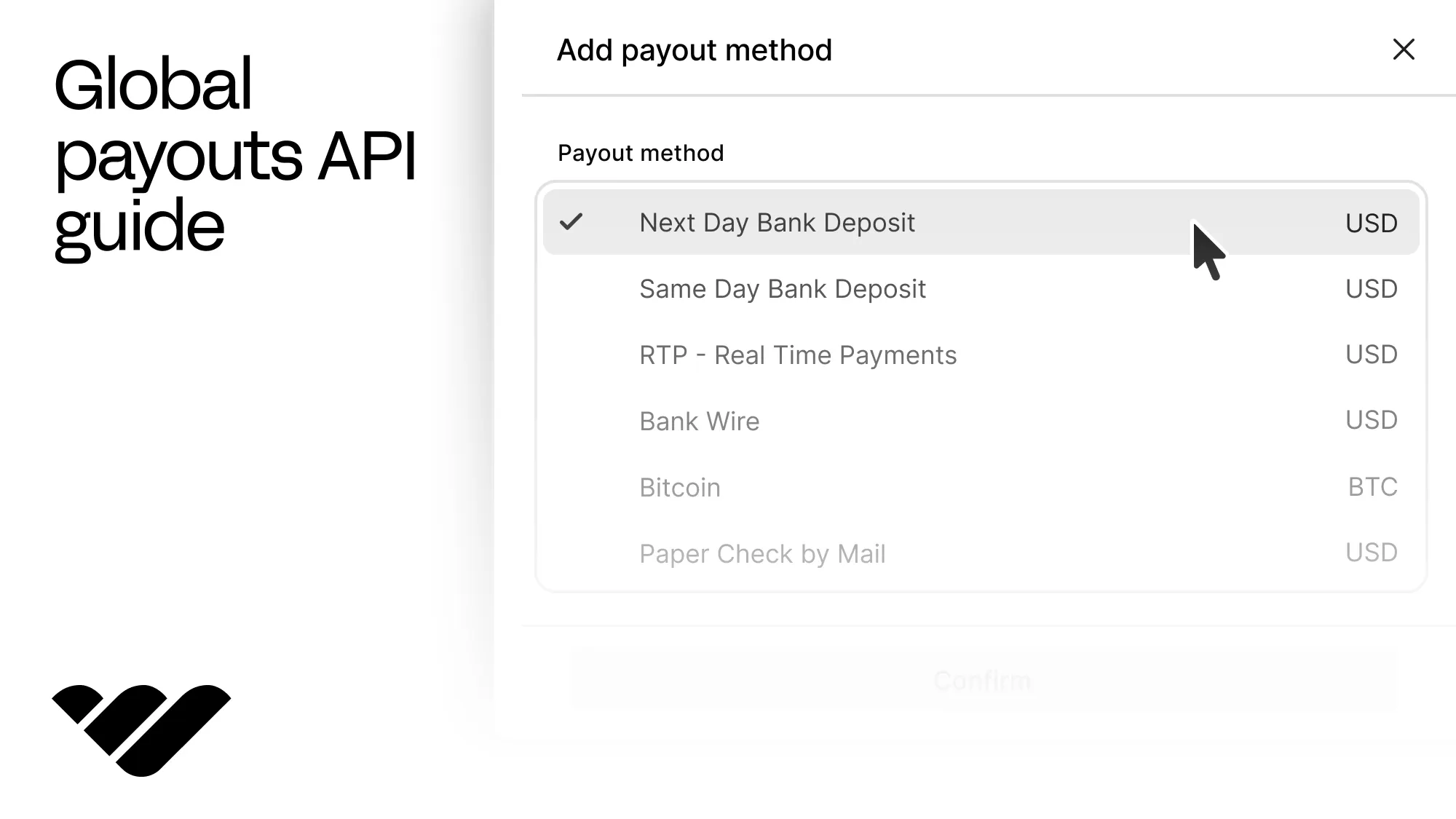
In the same wrapper, we'll use a different element now. AddPayoutMethodElement lets the seller know what their chosen bank needs (like IBAN numbers or wallet addresses).
<PayoutsSession companyId={sellerId} redirectUrl={redirectUrl} token={getToken}>
  <AddPayoutMethodElement />
</PayoutsSession>
We can also see what the choices look like before the seller picks. This is how you show someone what a payout will actually cost them. Create app/api/rails/route.ts:
const page = await whop().payouts.supportedMethods.list({
  account_id: state.sellerId,
  amount,
  currency: "usd",
});

const destinations = [];
for await (const destination of page) destinations.push(destination);
const rails = destinations.map(formatRail).sort(compareRails);
Each destination comes back with a live quote, and they differ a lot. For the same 100$ payment, one bank might charge 0,20$ while another charges 2,70$.
Sending money doesn't have a set price and now we can show the seller that before they choose.
Reading back what the seller saved is payouts.methods.list with the same account_id. Take the one with is_default set, and keep its potk_ ID.
Send the money
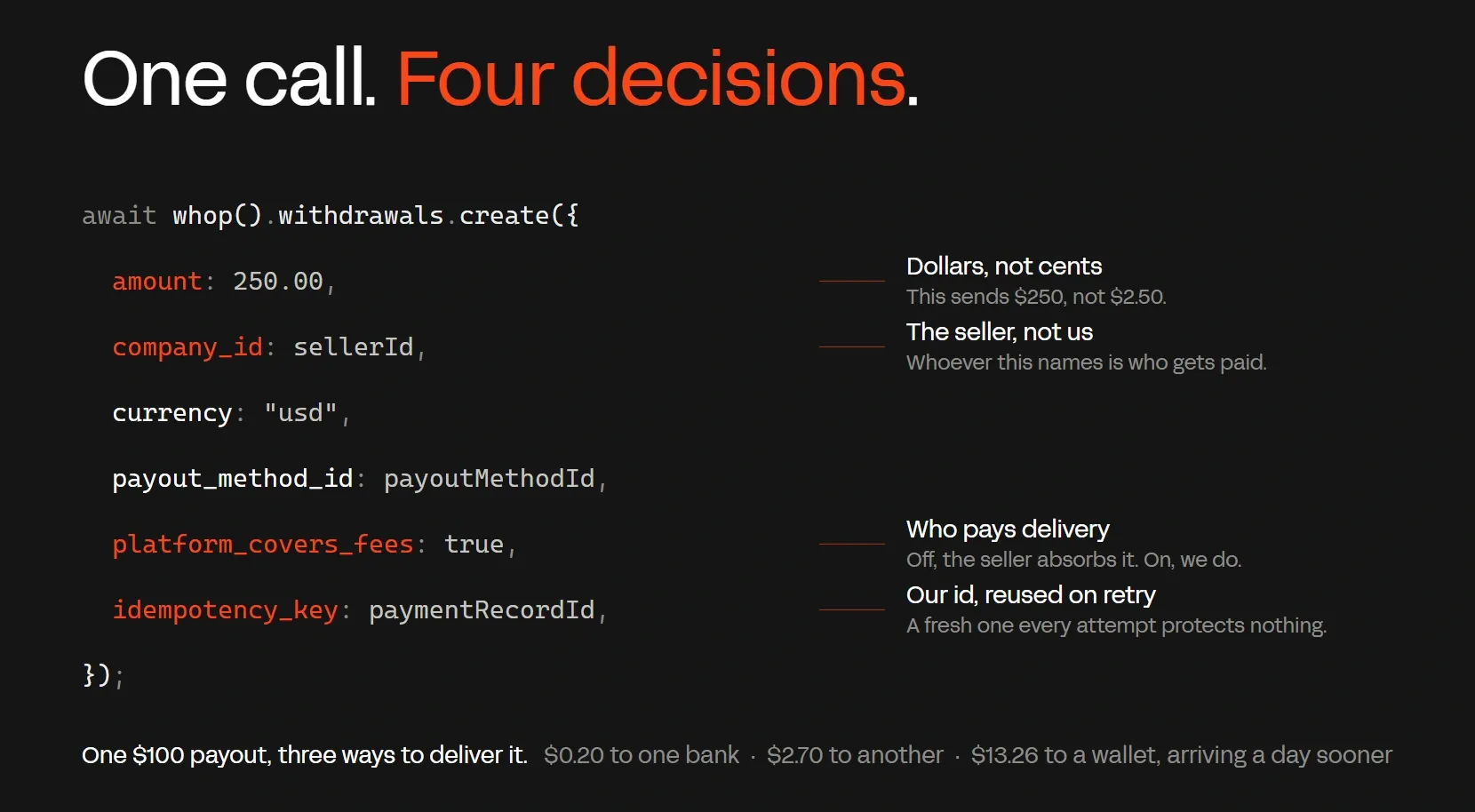
Now, let's take a look at sending the money. It takes one call and looks the same no matter which country we're doing the payout to. A couple things you should keep in mind are:
- Amounts are in dollars, not cents, so
250.00sends $250 account_idis the seller getting paid, not usplatform_covers_feesdecides who pays the delivery fee. Leave it off and Whop follows our platform's fee policy, which by default takes the fee out of the seller's money. Turn it on and we pay it instead, so they get the full amount. Fees change with the payout method and the seller's country, so that choice matters.
Last, in cases of retries, users shouldn't get paid twice. If the request times out and we send it again, Whop needs to see it as the same payment rather than a new one.
To make sure this doesn't happen, we save an ID of our own before calling, and reuse it on every attempt:
const paymentRecordId = state.paymentRecordId ?? randomUUID();
await writeState({ paymentRecordId });
Now let's look at the actual call:
const withdrawal = await whop().payouts.create(
{
amount: parsed.data.amount,
account_id: state.sellerId,
currency: "usd",
payout_method_id: state.payoutMethodId,
platform_covers_fees: parsed.data.platformCoversFees,
},
{ idempotencyKey: paymentRecordId },
);
The response to this call comes back with status: "requested" and an ID starting with wdrl_. You should save that ID, because we'll use it in the next sections to follow the payment.
Follow it to arrival
Notice the withdrawal came back as requested, not completed. A standard payout can take up to 5 business days to reach the seller, and Whop sends us a webhook each time that status changes.
You can create the webhook in the dashboard, under Developer, pointing at your URL + /api/webhooks/whop, and subscribe to the payout.created and payout.updated events.
The webhook handler has three jobs: checking the signature, ignoring anything that is not a payout event, and ignoring repeats.
That last one matters because Whop resends any delivery it does not get a reply to. Create app/api/webhooks/whop/route.ts:
import { NextResponse } from "next/server";
import { unwrapWebhook } from "@whop/sdk/helpers";
import { getEnv } from "@/lib/env";

type WithdrawalEvent = {
  id: string;
  type: string;
  data: { id: string; status: string };
};

const seen = new Set<string>();

export async function POST(request: Request) {
  const raw = await request.text();
  const headers = Object.fromEntries(request.headers.entries());

  let event: WithdrawalEvent;
  try {
    event = unwrapWebhook<WithdrawalEvent>(raw, {
      headers,
      key: getEnv().WHOP_WEBHOOK_SECRET,
    });
  } catch (error) {
    console.error("webhook_signature_failed", error);
    return NextResponse.json({ error: "bad signature" }, { status: 401 });
  }

  if (!event.type?.startsWith("payout.") && !event.type?.startsWith("withdrawal.")) {
    return NextResponse.json({ received: true, outcome: "ignored" });
  }

  const deliveryId = headers["webhook-id"] ?? event.id;
  if (seen.has(deliveryId)) {
    return NextResponse.json({ received: true, outcome: "duplicate" });
  }
  seen.add(deliveryId);

  return NextResponse.json({ received: true, outcome: "applied" });
}
The event.data has the entire withdrawal, so we should save event.data.status against our own payment record. Most payments go requested, then processing, then completed. On the way, a payout can also read in_review before processing starts.
A payment that stopped ends as failed, canceled, denied or reversed, with failure.code and failure.message filled in.
Older webhooks that subscribe to the withdrawal events without an API version pin still send the previous shape, where the middle step reads in_transit and the reason sits in error_code and error_message.
Going live
At this point, we can create connected accounts for sellers anywhere in the world, show them Whop's own identity and payout method screens, pay them, and follow the payment until it lands.
To switch over to production from sandbox, you should create Company API key and webhooks in the live Whop.com website and remove (or set to false) the WHOP_SANDBOX secret from your environment variables.
Then, set the APP_URL to your real domain, and check capabilities.standard_payout on the live account and clear anything in required_actions.
What's next
You can now offer payouts to 187+ countries from your app. If you're interested in other payment helper features like embedded checkout, a checkout API, user authentication, express checkout buttons, and more, make sure to check out our other tutorials and the Whop developer docs.
If you don't already have an app of your own, we also have guides that can help you get started from scratch, like building a Gumroad clone or an AI chatbot SaaS.
Global payouts API FAQ
Which API can I use to send payouts to sellers in multiple countries?
Whop's payout API offers payouts to 187+ countries and the same payouts.create call works for every single one of them.
To get more information about all the countries you can pay out to using Whop, check out our documentation.
What is the best global payouts API?
For platforms that take payments and payout to sellers, the best global payouts API is the one that bundles the onboarding, the KYC, and the payouts together.
This is why Whop is one of the best options for platforms that are looking to integrate a global payouts API into their systems.
Does a seller need to verify their identity before getting paid?
Yes, connected accounts need completed identity verification (KYC) and a saved payout method before they can receive payouts.
In this guide the seller does both inside our page with Whop's embedded components. Our KYC API guide shows how to run the same check through the API and gate the payout button on it.
How long do international payouts take?
While standard payouts take up to 5 business days and instant methods take a few minutes, it depends on the method and the timing of the local bank transfers.
With Whop you can always check the status of payouts using the payouts.updated webhook.