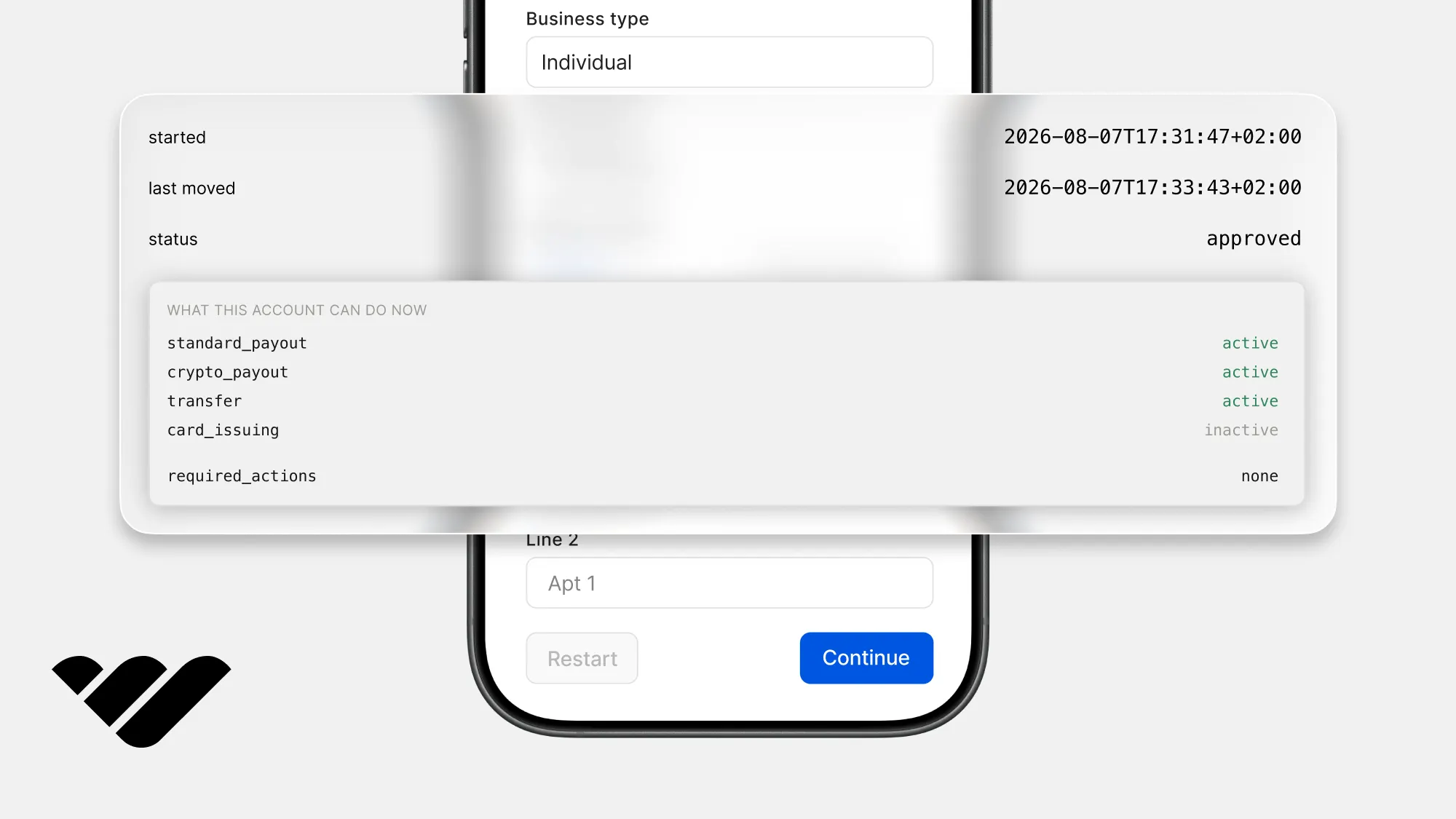
You can integrate a KYC verification API into your platform using Next.js and Whop, without building a document upload form or ever holding somebody's passport yourself. Learn how to in this guide.
Key takeaways
- Offload identity checks to Whop's hosted page so you never build upload forms or store passports.
- Start a check with one API call, hand over the returned link, and track the idpf_ record.
- Treat webhooks as change signals only, re-reading the record before writing any verification status.
You can integrate a KYC verification API into your platform using Next.js and Whop, without building a document upload form or ever holding somebody's passport yourself.
Instead, we'll get help from Whop, which can confirm users on our behalf. We can start this check with a single call, hand that person a link, and read their confirmed name, date of birth and address back in our own records. This way, we don't have to build the form or hold important documents.
KYC APIs check your users' identity document and their face, then send them back with a verified record so their documents don't touch your servers. If you are verifying people because you are going to pay them, the best KYC API is the one that lives inside the payouts API itself.
Whop's KYC API works that way. One call starts the check and approval switches on payouts for the same account. To see a full comparison list of the best, check out our KYC API providers guide.
In this tutorial we're going to start a check for one person with some fields pre-filled, send them to the Whop-hosted page, get the results from a webhook, answer the follow-up question a reviewer can come back with, and parse the finished record.
You can walk the whole flow in our companion demo here and read its repository here.
Prerequisites
In this tutorial, we're going to work on an existing Next.js app and add files under lib/, components/ and app/api/.
Set up a sandbox account
Until the end section of this tutorial, we're going to use the Whop sandbox. This is going to help us test the KYC without having to complete a real check.
To set up a sandbox account:
- Go to Sandbox.Whop.com, create an account, then create a business with the Start a business button in the sidebar
- Click on the Dashboard button on your business' sidebar to go to its dashboard
- Once you're in the dashboard, look at the URL in your browser and note your company ID which starts with
biz_. We'll use it later
Get an API key
To get an API key, go to the Developer page of your business dashboard and find the Company API keys section.
There, click the Create button. This will prompt you to give your API key a name and select which permissions you want to grant to it. You should select:
identity:writeto start a check and to answer a follow-up questionidentity:readto read it backwebhook_receive:identity_profilesto receive the result events
Install the packages
Now, let's run the command below to install the packages we're going to use for the KYC integration:
npm install @whop/sdk@2.4.0 zod iron-sessionWe use @whop/sdk to let our server work with Whop, zod to check that anything that arrives is in the shape we want, and iron-session to get a place to keep the IDs we get.
Environment variables
Create or open .env.local in the project root:
| Variable | Example | Where it comes from |
|---|---|---|
WHOP_COMPANY_API_KEY |
apik_... |
Dashboard, Developer, Company API keys |
WHOP_PLATFORM_ACCOUNT_ID |
biz_... |
Only for the demo, which makes itself a throwaway account to verify |
WHOP_WEBHOOK_SECRET |
ws_... |
Shown when the webhook is created, later |
DEMO_SELLER_EMAIL |
you@example.com |
Only for the demo, a mailbox you own standing in for the person's own |
WHOP_SANDBOX |
true |
Typed by hand. Remove it or set false for production |
SESSION_PASSWORD |
32 random characters | Typed by hand. Encrypts our own cookie |
APP_URL |
http://localhost:3000 |
Our app's own address |
Check your env vars on startup
Now, let's create the environment validator so nothing fails without clear errors. Create lib/env.ts:
import { z } from "zod";

const schema = z.object({
  WHOP_COMPANY_API_KEY: z
    .string()
    .startsWith("apik_", "WHOP_COMPANY_API_KEY must start with apik_"),
  WHOP_PLATFORM_ACCOUNT_ID: z
    .string()
    .startsWith("biz_", "WHOP_PLATFORM_ACCOUNT_ID must start with biz_"),
  WHOP_WEBHOOK_SECRET: z.string().optional(),
  DEMO_SELLER_EMAIL: z.string().email("DEMO_SELLER_EMAIL must be an email address"),
  WHOP_SANDBOX: z
    .string()
    .optional()
    .transform((value) => value === "true"),
  SESSION_PASSWORD: z
    .string()
    .min(32, "SESSION_PASSWORD must be at least 32 characters"),
  APP_URL: z.string().url("APP_URL must be a full URL"),
});

export type Env = z.infer<typeof schema>;

let cached: Env | undefined;

export function getEnv(): Env {
  if (cached) return cached;

  const raw: Record<string, string | undefined> = { ...process.env };
  for (const key of Object.keys(raw)) {
    if (raw[key] === "") delete raw[key];
  }

  const parsed = schema.safeParse(raw);

  if (!parsed.success) {
    const problems = parsed.error.issues
      .map((issue) => `${issue.path.join(".")}: ${issue.message}`)
      .join("\n");
    throw new Error(`Environment is not configured.\n${problems}`);
  }

  cached = parsed.data;
  return cached;
}
How verification works
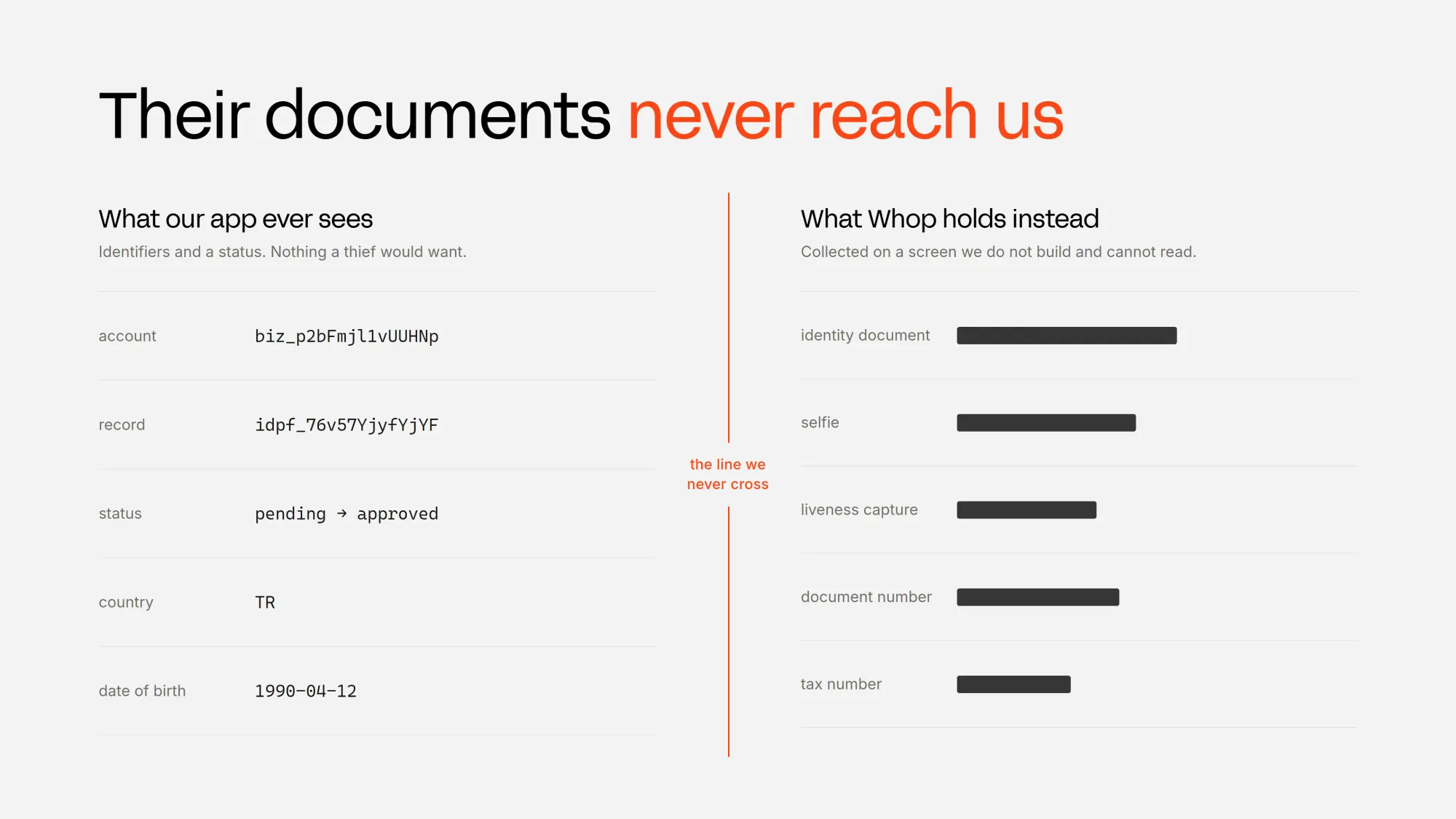
Users complete the KYC in a Whop hosted page and we never have to build a form, get camera access or build a doc picker.
We create the verification against an account ID and get back a record whose ID starts with idpf_ and a link to that page. Whop reviews the submitted information and lets us know the result using a webhook.
This is required for Whop to pay them out, so it's the gate that any marketplace paying its sellers has to clear first.
Once the check clears, the account's payout capabilities switch on, and our global payouts API guide shows how to send the payout itself.
The payouts provider can still ask for one more thing before money moves, like a bank statement, and that shows up as action_required on the same verification.
Verifying a company runs through the same calls with kind set to business, and the extra fields it wants are in Whop's business verification docs.
Connect to Whop
Now, let's build the client. Keep in mind that the SDK takes our API key as token and picks the host from environment.
Older option names like apiKey and baseURL no longer compile, and in plain JavaScript they're silently ignored, which sends every call to production instead of the sandbox environment.
Create lib/whop.ts:
import { WhopClient, WhopEnvironment } from "@whop/sdk";
import { getEnv } from "@/lib/env";

let cached: WhopClient | undefined;

export function whop(): WhopClient {
  if (cached) return cached;

  const env = getEnv();

  cached = new WhopClient({
    token: env.WHOP_COMPANY_API_KEY,
    environment: env.WHOP_SANDBOX
      ? WhopEnvironment.Sandbox
      : WhopEnvironment.Production,
  });

  return cached;
}
Start a verification
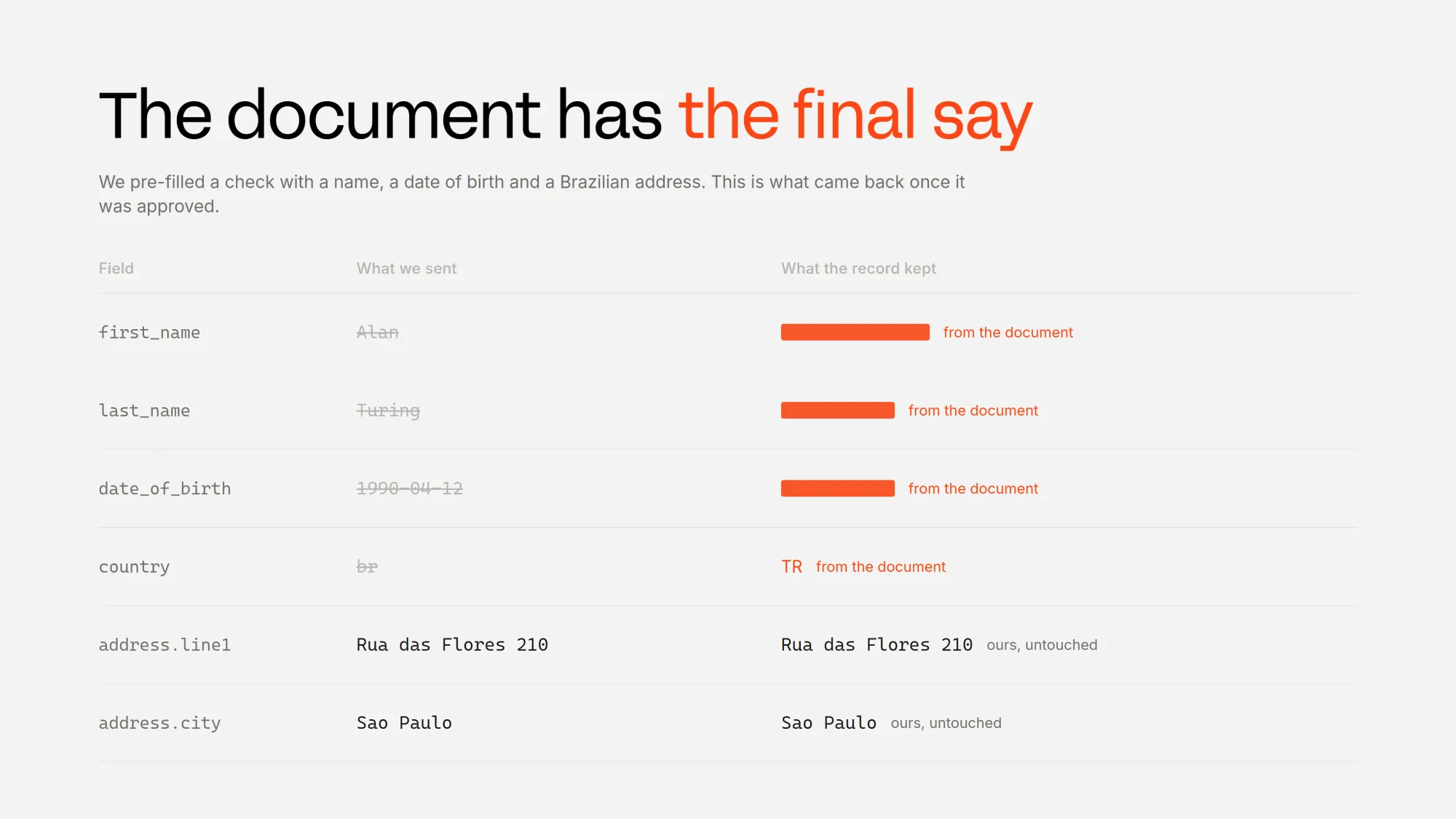
We need to store the check somewhere. The lib/store.ts stands in for the database we already have and it has the account IDs we're verifying, the verification ID, which status we saw last, and the IDs of the webhooks we already handled.
Create lib/store.ts:
import { getIronSession, type IronSession } from "iron-session";
import { cookies } from "next/headers";
import { getEnv } from "@/lib/env";

export type VerificationStatus =
  | "not_started"
  | "pending"
  | "processing"
  | "manual_review"
  | "action_required"
  | "approved"
  | "rejected";

export type DemoState = {
  accountId?: string;
  verificationId?: string;
  status?: VerificationStatus;
};

async function session(): Promise<IronSession<DemoState>> {
  const env = getEnv();
  return getIronSession<DemoState>(await cookies(), {
    password: env.SESSION_PASSWORD,
    cookieName: "kyc_demo",
    cookieOptions: {
      httpOnly: true,
      sameSite: "lax",
      secure: env.APP_URL.startsWith("https://"),
      path: "/",
    },
  });
}

export async function readState(): Promise<DemoState> {
  return { ...(await session()) };
}

export async function writeState(patch: Partial<DemoState>): Promise<DemoState> {
  const current = await session();
  Object.assign(current, patch);
  await current.save();
  return { ...current };
}

export async function clearState(): Promise<void> {
  (await session()).destroy();
}

const delivered = new Set<string>();

export function markDelivered(deliveryId: string): boolean {
  if (delivered.has(deliveryId)) return false;
  delivered.add(deliveryId);
  if (delivered.size > 200) {
    delivered.delete(delivered.values().next().value as string);
  }
  return true;
}
The route we're about to write is public, and every call to it creates something real on Whop, so let's put a rate limit in front of it first. Create lib/rate-limit.ts:
const hits = new Map<string, { count: number; resetAt: number }>();

export function checkRateLimit(ip: string, limit = 10, windowMs = 60_000): boolean {
  const now = Date.now();
  const entry = hits.get(ip);

  if (!entry || now > entry.resetAt) {
    hits.set(ip, { count: 1, resetAt: now + windowMs });
    return true;
  }

  if (entry.count >= limit) return false;

  entry.count += 1;
  return true;
}

export function clientIp(request: Request): string {
  return request.headers.get("x-forwarded-for")?.split(",")[0]?.trim() ?? "local";
}
Now, let's write the route that starts the check. It starts by taking the details we already have about the person, sends them to Whop, and gets back a record ID plus a link to the page where they'll finish. If your app doesn't have signed-in people to verify yet, Whop OAuth is the quickest way to add them.
country is US, we have to send tax_identification_number as well. Without it the check still starts and can still be approved, but the payout account can't be created later.Create app/api/verification/start/route.ts:
import { NextResponse } from "next/server";
import { z } from "zod";
import { whop } from "@/lib/whop";
import { writeState, type VerificationStatus } from "@/lib/store";
import { checkRateLimit, clientIp } from "@/lib/rate-limit";

const body = z
  .object({
    account_id: z.string().min(1),
    first_name: z.string().min(1).max(60),
    last_name: z.string().min(1).max(60),
    date_of_birth: z.string().regex(/^\d{4}-\d{2}-\d{2}$/),
    country: z.string().length(2),
    tax_identification_number: z.string().optional(),
    address: z.object({
      line1: z.string().min(1),
      city: z.string().min(1),
      state: z.string().min(1),
      postal_code: z.string().min(1),
    }),
  })
  .refine(
    (value) =>
      value.country.toUpperCase() !== "US" || Boolean(value.tax_identification_number),
    { message: "A tax number is required when the country is US" },
  );

export async function POST(request: Request) {
  if (!checkRateLimit(clientIp(request), 5)) {
    return NextResponse.json({ error: "Too many requests" }, { status: 429 });
  }

  const parsed = body.safeParse(await request.json());
  if (!parsed.success) {
    return NextResponse.json(
      { error: parsed.error.issues[0]?.message ?? "Invalid request" },
      { status: 400 },
    );
  }

  const { account_id, address, ...prefill } = parsed.data;

  try {
    const created = await whop().verifications.create(
      {
        account_id,
        body: {
          kind: "individual",
          ...prefill,
          address: { ...address, country: prefill.country },
        },
      },
      { idempotencyKey: `verify-${account_id}-individual` },
    );

    if (!created.id) {
      return NextResponse.json({ error: "Whop returned no record id" }, { status: 502 });
    }

    await writeState({
      accountId: account_id,
      verificationId: created.id,
      status: created.status as VerificationStatus | undefined,
    });

    return NextResponse.json({
      id: created.id,
      sessionUrl: created.session_url ?? null,
      status: created.status ?? "pending",
    });
  } catch (error) {
    console.error("verification_create_failed", error);
    return NextResponse.json(
      { error: whopMessage(error) ?? "Could not start the check" },
      { status: 502 },
    );
  }
}

function whopMessage(error: unknown): string | null {
  if (typeof error !== "object" || error === null) return null;
  const shape = error as { body?: { error?: { message?: unknown } } };
  const message = shape.body?.error?.message;
  return typeof message === "string" ? message : null;
}
The fields we sent save the person from typing every detail again, and Whop keeps them unless their document says otherwise.
Keep in mind that we don't want to treat only 201 as a success, because calling this again for the same account doesn't fail. It just hands back the same record and link with a 200.
Send the person to the hosted page
The hosted page is a page that we don't build the UI for. We simply hand over the link to the user and Whop takes it from there.
Whop will ask for some details like the user's name and date of birth, because they have to answer somewhere we can't see.
The link we create expires after 7 days and disappears from the record completely once the user fully completes it. Whenever we need the link, we read the record again and use whatever comes back.
Create app/api/verification/route.ts:
import { NextResponse } from "next/server";
import { whop } from "@/lib/whop";
import { readState, writeState } from "@/lib/store";
import { parseVerification } from "@/lib/verification-schema";

export async function GET() {
  const state = await readState();

  if (!state.verificationId) {
    return NextResponse.json({ record: null });
  }

  try {
    const record = parseVerification(
      await whop().verifications.retrieve({ id: state.verificationId }),
    );
    await writeState({ status: record.status });
    return NextResponse.json({ record });
  } catch (error) {
    console.error("verification_read_failed", error);
    return NextResponse.json({ error: "Could not read the check" }, { status: 502 });
  }
}
Read the record back with the same ID we started it with. Asking with an ID that doesn't exist returns a 404, which our route reports as an error rather than an empty record.
Now, let's build the form that collects those details and sends them off.
Create components/StartVerification.tsx:
"use client";

import { useState } from "react";
import { Button, Select, Text, TextField } from "@whop/react/components";

const VERIFY_COUNTRIES = [
  { code: "us", label: "United States" },
  { code: "br", label: "Brazil" },
  { code: "de", label: "Germany" },
  { code: "tr", label: "Turkey" },
  { code: "ng", label: "Nigeria" },
  { code: "ph", label: "Philippines" },
] as const;

const DEFAULT_COUNTRY = "br";

export interface StartedVerification {
  id: string;
  sessionUrl: string | null;
  status: string;
}

function Field({
  label,
  children,
  hint,
}: {
  label: string;
  children: React.ReactNode;
  hint?: string;
}) {
  return (
    <label className="flex flex-col gap-1.5">
      <Text size="1" weight="medium" color="gray">
        {label}
      </Text>
      {children}
      {hint ? (
        <Text size="1" color="gray">
          {hint}
        </Text>
      ) : null}
    </label>
  );
}

export function StartVerification({
  accountId,
  defaults,
  onStarted,
  onLog,
}: {
  accountId: string | null;
  defaults: { first: string; last: string };
  onStarted: (started: StartedVerification) => void;
  onLog: (kind: string, detail: string) => void;
}) {
  const [country, setCountry] = useState<string>(DEFAULT_COUNTRY);
  const [busy, setBusy] = useState(false);
  const [error, setError] = useState<string | null>(null);

  const needsTaxNumber = country.toUpperCase() === "US";

  async function submit(event: React.FormEvent<HTMLFormElement>) {
    event.preventDefault();
    if (!accountId) return;
    setError(null);
    setBusy(true);

    const form = new FormData(event.currentTarget);
    const payload = {
      account_id: accountId,
      first_name: String(form.get("first_name")),
      last_name: String(form.get("last_name")),
      date_of_birth: String(form.get("date_of_birth")),
      country,
      tax_identification_number:
        String(form.get("tax_identification_number") || "") || undefined,
      address: {
        line1: String(form.get("line1")),
        city: String(form.get("city")),
        state: String(form.get("state")),
        postal_code: String(form.get("postal_code")),
      },
    };

    onLog("POST", "/api/verification/start");

    const response = await fetch("/api/verification/start", {
      method: "POST",
      headers: { "Content-Type": "application/json" },
      body: JSON.stringify(payload),
    });
    const data = await response.json();
    setBusy(false);

    if (!response.ok) {
      setError(String(data.error));
      onLog("error", String(data.error));
      return;
    }

    onLog("idpf", data.id);
    onStarted(data as StartedVerification);
  }

  return (
    <form onSubmit={submit} className="flex flex-col gap-4">
      <div className="grid gap-4 sm:grid-cols-2">
        <Field label="First name">
          <TextField.Root size="2" variant="soft">
            <TextField.Input name="first_name" defaultValue={defaults.first} required />
          </TextField.Root>
        </Field>

        <Field label="Last name">
          <TextField.Root size="2" variant="soft">
            <TextField.Input name="last_name" defaultValue={defaults.last} required />
          </TextField.Root>
        </Field>

        <Field label="Date of birth">
          <TextField.Root size="2" variant="soft">
            <TextField.Input
              name="date_of_birth"
              type="date"
              defaultValue="1990-04-12"
              required
            />
          </TextField.Root>
        </Field>

        <Field label="Country">
          <Select.Root size="2" value={country} onValueChange={setCountry}>
            <Select.Trigger variant="soft" color="gray" />
            <Select.Content>
              {VERIFY_COUNTRIES.map((c) => (
                <Select.Item key={c.code} value={c.code}>
                  {c.label}
                </Select.Item>
              ))}
            </Select.Content>
          </Select.Root>
        </Field>
      </div>

      <Field
        label="Tax number"
        hint={
          needsTaxNumber
            ? "Whop needs this for someone in the United States. Leave it out and the check still starts and can still be approved, and then the payouts account cannot be created later."
            : undefined
        }
      >
        <TextField.Root size="2" variant="soft">
          <TextField.Input
            name="tax_identification_number"
            required={needsTaxNumber}
            placeholder={needsTaxNumber ? "Required" : "Optional"}
          />
        </TextField.Root>
      </Field>

      <Field label="Address">
        <TextField.Root size="2" variant="soft">
          <TextField.Input name="line1" defaultValue="Rua das Flores 210" required />
        </TextField.Root>
      </Field>

      <div className="grid gap-4 sm:grid-cols-3">
        <Field label="City">
          <TextField.Root size="2" variant="soft">
            <TextField.Input name="city" defaultValue="Sao Paulo" required />
          </TextField.Root>
        </Field>

        <Field label="State">
          <TextField.Root size="2" variant="soft">
            <TextField.Input name="state" defaultValue="SP" required />
          </TextField.Root>
        </Field>

        <Field label="Postal code">
          <TextField.Root size="2" variant="soft">
            <TextField.Input name="postal_code" defaultValue="01452-000" required />
          </TextField.Root>
        </Field>
      </div>

      {error ? (
        <Text size="1" className="text-[#FA4616]">
          {error}
        </Text>
      ) : null}

      <Button type="submit" size="2" disabled={busy || !accountId} className="self-start">
        {busy ? "Starting" : "Start the check"}
      </Button>
    </form>
  );
}
Register the webhook
Now, let's set up the webhook so Whop can tell us when the check moves. Whop does that by calling a URL of ours, which means the URL has to be reachable from the internet.
This is the point where we deploy or open a tunnel, because a localhost address won't receive anything.
To create the webhook:
- Go to your business' Whop dashboard and open the Developer page
- Find the Webhooks section and click the Create button
- Point the webhook to your app's address plus
/api/webhooks/whop - Subscribe to the events
identity_profile.approved,identity_profile.needs_action,identity_profile.rejectedandidentity_profile.updated.
Once you create the webhook, copy the secret it shows into the WHOP_WEBHOOK_SECRET environment variable.
Handle the webhook
Now, let's write the route that receives those events. It does three things: it checks the delivery is really from Whop, it ignores anything it has already seen, and it reads the record again to find out what actually changed.
That last one is the part worth remembering. A webhook tells us something changed, not what is now true, so we never write a status straight from what it says.
Create app/api/webhooks/whop/route.ts:
import { NextResponse } from "next/server";
import { unwrapWebhook } from "@whop/sdk/helpers";
import { whop } from "@/lib/whop";
import { getEnv } from "@/lib/env";
import { markDelivered } from "@/lib/store";

type IdentityProfileEvent = {
  id: string;
  type: string;
  data: { id?: string };
};

export async function POST(request: Request) {
  const secret = getEnv().WHOP_WEBHOOK_SECRET;
  if (!secret) {
    return NextResponse.json(
      { error: "webhook secret is not configured" },
      { status: 500 },
    );
  }

  const raw = await request.text();
  const headers = Object.fromEntries(request.headers.entries());

  let event: IdentityProfileEvent;
  try {
    event = unwrapWebhook<IdentityProfileEvent>(raw, { headers, key: secret });
  } catch (error) {
    console.error("webhook_signature_failed", error);
    return NextResponse.json({ error: "bad signature" }, { status: 401 });
  }

  if (!event.type?.startsWith("identity_profile.") || !event.data?.id) {
    return NextResponse.json({ received: true, outcome: "ignored" });
  }

  // Read the record before marking the delivery, so a failed read lets Whop retry it
  let status: string | undefined;
  try {
    status = (await whop().verifications.retrieve({ id: event.data.id })).status;
  } catch (error) {
    console.error("verification_reread_failed", error);
    return NextResponse.json({ error: "could not read the check" }, { status: 502 });
  }

  if (!markDelivered(headers["webhook-id"] ?? event.id)) {
    return NextResponse.json({ received: true, outcome: "duplicate" });
  }

  console.log(
    JSON.stringify({
      at: "identity_webhook",
      type: event.type,
      profile: event.data.id,
      status,
      delivery: headers["webhook-id"],
    }),
  );

  return NextResponse.json({ received: true, outcome: "applied" });
}
Keep in mind that the same event can arrive more than once, so we store the delivery ID from the webhook-id header so we can skip anything we have already handled.
identity_profile.needs_action means the reviewer wants something else before deciding, like a tax number, the person's occupation, or a clearer photo of their ID. The record holds onto those questions until they're answered, and Whop's follow-up guide shows how to send the answers back.Read the verified details back
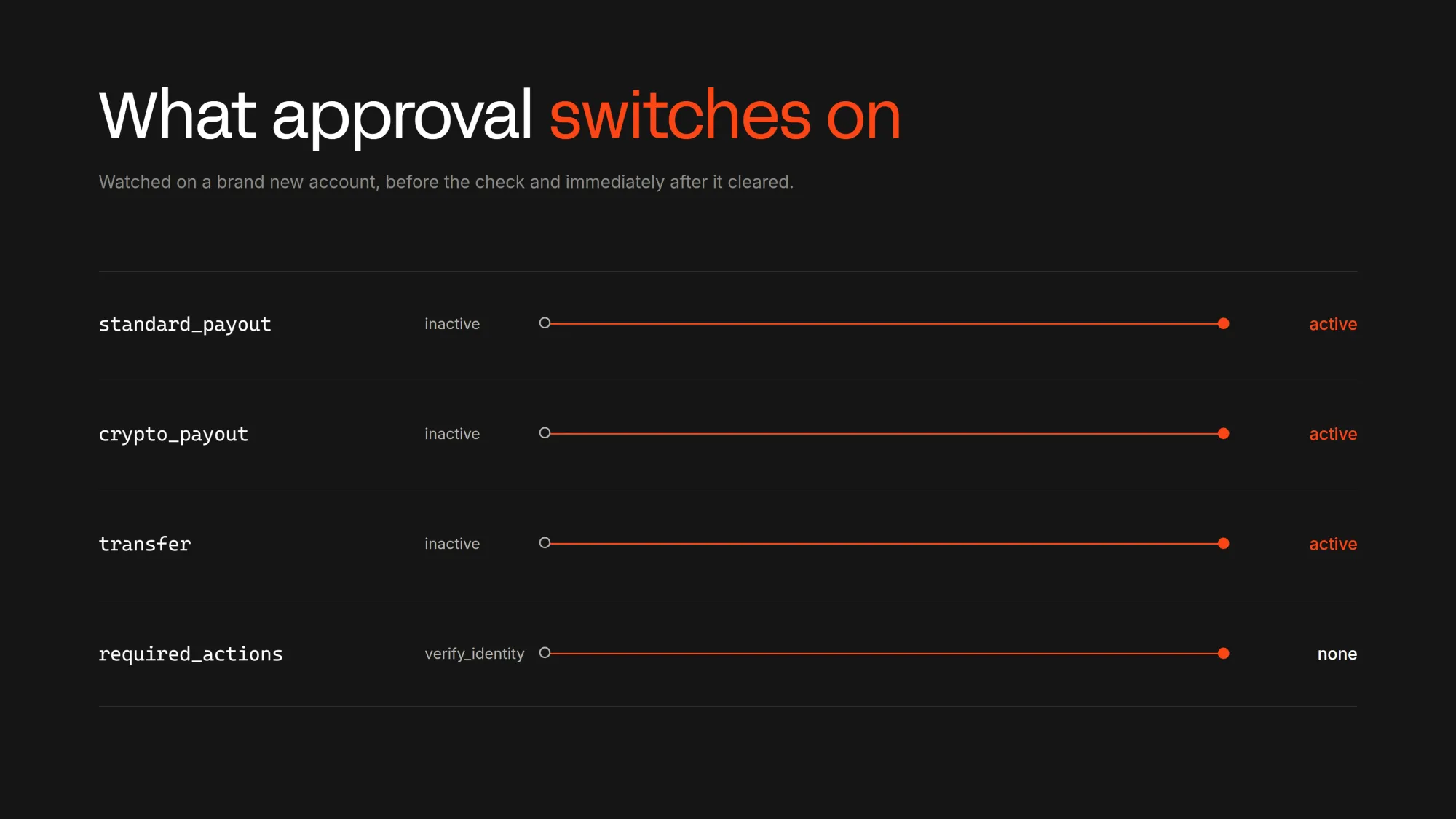
It's time to read the finished record and display it. What we get back is the document's account of the person rather than ours, so the name, date of birth and country all belong to whatever they used to prove themselves.
Tax numbers are never sent back at all. The record can carry email and phone, but our schema doesn't read them.
Create lib/verification-schema.ts:
import { z } from "zod";
import type { VerificationStatus } from "@/lib/store";

export type RequestedItemType =
  | "text"
  | "date"
  | "phone"
  | "address"
  | "select"
  | "files"
  | "id_document"
  | "text_with_files"
  | "liveness";

export interface RequestedItem {
  id: string;
  field: string;
  type: RequestedItemType;
  label: string;
  options: string[];
  errorMessage: string | null;
}

export interface VerifiedAddress {
  line1: string | null;
  line2: string | null;
  city: string | null;
  state: string | null;
  postalCode: string | null;
  country: string | null;
}

export interface VerifiedRecord {
  id: string;
  kind: "individual" | "business";
  status: VerificationStatus;
  firstName: string | null;
  lastName: string | null;
  dateOfBirth: string | null;
  country: string | null;
  address: VerifiedAddress;
  sessionUrl: string | null;
  requestedInformation: RequestedItem[];
  createdAt: string;
  updatedAt: string | null;
  normalised: string[];
}

const ALPHA3: Record<string, string> = {
  USA: "US",
  BRA: "BR",
  NGA: "NG",
  PHL: "PH",
  DEU: "DE",
  TUR: "TR",
};

const raw = z
  .object({
    id: z.string(),
    kind: z.enum(["individual", "business"]).default("individual"),
    status: z.enum([
      "not_started",
      "pending",
      "processing",
      "manual_review",
      "action_required",
      "approved",
      "rejected",
    ]),
    first_name: z.string().nullish(),
    last_name: z.string().nullish(),
    date_of_birth: z.string().nullish(),
    country: z.string().nullish(),
    address: z
      .object({
        line1: z.string().nullish(),
        line2: z.string().nullish(),
        city: z.string().nullish(),
        state: z.string().nullish(),
        postal_code: z.string().nullish(),
        country: z.string().nullish(),
      })
      .nullish(),
    session_url: z.string().nullish(),
    requested_information: z
      .array(
        z.object({
          id: z.string(),
          requirement: z.string(),
          type: z.enum([
            "text",
            "date",
            "phone",
            "address",
            "select",
            "files",
            "id_document",
            "text_with_files",
            "liveness",
          ]),
          label: z.string(),
          options: z.array(z.string()).nullish(),
          errors: z.array(z.object({ reason: z.string().nullish() })).nullish(),
        }),
      )
      .nullish(),
    created_at: z.iso.datetime({ offset: true }),
    updated_at: z.iso.datetime({ offset: true }).nullish(),
  })
  .passthrough();

export function parseVerification(input: unknown): VerifiedRecord {
  const source = raw.parse(input);
  const normalised: string[] = [];

  const clean = (value: string | null | undefined, path: string): string | null => {
    if (value === undefined || value === null) return null;
    if (value === "" || value === "null") {
      normalised.push(path);
      return null;
    }
    return value;
  };

  const country = (value: string | null | undefined, path: string): string | null => {
    const cleaned = clean(value, path);
    if (cleaned === null) return null;
    if (cleaned.length === 2) return cleaned.toUpperCase();
    normalised.push(path);
    return ALPHA3[cleaned.toUpperCase()] ?? cleaned.toUpperCase();
  };

  const address = source.address ?? {};

  return {
    id: source.id,
    kind: source.kind,
    status: source.status,
    firstName: clean(source.first_name, "firstName"),
    lastName: clean(source.last_name, "lastName"),
    dateOfBirth: clean(source.date_of_birth, "dateOfBirth"),
    country: country(source.country, "country"),
    address: {
      line1: clean(address.line1, "address.line1"),
      line2: clean(address.line2, "address.line2"),
      city: clean(address.city, "address.city"),
      state: clean(address.state, "address.state"),
      postalCode: clean(address.postal_code, "address.postalCode"),
      country: country(address.country, "address.country"),
    },
    sessionUrl: source.session_url ?? null,
    requestedInformation: (source.requested_information ?? []).map((item) => ({
      id: item.id,
      field: item.requirement,
      type: item.type,
      label: item.label,
      options: item.options ?? [],
      errorMessage: item.errors?.[0]?.reason ?? null,
    })),
    createdAt: source.created_at,
    updatedAt: source.updated_at ?? null,
    normalised,
  };
}
Then, let's create components/VerifiedDetails.tsx:
"use client";

import type { VerifiedRecord } from "@/lib/verification-schema";

function Row({
  label,
  value,
  path,
  normalised,
}: {
  label: string;
  value: string | null;
  path: string;
  normalised: string[];
}) {
  const repaired = normalised.includes(path);

  return (
    <div className="flex items-baseline justify-between gap-4 border-b border-[#E3E2DE] py-2 last:border-0">
      <span className="text-xs text-[#9A9993]">{label}</span>
      <span className="flex items-center gap-1.5 font-mono text-sm">
        {value ?? <span className="text-[#B6B5B0]">not given</span>}
        {repaired ? (
          <span className="text-[#FA4616]" title="Repaired on the way in">
            *
          </span>
        ) : null}
      </span>
    </div>
  );
}

export function VerifiedDetails({ record }: { record: VerifiedRecord }) {
  const rows: Array<[string, string | null, string]> = [
    ["First name", record.firstName, "firstName"],
    ["Last name", record.lastName, "lastName"],
    ["Date of birth", record.dateOfBirth, "dateOfBirth"],
    ["Country", record.country, "country"],
    ["Address line 1", record.address.line1, "address.line1"],
    ["City", record.address.city, "address.city"],
    ["State", record.address.state, "address.state"],
    ["Postal code", record.address.postalCode, "address.postalCode"],
    ["Address country", record.address.country, "address.country"],
  ];

  return (
    <div className="flex flex-col">
      {rows.map(([label, value, path]) => (
        <Row
          key={path}
          label={label}
          value={value}
          path={path}
          normalised={record.normalised}
        />
      ))}
      {record.normalised.length > 0 ? (
        <p className="mt-3 text-xs text-[#6B6A66]">
          A star marks a value that arrived in a shape the schema had to repair.
        </p>
      ) : null}
    </div>
  );
}
Accounts get enabled when they get approval. Before that, standard_payout, crypto_payout and transfer all sit at inactive, and required_actions still asks for identity verification.
After it, those three flip to active and required_actions is empty. Money coming the other way, from your customers into your app, is a separate integration that the checkout API covers.
Verify seller identity before sending payouts
Identity verification matters most when sellers ask for their money on marketplaces. So, we start the check when they sign up and let the payout button ask Whop whether the seller is cleared.
Create lib/payout-gate.ts:
import { whop } from "@/lib/whop";
import type { VerificationStatus } from "@/lib/store";

const REASONS: Record<VerificationStatus, string> = {
  not_started: "We need to confirm who you are before we can send you money.",
  pending: "Finish the identity check we opened for you.",
  processing: "We are checking the details you sent. There is nothing to do right now.",
  manual_review: "A person is reviewing your details. This usually takes up to 3 business days.",
  action_required: "We need one more thing from you before payouts can start.",
  rejected: "We could not confirm your identity. Contact support to try again.",
  approved: "Your identity is confirmed, so payouts can start.",
};

export async function canReceivePayouts(
  accountId: string,
): Promise<{ allowed: boolean; reason: string }> {
  const { data } = await whop().verifications.list({ account_id: accountId });
  const individual = data?.find((verification) => verification.kind === "individual");
  const status = individual?.status ?? "not_started";

  if (status !== "approved") {
    return { allowed: false, reason: REASONS[status] };
  }

  if ((individual?.requested_information ?? []).length > 0) {
    return { allowed: false, reason: REASONS.action_required };
  }

  return { allowed: true, reason: REASONS.approved };
}
We call canReceivePayouts from the route that creates a payout and from the page that shows the Withdraw button, so a seller who is still in review reads the reason instead of hitting a failed payout.
Switching to production
At this point we can start an identity check from our own app, follow it to approval, answer the question a reviewer comes back with, and read the verified details into our own records.
- Create a production Company API key with the same three permissions and swap
WHOP_COMPANY_API_KEY. - Remove
WHOP_SANDBOXor set it tofalse. The SDK's address switches with it. - Register the webhook again in the production dashboard against the production URL, and swap
WHOP_WEBHOOK_SECRET. - Point
APP_URLat the real domain. - Pin the exact
@whop/sdkversion, because each SDK release sends its ownApi-Version-Date, so an upgrade would otherwise move the response shape underneath us. - Run one real check end to end before anybody else does.
Build the rest of your platform with Whop
Your app now has an integrated KYC system to confirm who someone is, without ever storing an identity document. That's one piece of running a platform, and Whop can help you with lots of different pieces.
If you don't have a platform of your own yet, our building guides like How to build a Gumroad clone can help.
To see everything else Whop can do, check out our other tutorials and the Whop developer docs.
KYC API FAQ
What is the best KYC API?
Depending on why you are verifying your users, the best KYC API for you might change. If you are going to pay them, the best KYC API is the one inside the payout API itself, which is how Whop works.
Since verification and payouts share one account and one integration, the Whop KYC API is one of the best options out there. If you want to learn more about the options out there, our KYC API providers guide compares 11 of them.
How do I verify seller identity automatically before sending payouts?
To verify seller identity automatically before payouts, start a verification when the seller signs up, send them to the hosted page, and listen for the identity_profile webhooks.
When one arrives, read the verification again and only allow payouts once its status is approved, which is what canReceivePayouts in our payout gate does.
What's the difference between KYC and KYB?
KYC verifies people and KYB verifies businesses. On Whop both go through the same verification endpoint with kind set to individual or business.