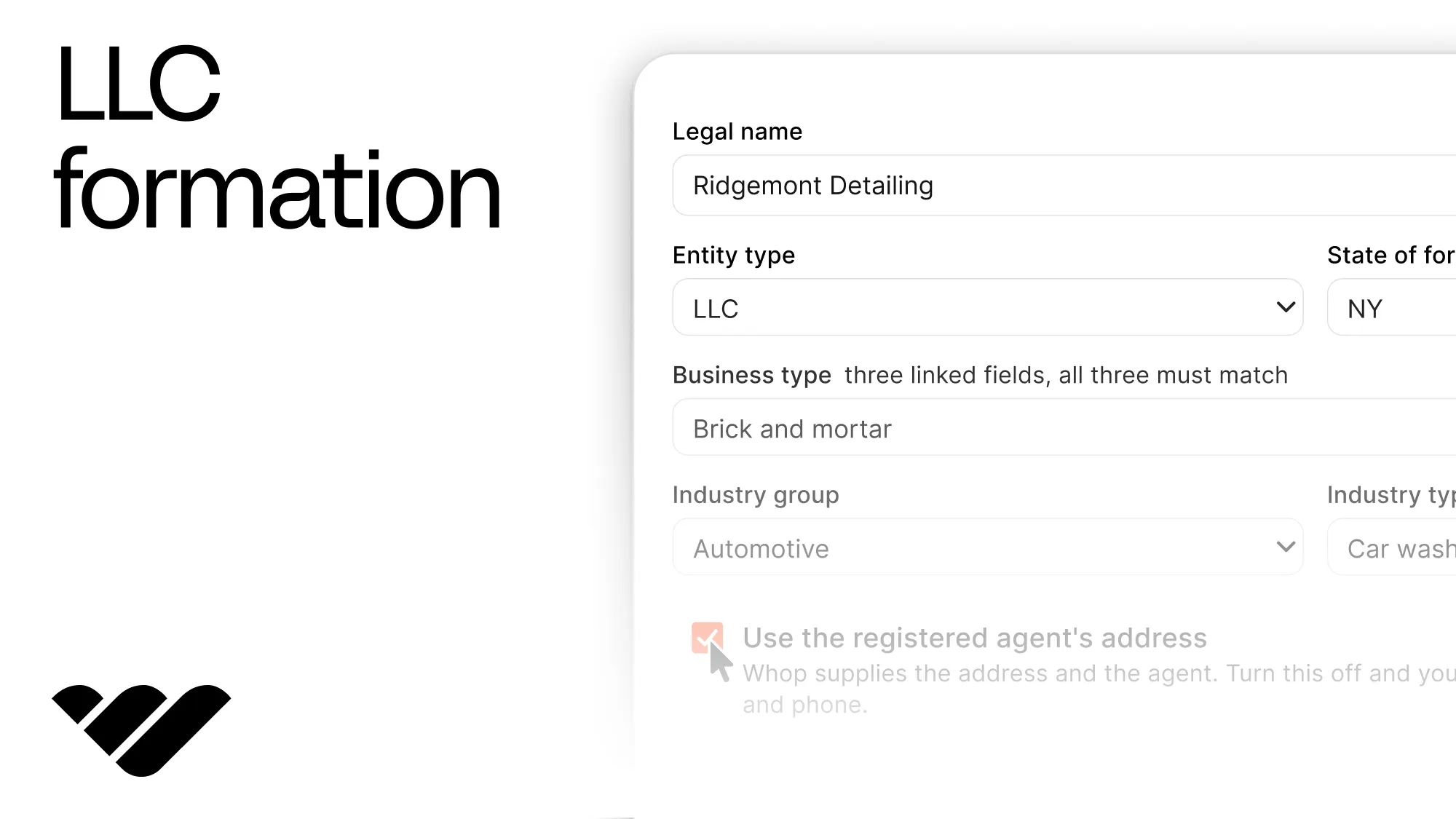
You can form an LLC for one of your users using Next.js and Whop, without building a filing flow or ever touching state paperwork yourself. Learn how to in this guide.
Key takeaways
- One POST to Whop's formation endpoint registers an LLC or C-Corp, appoints a registered agent, and files for an EIN.
- Nothing gets filed until your user pays the returned checkout link, so applications stay reversible until payment.
- Whop validates structural rules like ownership splits and officer roles, but your platform must validate the user's raw input.
You can form an LLC for one of your users with a single API call. One POST to Whop's company formation endpoint registers the company with the state, appoints its registered agent, and starts its EIN application.
Sooner or later one of your freelancers, sellers, or creators is going to find they cannot invoice a corporate customer or open a business bank account, because they are not a company yet. Whop's LLC endpoint lets them fix that without leaving your app.
This isn't about creating a business for yourself, which Whop already does in a few clicks. The main value point of the API is letting other people create their own companies in a workflow that you control.
In this tutorial, we're going to walk you through adding company formation to your app, so your users can register an LLC or a C-Corp without leaving it.
You can see the end product in our companion demo here and the code of the demo in this GitHub repository.
Prerequisites
For the sake of this tutorial, we are going to assume that your app runs on Next.js with App Router. We're going add files under lib/, lib/formation/, components/, constants/, and app/api/.
The process of creating a company runs through accounts, which means a Whop business. On a platform, that is the connected account you create for each user when they sign up, with a single POST /accounts. You form the company on an account that already exists.
Create a sandbox account
We are going to build on Whop's sandbox first, so no real money moves and no real paperwork is filed.
When we use Sandbox, it confirms the application from start to end but refuses it at the checkout step. That is what makes Sandbox free and unlimited to test against, and it means the success branch is the one path you cannot test there.
At this point, you should:
- Go to sandbox.Whop.com and create an account.
- After creating an account, use the Start a Business button on the left navigation bar.
- After creating a business, go to the dashboard of your business.
- While viewing the dashboard, look at the URL and copy your company ID that starts with
biz_. This is what we are going to use to create a company.
Get an API key
API keys are the secrets your app uses when it talks to Whop. While in the dashboard of your business, go to the Developer page (at the bottom of the left dashboard navigation) and find the Company API keys section. There, click the Create button and create an API key.
While creating, make sure you give the permissions below to the API key:
incorporation:writeincorporation:readcompany:basic:readwebhook_receive:accounts
Install the packages
For this tutorial, we're only going to need a single package that checks the data we get is the shape we expect. Run the command below to install zod:
npm install zodEnvironment variables
Now you should get a bunch of secret keys and settings in your environment variables. You should keep these in the .env.local file of your app:
| Variable | Example | How to get it |
|---|---|---|
WHOP_COMPANY_API_KEY | apik_... | Whop dashboard > Developer > Company API keys. |
WHOP_COMPANY_ID | biz_... | The company id in your dashboard URL. The account you're forming on. |
WHOP_API_VERSION_DATE | 2026-08-13 | Set manually. Pins the request to a dated API version. |
WHOP_SANDBOX | true | Set manually. Keep it true while you build. |
APP_URL | http://localhost:3000 | Your app origin. |
Verify the environment variables at the start
We want to ensure that if a key is missing or not in the expected format, a clear error message appears at the start.
Go to the lib/ folder and create a file called env.ts with the content:
import { z } from "zod";

const schema = z.object({
  WHOP_COMPANY_API_KEY: z.string().min(1, "WHOP_COMPANY_API_KEY is missing"),
  WHOP_COMPANY_ID: z
    .string()
    .startsWith("biz_", "WHOP_COMPANY_ID must start with biz_"),
  WHOP_API_VERSION_DATE: z.string().min(1).default("2026-08-13"),
  WHOP_SANDBOX: z
    .string()
    .optional()
    .transform((value) => value === "true"),
  APP_URL: z.string().url("APP_URL must be a full URL"),
});

export type Env = z.infer<typeof schema>;

let cached: Env | undefined;

export function getEnv(): Env {
  if (cached) return cached;

  const raw: Record<string, string | undefined> = { ...process.env };
  for (const key of Object.keys(raw)) {
    if (raw[key] === "") delete raw[key];
  }

  const parsed = schema.safeParse(raw);

  if (!parsed.success) {
    const problems = parsed.error.issues
      .map((issue) => `${issue.path.join(".")}: ${issue.message}`)
      .join("\n");
    throw new Error(`Environment is not configured.\n${problems}`);
  }

  cached = parsed.data;
  return cached;
}
Connect to Whop
Forming an LLC is a single endpoint, so instead of a client object, we are going to write a function that sends a POST request and gives us back the response or the error.
A rejection here is not an exception, it is the normal case while a user is still filling in the form.
Go to the lib/ folder and create a file called whop.ts with the content:
import { getEnv } from "@/lib/env";

export function apiBaseUrl(): string {
  return getEnv().WHOP_SANDBOX
    ? "https://sandbox-api.whop.com/api/v1"
    : "https://api.whop.com/api/v1";
}

export interface WhopErrorBody {
  status: number;
  message: string;
  type?: string;
  code?: string;
}

export async function whopPost<T>(
  path: string,
  body: unknown,
  idempotencyKey: string,
): Promise<{ ok: true; data: T } | { ok: false; error: WhopErrorBody }> {
  const env = getEnv();

  const response = await fetch(`${apiBaseUrl()}${path}`, {
    method: "POST",
    cache: "no-store",
    headers: {
      Authorization: `Bearer ${env.WHOP_COMPANY_API_KEY}`,
      "Api-Version-Date": env.WHOP_API_VERSION_DATE,
      "Content-Type": "application/json",
      "Idempotency-Key": idempotencyKey,
    },
    body: JSON.stringify(body),
  });

  const parsed: unknown = await response.json().catch(() => null);

  if (!response.ok) {
    return {
      ok: false,
      error: {
        status: response.status,
        message: readError(parsed, "message") ?? "Whop did not explain what went wrong.",
        type: readError(parsed, "type"),
        code: readError(parsed, "code"),
      },
    };
  }

  return { ok: true, data: parsed as T };
}

function readError(body: unknown, field: string): string | undefined {
  if (!body || typeof body !== "object" || !("error" in body)) return undefined;
  const error = (body as { error: unknown }).error;
  if (!error || typeof error !== "object" || !(field in error)) return undefined;
  const value = (error as Record<string, unknown>)[field];
  return typeof value === "string" ? value : undefined;
}Api-Version-Date. Leave the header off and you get much older response shapes.Describe the company
The form needs two lists: the states a company can be formed in, and the taxonomy that says what the business does.
In the taxonomy, three fields have to agree with each other: a business_type, an industry_group inside it, and an industry_type inside that. If you pick a combination that doesn't exist in Whop's tree, the application will be refused.
There are 13 business types, and each one has its own industry groups and, under those, industry types. You can find all of them in the business types and industries glossary here.
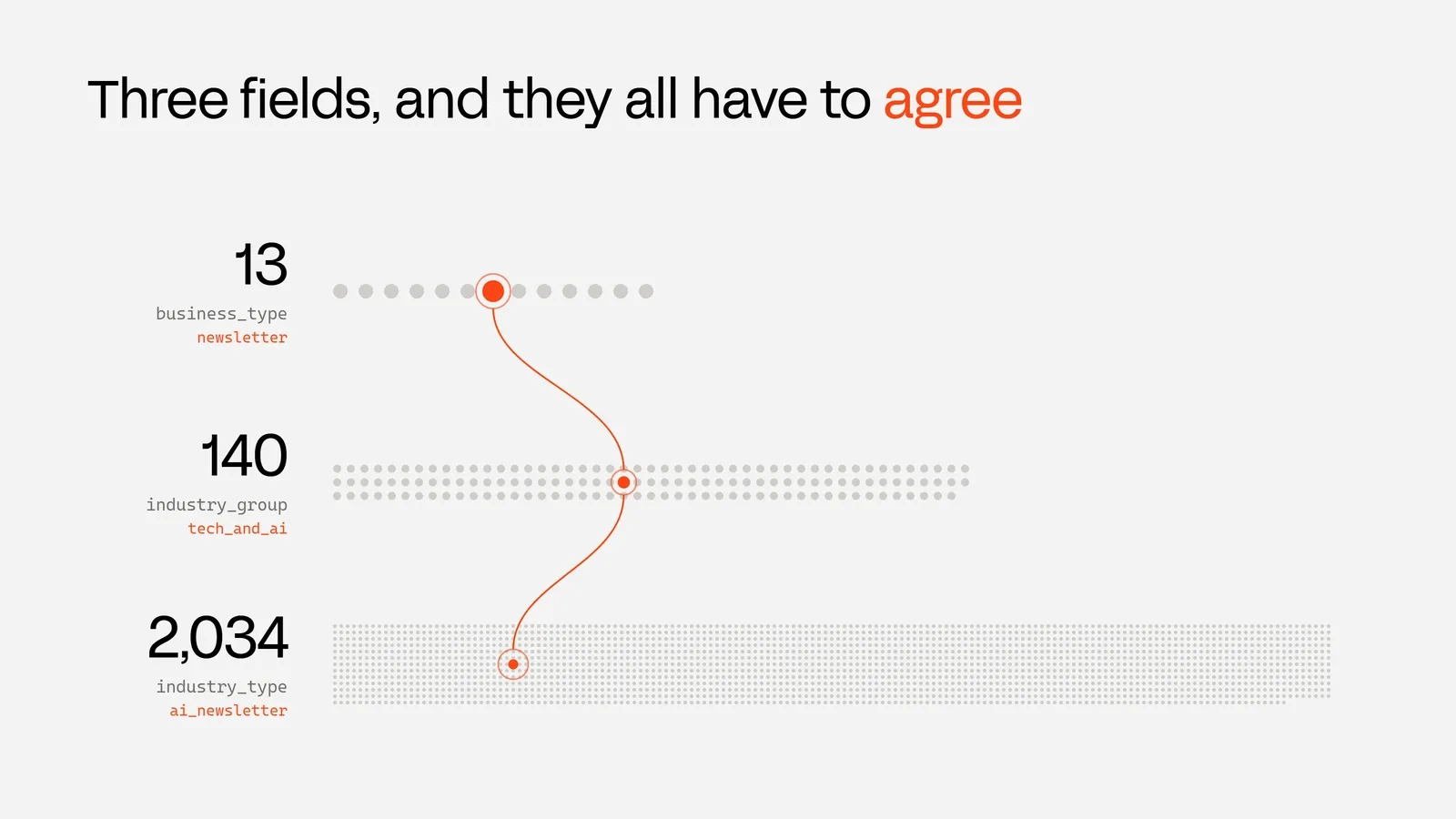
Save that tree as constants/taxonomy.json, shaped as an object of business types, each holding groups, each holding an array of types. The companion repo ships the full file.
Collect all three values from your own form rather than reading them off the account, so the combination you send always comes from this tree.
Now, go to lib/formation/ and create a file called taxonomy.ts with the content:
import raw from "@/constants/taxonomy.json";

export type Taxonomy = Record<string, Record<string, string[]>>;

export const TAXONOMY = raw as Taxonomy;

export const BUSINESS_TYPES = Object.keys(TAXONOMY);

export function groupsFor(businessType: string): string[] {
  return Object.keys(TAXONOMY[businessType] ?? {});
}

export function typesFor(businessType: string, group: string): string[] {
  return TAXONOMY[businessType]?.[group] ?? [];
}

export function label(value: string): string {
  const spaced = value.replace(/_/g, " ");
  return spaced.charAt(0).toUpperCase() + spaced.slice(1);
}
Then, again in lib/formation/, create a file called states.ts with the content:
export const FORMATION_STATES = [
  "AL", "AK", "AZ", "AR", "CA", "CO", "CT", "DE", "DC", "FL",
  "GA", "HI", "ID", "IL", "IN", "IA", "KS", "KY", "LA", "ME",
  "MD", "MA", "MI", "MN", "MS", "MO", "MT", "NE", "NV", "NH",
  "NJ", "NM", "NY", "NC", "ND", "OH", "OK", "OR", "PA", "RI",
  "SC", "SD", "TN", "TX", "UT", "VT", "VA", "WA", "WV", "WI", "WY",
] as const;

export const LLC_SUFFIXES = [
  "LLC",
  "L.L.C",
  "L.L.C.",
  "Limited Liability Company",
] as const;

export const CORP_SUFFIXES = [
  "Inc.",
  "Inc",
  "Incorporated",
  "Corp.",
  "Corporation",
  "C Corp",
  "C Corporation",
  "CCorp",
  "Company",
] as const;

export const OFFICER_ROLES = [
  "president",
  "secretary",
  "treasurer",
  "director",
] as const;

export type OfficerRole = (typeof OFFICER_ROLES)[number];
Shape the application
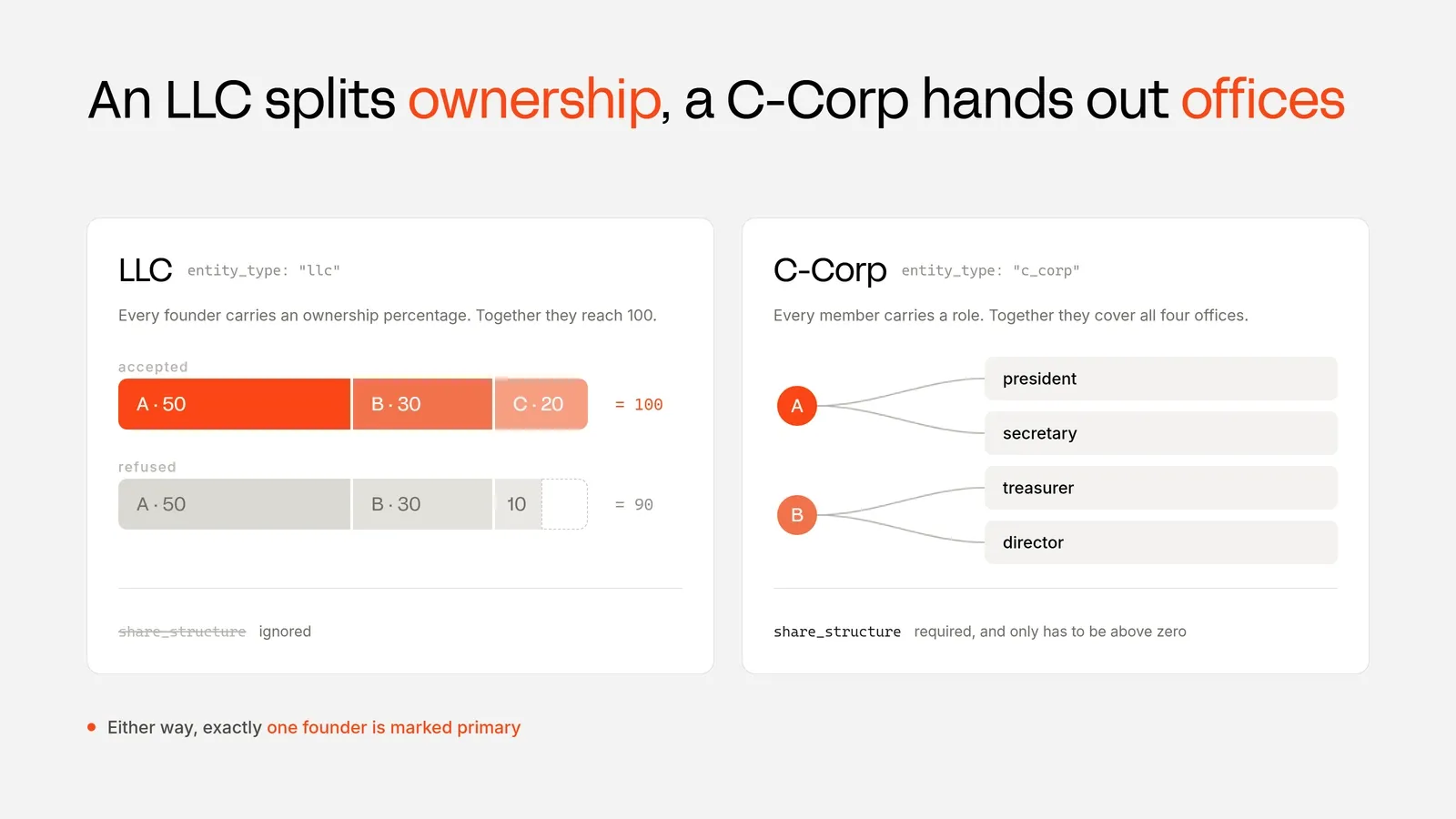
With a total of 100, LLCs split ownership and every founder carries an ownership_percentage.
A C-Corp hands out offices instead, so every member carries at least one role and between them they cover president, secretary, treasurer, and director. One person can hold several.
A C-Corp also needs a share_structure. Whop only checks that number_of_shares and the par value are above zero. Ten million shares at $0.00001 is the usual startup default. An LLC ignores the field.
Go to lib/formation/ and create a file called schema.ts with the content:
import { z } from "zod";
import { OFFICER_ROLES } from "@/lib/formation/states";

const addressSchema = z.object({
  line1: z.string(),
  line2: z.string().optional(),
  city: z.string(),
  state: z.string(),
  postal_code: z.string(),
  country: z.string(),
});

const founderSchema = z.object({
  first_name: z.string(),
  last_name: z.string(),
  email: z.string(),
  phone: z.string(),
  is_primary: z.boolean(),
  date_of_birth: z.string().optional(),
  ssn: z.string().optional(),
  ownership_percentage: z.number().optional(),
  roles: z.array(z.enum(OFFICER_ROLES)).optional(),
  address: addressSchema,
});

export const applicationSchema = z.object({
  business_name: z.string(),
  entity_type: z.enum(["llc", "c_corp"]),
  entity_suffix: z.string().optional(),
  formation_state: z.string(),
  business_type: z.string(),
  industry_group: z.string(),
  industry_type: z.string(),
  business_website: z.string().optional(),
  business_phone: z.string().optional(),
  business_address: addressSchema.optional(),
  use_registered_agent: z.boolean(),
  expedite_ein: z.boolean(),
  share_structure: z
    .object({ number_of_shares: z.number(), value: z.number() })
    .optional(),
  founders: z.array(founderSchema).min(1).max(6),
});

export type Application = z.infer<typeof applicationSchema>;
export type Founder = z.infer<typeof founderSchema>;
export type Address = z.infer<typeof addressSchema>;

export function toRequestBody(app: Application): Record<string, unknown> {
  const llc = app.entity_type === "llc";

  const founders = app.founders.map((founder) => ({
    first_name: founder.first_name,
    last_name: founder.last_name,
    email: founder.email,
    phone: founder.phone,
    is_primary: founder.is_primary,
    ...(founder.date_of_birth ? { date_of_birth: founder.date_of_birth } : {}),
    ...(founder.ssn ? { ssn: founder.ssn } : {}),
    ...(llc
      ? { ownership_percentage: founder.ownership_percentage ?? 0 }
      : { roles: founder.roles ?? [] }),
    address: compactAddress(founder.address),
  }));

  return {
    business_name: app.business_name,
    entity_type: app.entity_type,
    ...(app.entity_suffix ? { entity_suffix: app.entity_suffix } : {}),
    formation_state: app.formation_state,
    business_type: app.business_type,
    industry_group: app.industry_group,
    industry_type: app.industry_type,
    ...(app.business_website ? { business_website: app.business_website } : {}),
    ...(app.use_registered_agent
      ? { use_registered_agent: true }
      : {
          ...(app.business_address
            ? { business_address: compactAddress(app.business_address) }
            : {}),
          ...(app.business_phone ? { business_phone: app.business_phone } : {}),
        }),
    ...(app.expedite_ein ? { expedite_ein: true } : {}),
    ...(!llc && app.share_structure ? { share_structure: app.share_structure } : {}),
    founders,
  };
}

function compactAddress(address: Address): Record<string, string> {
  const { line2, ...rest } = address;
  return line2 ? { ...rest, line2 } : rest;
}
You should keep in mind that every founder needs a personal address, and exactly one founder must be marked is_primary, which makes them the responsible party for the filing. The company needs its own address too, unless use_registered_agent is true.
ssn is optional, and without one the IRS can take up to eight weeks to issue the EIN. That is what expedite_ein is for: $250 extra, and only accepted when no founder supplied an SSN.Send the application
Now let's do the call itself. It is a POST to /accounts/{id}/form_company. There is no draft to create first, no session to open, and nothing to poll afterwards.
On the sandbox, Whop validates the entire application and then stops with Incorporation seller company is not configured, because the sandbox has no incorporation product behind it. In this case, this means the application has passed.
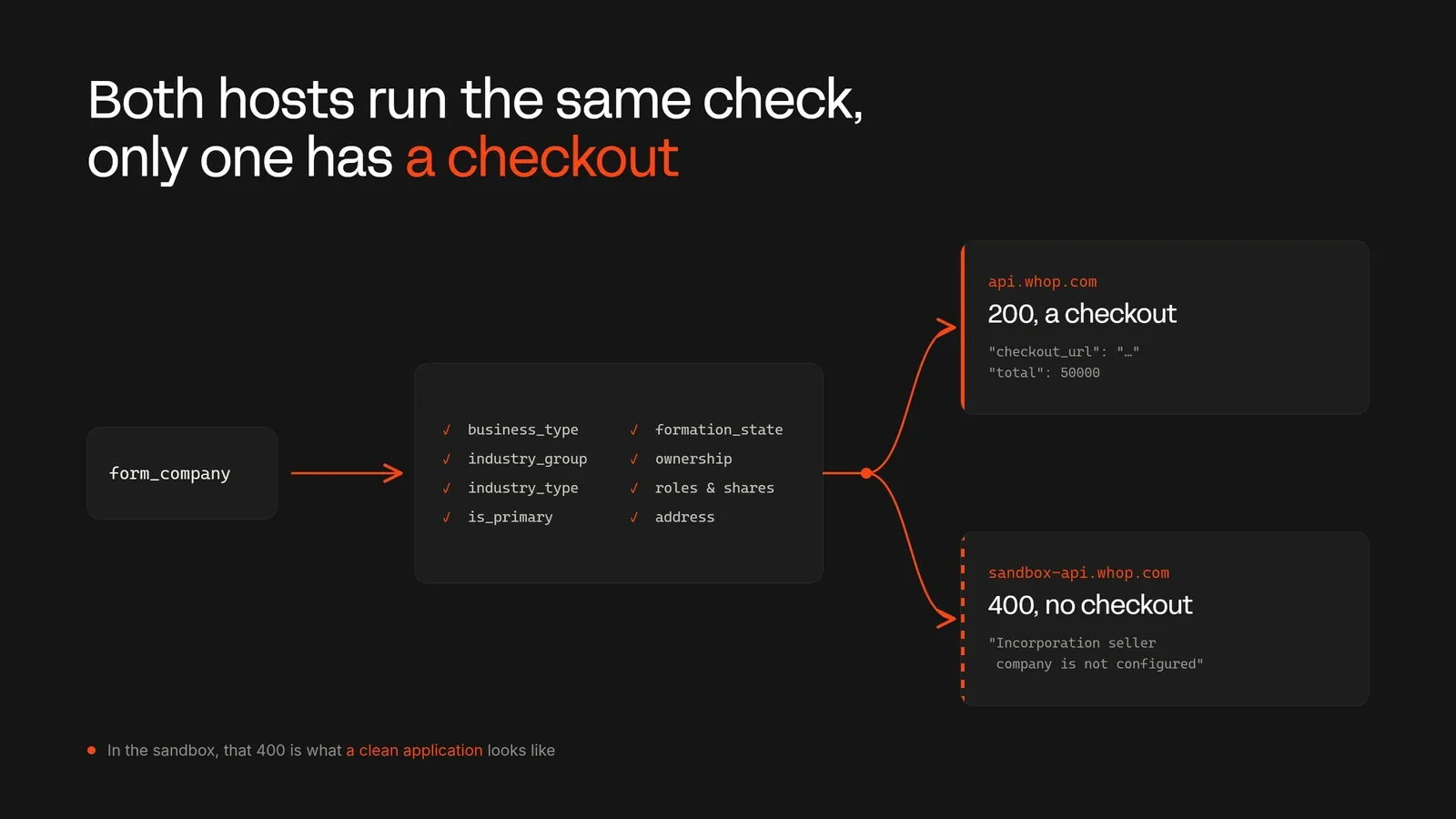
Now go to lib/formation/ and create a file called preflight.ts with the content:
import { getEnv } from "@/lib/env";
import { whopPost, type WhopErrorBody } from "@/lib/whop";
import { toRequestBody, type Application } from "@/lib/formation/schema";
import { fieldFor } from "@/lib/formation/errors";

const SELLER_NOT_CONFIGURED = "Incorporation seller company is not configured";

export interface FormationCheckout {
  checkout_url: string;
  checkout_session_id: string;
  total: number;
  currency: string;
}

export type PreflightResult =
  | { outcome: "accepted"; request: Record<string, unknown> }
  | {
      outcome: "rejected";
      request: Record<string, unknown>;
      error: WhopErrorBody;
      field: string | null;
    }
  | {
      outcome: "checkout";
      request: Record<string, unknown>;
      checkout: FormationCheckout;
    };

export async function preflight(
  application: Application,
  idempotencyKey: string,
): Promise<PreflightResult> {
  const env = getEnv();
  const request = toRequestBody(application);

  const response = await whopPost<FormationCheckout>(
    `/accounts/${env.WHOP_COMPANY_ID}/form_company`,
    request,
    idempotencyKey,
  );

  if (response.ok) {
    return { outcome: "checkout", request, checkout: response.data };
  }

  if (response.error.message === SELLER_NOT_CONFIGURED) {
    return { outcome: "accepted", request };
  }

  return {
    outcome: "rejected",
    request,
    error: response.error,
    field: fieldFor(response.error.message),
  };
}checkout outcome above.Read Whop's response
When you submit a bad application, Whop refuses it with a plain English sentence and an HTTP 400. It does not tell you which field was wrong, and it reports only one problem at a time, so if you make 3 mistakes, the response takes 3 round trips.
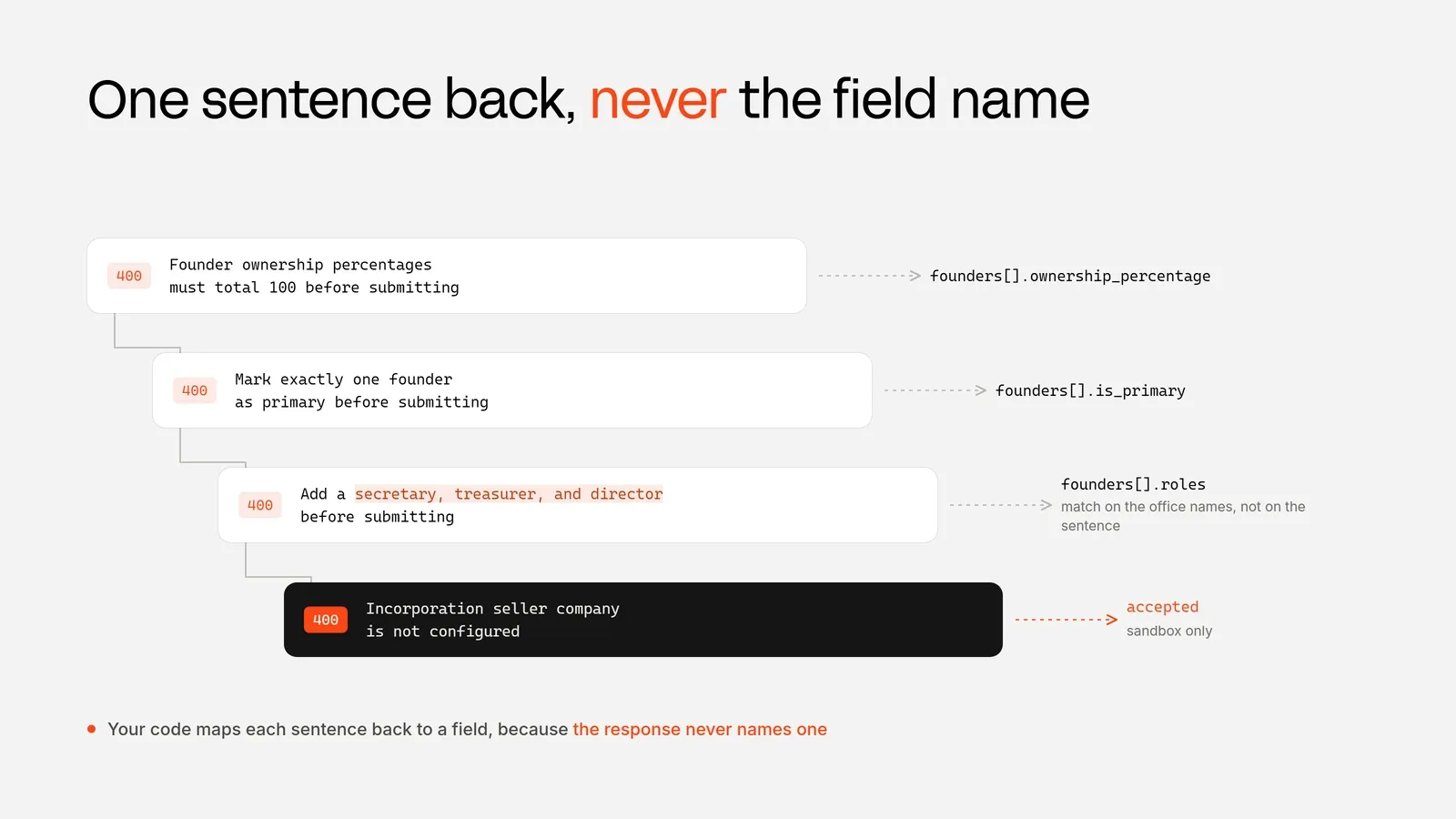
That is why we map each sentence back to the input that caused it. One case is worth knowing before you write the matching: the officer roles message is assembled from whichever offices are missing.
So, it arrives as "Add a secretary before submitting" with one gap and "Add a secretary, treasurer, and director before submitting" with three. Match on the office names, not on the whole sentence.
Go to lib/formation/ and create a file called errors.ts with the content:
const FIELD_MESSAGES: ReadonlyArray<[RegExp, string]> = [
  [/valid business type/i, "business_type"],
  [/valid industry group|Add your industry/i, "industry_group"],
  [/valid industry type/i, "industry_type"],
  [/valid state of formation/i, "formation_state"],
  [/primary founder is required|founder as primary/i, "founders"],
  [/ownership percentages/i, "founders"],
  [/company address/i, "business_address"],
  [/number of shares|par value/i, "share_structure"],
  [/valid role|president|secretary|treasurer|director/i, "founders"],
  [/expedited ein/i, "expedite_ein"],
];

export function fieldFor(message: string): string | null {
  for (const [pattern, field] of FIELD_MESSAGES) {
    if (pattern.test(message)) return field;
  }
  return null;
}
Validate the rest yourself
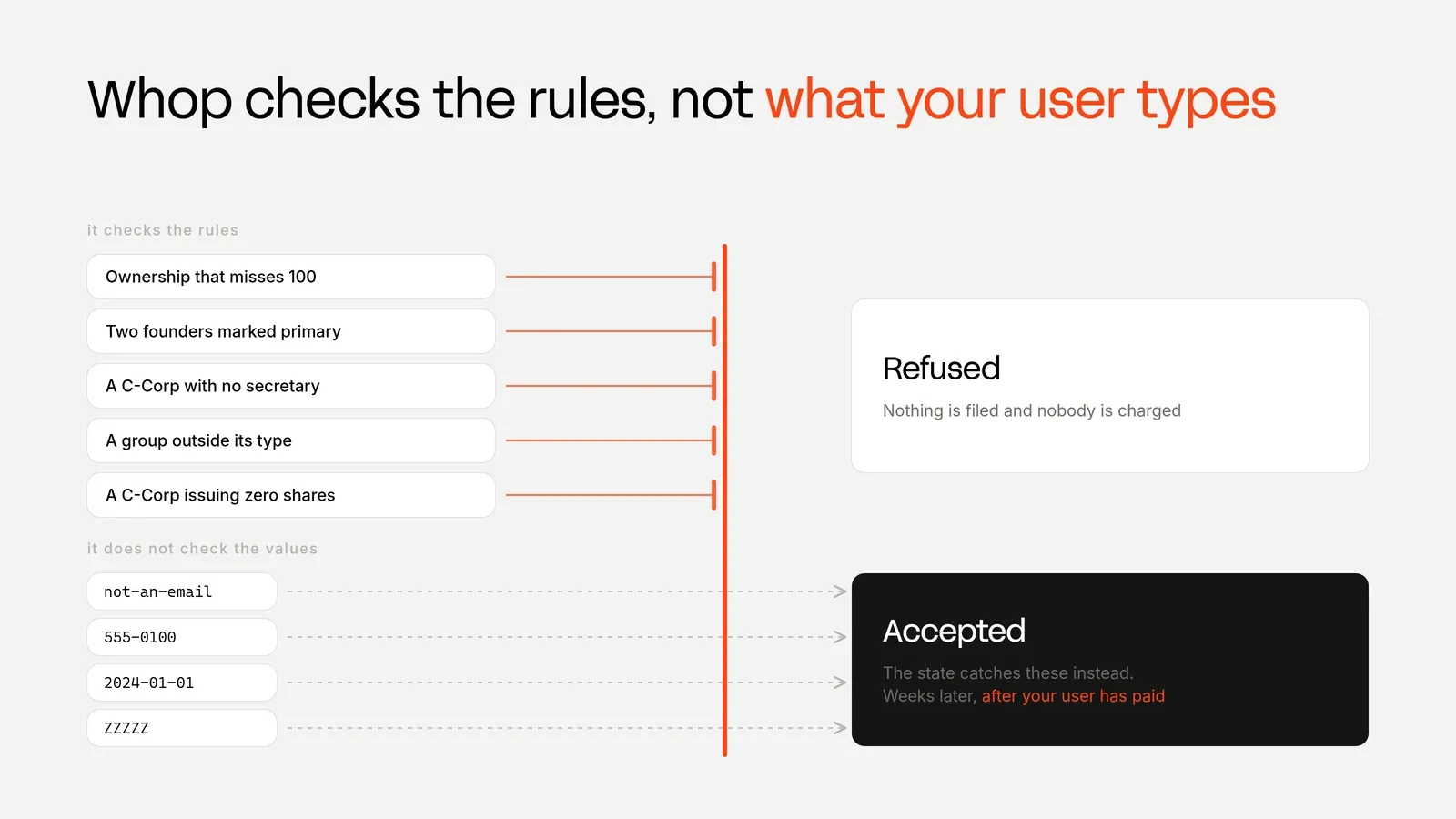
Whop checks the parts with rules: the three industry fields, the ownership split, the officer roles, the share count, and the address.
It does not check what your user types. An email of not-an-email goes through. So does a phone number of 555-0100, or a date of birth of 2024-01-01. The state catches those instead, weeks later, once your user has paid. So we want to catch them first.
Go to lib/formation/ and create a file called unchecked.ts with the content:
import type { Application } from "@/lib/formation/schema";

export interface UncheckedFinding {
  field: string;
  value: string;
  detail: string;
}

const EMAIL = /^[^\s@]+@[^\s@]+\.[^\s@]{2,}$/;
const E164 = /^\+[1-9]\d{7,14}$/;
const US_ZIP = /^\d{5}(-\d{4})?$/;

export function findUnchecked(app: Application): UncheckedFinding[] {
  const findings: UncheckedFinding[] = [];

  app.founders.forEach((founder, index) => {
    const who = `Founder ${index + 1}`;

    if (founder.email && !EMAIL.test(founder.email)) {
      findings.push({
        field: `${who} email`,
        value: founder.email,
        detail: "Not a valid address, so the filing confirmation goes nowhere.",
      });
    }

    if (founder.phone && !E164.test(founder.phone)) {
      findings.push({
        field: `${who} phone`,
        value: founder.phone,
        detail: "The docs ask for E.164, like +12125550100.",
      });
    }

    if (founder.date_of_birth) {
      const age = yearsSince(founder.date_of_birth);
      if (age === null) {
        findings.push({
          field: `${who} date of birth`,
          value: founder.date_of_birth,
          detail: "Not a date the state will be able to read.",
        });
      } else if (age < 18) {
        findings.push({
          field: `${who} date of birth`,
          value: `${founder.date_of_birth} (age ${age})`,
          detail: "No state registers a minor as the responsible party.",
        });
      }
    } else {
      findings.push({
        field: `${who} date of birth`,
        value: "not sent",
        detail: "Optional on the endpoint, and needed by the state later.",
      });
    }

    if (
      founder.address.country.toUpperCase() === "US" &&
      founder.address.postal_code &&
      !US_ZIP.test(founder.address.postal_code)
    ) {
      findings.push({
        field: `${who} ZIP code`,
        value: founder.address.postal_code,
        detail: "Not a US ZIP, so the state will reject the filing.",
      });
    }
  });

  if (app.business_name.trim().length < 3) {
    findings.push({
      field: "Business name",
      value: app.business_name.trim() || "(empty)",
      detail: "A name that is only the entity ending will be rejected by the state.",
    });
  }

  return findings;
}

function yearsSince(iso: string): number | null {
  const born = new Date(iso);
  if (Number.isNaN(born.getTime())) return null;
  const now = new Date();
  let age = now.getFullYear() - born.getFullYear();
  const monthDelta = now.getMonth() - born.getMonth();
  if (monthDelta < 0 || (monthDelta === 0 && now.getDate() < born.getDate())) age -= 1;
  return age;
}
Set up the route
This route is the place where your app talks to Whop. It does four things:
- It blocks excessive requests.
- It confirms the data is in the format they should be.
- It sends it to Whop.
- It gives back the response to us with the issues we find.
In production, every application that gets through ends in a $500 charge for somebody. The sandbox cannot charge anyone, but the limit belongs here either way.
Now go to the lib/ folder and create a file called rate-limit.ts with the content:
const hits = new Map<string, { count: number; resetAt: number }>();

export function checkRateLimit(ip: string, limit = 10, windowMs = 60_000): boolean {
  const now = Date.now();
  const entry = hits.get(ip);

  if (!entry || now > entry.resetAt) {
    hits.set(ip, { count: 1, resetAt: now + windowMs });
    return true;
  }

  if (entry.count >= limit) return false;

  entry.count += 1;
  return true;
}

export function clientIp(request: Request): string {
  return request.headers.get("x-forwarded-for")?.split(",")[0]?.trim() ?? "local";
}
And then go to app/api/formation and create a file called route.ts with the content:
import { randomUUID } from "node:crypto";
import type { NextRequest } from "next/server";
import { getEnv } from "@/lib/env";
import { applicationSchema } from "@/lib/formation/schema";
import { preflight } from "@/lib/formation/preflight";
import { findUnchecked } from "@/lib/formation/unchecked";
import { checkRateLimit, clientIp } from "@/lib/rate-limit";

export const dynamic = "force-dynamic";

export async function POST(request: NextRequest): Promise<Response> {
  const env = getEnv();

  if (!checkRateLimit(clientIp(request))) {
    return Response.json(
      { error: "Too many submissions. Wait a minute and try again." },
      { status: 429 },
    );
  }

  const parsed = applicationSchema.safeParse(await request.json().catch(() => null));

  if (!parsed.success) {
    return Response.json(
      { error: "That application is not shaped like an application." },
      { status: 400 },
    );
  }

  const result = await preflight(parsed.data, randomUUID());

  return Response.json({
    accountId: env.WHOP_COMPANY_ID,
    result,
    unchecked: findUnchecked(parsed.data),
  });
}
Each submission goes out with a fresh idempotency key. That is how Whop recognizes a repeat of the same request, so a network retry cannot file the same company twice.
Reuse a key but change the data and Whop rejects it, with a message that looks like a form error your user cannot fix.
Create the form
Now we need the form to have two things. First, when someone changes the business type, we want to clear out the industry group and the industry type to avoid mismatches that Whop could refuse.
Then, when someone edits any field, we want to clear the last result, so a field doesn't stay marked as wrong after they have already fixed it.
Now go to the components/ folder and create a file called FormationForm.tsx with the content:
"use client";
import { useState } from "react";
import type { Application } from "@/lib/formation/schema";
import { BUSINESS_TYPES, groupsFor, label, typesFor } from "@/lib/formation/taxonomy";
import { FORMATION_STATES, OFFICER_ROLES } from "@/lib/formation/states";
import type { UncheckedFinding } from "@/lib/formation/unchecked";
import type { PreflightResult } from "@/lib/formation/preflight";
const START: Application = {
business_name: "Ridgemont Detailing",
entity_type: "llc",
entity_suffix: "LLC",
formation_state: "WY",
business_type: "brick_and_mortar",
industry_group: "automotive",
industry_type: "car_wash",
use_registered_agent: true,
expedite_ein: false,
share_structure: { number_of_shares: 10000000, value: 0.00001 },
founders: [
{
first_name: "Marcus",
last_name: "Webb",
email: "marcus@ridgemont.example",
phone: "+12125550100",
is_primary: true,
date_of_birth: "1990-04-12",
ownership_percentage: 100,
roles: ["president", "secretary", "treasurer", "director"],
address: {
line1: "907 Ridgemont Dr",
city: "Austin",
state: "TX",
postal_code: "78704",
country: "US",
},
},
],
};
export function FormationForm() {
const [app, setApp] = useState<Application>(START);
const [result, setResult] = useState<PreflightResult | null>(null);
const [unchecked, setUnchecked] = useState<UncheckedFinding[]>([]);
const [busy, setBusy] = useState(false);
function update(patch: Partial<Application>) {
setApp((current) => ({ ...current, ...patch }));
setResult(null);
setUnchecked([]);
}
function updateFounder(patch: Partial<Application["founders"][number]>) {
update({ founders: [{ ...app.founders[0], ...patch }] });
}
function setBusinessType(value: string) {
const group = groupsFor(value)[0] ?? "";
update({
business_type: value,
industry_group: group,
industry_type: typesFor(value, group)[0] ?? "",
});
}
async function send() {
setBusy(true);
try {
const response = await fetch("/api/formation", {
method: "POST",
headers: { "Content-Type": "application/json" },
body: JSON.stringify(app),
});
const data = await response.json();
setResult(data.result ?? null);
setUnchecked(data.unchecked ?? []);
} finally {
setBusy(false);
}
}
const founder = app.founders[0];
const flagged = result?.outcome === "rejected" ? result.field : null;
const llc = app.entity_type === "llc";
return (
<div>
<label>
Legal name
<input
value={app.business_name}
onChange={(event) => update({ business_name: event.target.value })}
/>
</label>
<label>
Entity type
<select
value={app.entity_type}
onChange={(event) =>
update({
entity_type: event.target.value as Application["entity_type"],
entity_suffix: event.target.value === "llc" ? "LLC" : "Inc.",
})
}
>
<option value="llc">LLC</option>
<option value="c_corp">C-Corp</option>
</select>
</label>
<Choice
title="State of formation"
value={app.formation_state}
options={FORMATION_STATES}
onChange={(formation_state) => update({ formation_state })}
/>
<Choice
title="Business type"
value={app.business_type}
options={BUSINESS_TYPES}
onChange={setBusinessType}
/>
<Choice
title="Industry group"
value={app.industry_group}
options={groupsFor(app.business_type)}
onChange={(industry_group) =>
update({
industry_group,
industry_type: typesFor(app.business_type, industry_group)[0] ?? "",
})
}
/>
<Choice
title="Industry type"
value={app.industry_type}
options={typesFor(app.business_type, app.industry_group)}
onChange={(industry_type) => update({ industry_type })}
/>
<label>
Founder email
<input
value={founder.email}
onChange={(event) => updateFounder({ email: event.target.value })}
/>
</label>
<label>
Founder date of birth
<input
value={founder.date_of_birth ?? ""}
onChange={(event) => updateFounder({ date_of_birth: event.target.value })}
/>
</label>
{llc ? (
<label>
Ownership percentage
<input
type="number"
value={founder.ownership_percentage ?? 0}
onChange={(event) =>
updateFounder({ ownership_percentage: Number(event.target.value) || 0 })
}
/>
</label>
) : (
<fieldset>
<legend>Offices held</legend>
{OFFICER_ROLES.map((role) => (
<label key={role}>
<input
type="checkbox"
checked={(founder.roles ?? []).includes(role)}
onChange={() =>
updateFounder({
roles: (founder.roles ?? []).includes(role)
? (founder.roles ?? []).filter((held) => held !== role)
: [...(founder.roles ?? []), role],
})
}
/>
{label(role)}
</label>
))}
</fieldset>
)}
<label>
<input
type="checkbox"
checked={app.use_registered_agent}
onChange={(event) => update({ use_registered_agent: event.target.checked })}
/>
Use the registered agent's address
</label>
<button type="button" disabled={busy} onClick={send}>
{busy ? "Sending" : "Send the application"}
</button>
{result?.outcome === "rejected" && (
<p>
Whop refused it: {result.error.message}
{flagged ? ` (check ${flagged})` : ""}
</p>
)}
{result?.outcome === "accepted" && (
<p>Whop accepted it. The sandbox stops before the checkout.</p>
)}
{result?.outcome === "checkout" && (
<p>
${(result.checkout.total / 100).toFixed(2)} due at{" "}
<a href={result.checkout.checkout_url}>the checkout</a>.
</p>
)}
{unchecked.length > 0 && (
<ul>
{unchecked.map((finding, index) => (
<li key={index}>
{finding.field}: {finding.value}. {finding.detail}
</li>
))}
</ul>
)}
</div>
);
}
function Choice({
title,
value,
options,
onChange,
}: {
title: string;
value: string;
options: readonly string[];
onChange: (value: string) => void;
}) {
return (
<label>
{title}
<select value={value} onChange={(event) => onChange(event.target.value)}>
{options.map((option) => (
<option key={option} value={option}>
{label(option)}
</option>
))}
</select>
</label>
);
}Then go to the app/ folder and create a file called page.tsx with the content:
import { FormationForm } from "@/components/FormationForm";
import { getEnv } from "@/lib/env";

export const dynamic = "force-dynamic";

export default function Home() {
  getEnv();

  return (
    <main>
      <h1>Register your company</h1>
      <FormationForm />
    </main>
  );
}
This page is only a placeholder so you can see the form. Drop FormationForm into whatever page your onboarding already uses.
Hand over the checkout
Nothing has been charged for now, but in production the checkout returns this:
{
  "checkout_url": "https://whop.com/checkout/ch_xxxxxxxxxxxxxxx/",
  "checkout_session_id": "ch_xxxxxxxxxxxxxxx",
  "total": 50000,
  "currency": "usd"
}
checkout_url is the page your user pays on. checkout_session_id identifies this particular filing. total is what they will be charged, in cents.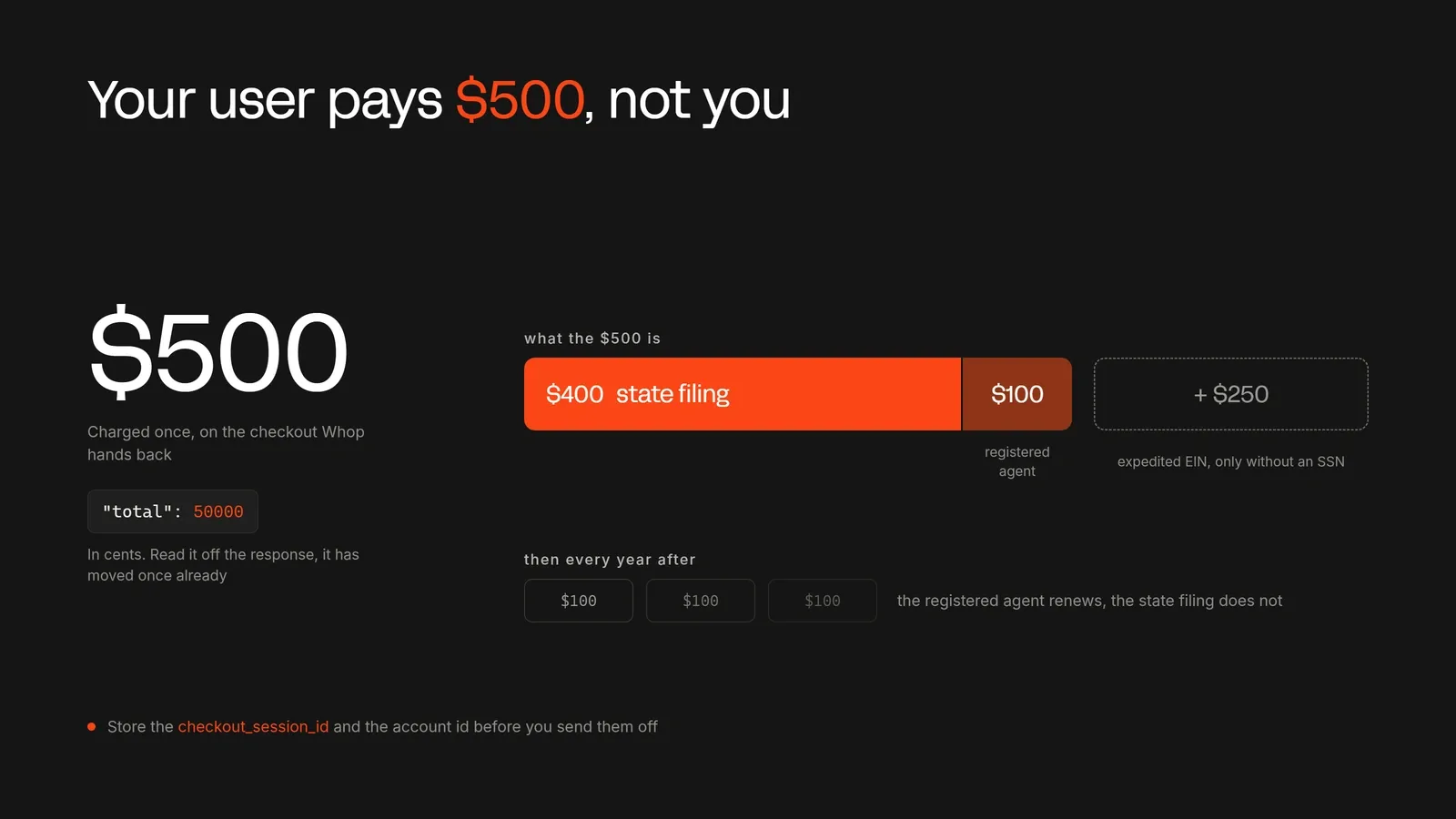
Keep in mind that you are not the one who is supposed to pay for this. It's your user. Show them the checkout_url, and the filing starts when they pay it.
But before you send the user to the checkout, make sure the checkout_session_id and the account ID are stored in your app.
The process of forming a company can take some time, and your user will probably leave the page by then. Those two ids are how you match the finished company back to the right person later.
total is in cents, so 50000 is $500. That is $400 for the formation and $100 for the first year of the registered agent, which renews every year after that.
Expedited EIN adds $250 on top. Read the number off the response instead of hardcoding it, because it has changed once already.
Track the filing
Once your user pays, the filing runs on its own and you watch it from their account.
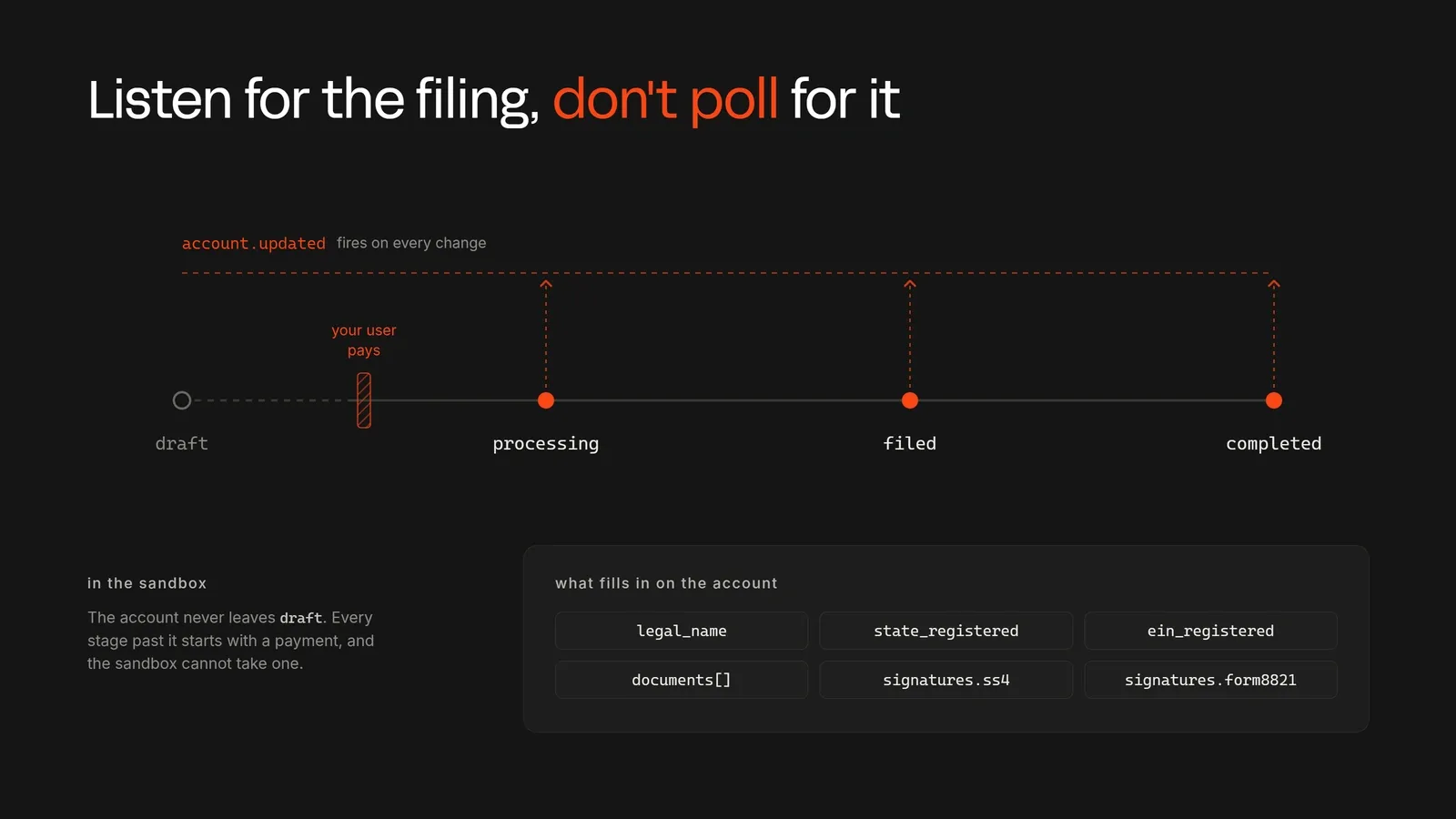
Retrieve the account and read company_formation. Its status moves through draft, then processing, then filed, then completed. It can also come back as rejected, so handle that value too.
Along the way legal_name gets filled in, state_registered and ein_registered turn true, and documents fills up with the Articles of Organization and the EIN letter.
If the IRS needs a signature, signatures.ss4 and signatures.form8821 hold links you pass on to your user.
Don't check that endpoint on a timer for every user you have. Register the account.updated webhook instead, and update your own record whenever it fires.
Try it in sandbox
Now, let's start the app and submit the form. Whatever you send, the sandbox cannot form a company, so you can test it here safely.
Send a clean application first, and you will get Incorporation seller company is not configured back, which means it passed.
Now let's break it on purpose, one thing at a time, and watch the message change:
- Set two founders to 30% each. Whop asks for 100.
- Mark both founders as primary. Whop asks for exactly one.
- Switch to a C-Corp and remove an office. Whop names the missing office.
- Pick an industry group that doesn't belong to the business type. Whop names the field.
Then send one with an email of not-an-email and a founder born in 2024. Whop takes it. That is the one to remember, and it is why unchecked.ts exists.
Going live
Everything we did so far has been on the sandbox. Moving to production is the point where this stops being free, so it's worth being deliberate.
To move to production, you should:
- Create a production key on Whop.com with the same four permissions and set it as
WHOP_COMPANY_API_KEYin your environment variables. - Remove
WHOP_SANDBOXor set it tofalsein your environment variables, since this is what switches the API address from sandbox to production. - Point
WHOP_COMPANY_IDat the real connected account you want to form on. Keep in mind that sandbox IDs don't carry over to production. - Register the
account.updatedwebhook against your production URL so filing progress reaches you without polling. - Keep the
Api-Version-Dateheader pinned. The endpoint is in beta and the shapes can move.
Test the success path before you switch
In the sandbox Whop always refused, so the part of your code that handles a success has never run once. Don't let a paying customer be the first to try it.
Temporarily replace the Whop call with a made-up response containing checkout_url, checkout_session_id, total and currency. Run your app and check that it saves the two ids and sends the user to the link. Then put the real call back.
Use more of Whop in your business
Your users can now register a company without leaving your platform, but it is only one of the things Whop can do for your app.
With Whop, pay your users, run identity verifications, or even take payments for them with an embedded checkout right in your app.
All of this can be done using the Whop API, and you can use Whop CLI with your agents to get everything done agentically.
If you want to learn more about how Whop can help you, check out our other tutorials and the Whop Developer Docs.