Check out this review of Chargebee for a breakdown of its features, pricing, and best use cases for growing subscription-based businesses. We'll also check out some alternatives if Chargebee doesn't meet your subscription billing needs.
Key takeaways
- Chargebee automates subscription billing, invoicing, and dunning, and most businesses pair it with an external payment gateway like Stripe or PayPal.
- The platform suits enterprise-level SaaS companies with complex billing needs better than small businesses or creators.
- Alternatives like Whop offer simpler, all-in-one solutions with built-in payment processing and lower barriers to entry.
Chargebee is a subscription billing and revenue management platform used by SaaS and subscription businesses to automate invoicing, dunning and recurring payments.
In this review, we'll look at what Chargebee offers, what it costs in 2026, and where it falls short – plus a full rundown of the best Chargebee alternatives, including Whop and Paddle.
What is Chargebee?
Chargebee is a recurring billing and subscription management platform that automates recurring payments, invoicing, dunning, proration, trials, coupons, tax, and reporting.
It's no longer a singular product – Chargebee sells its services as a modular suite:
- Billing (the core subscription/invoicing product)
- Payments (gateway routing, checkout, and payment retries)
- CPQ (quote-to-cash for sales teams)
- RevRec (revenue recognition)
- Growth (retention and churn tools, formerly known as 'Retention')
It’s built for teams that need granular billing logic, multiple payment gateways, and audit-friendly finance workflows – – but most teams pair it with an external payment processor like Stripe or PayPal to handle the actual transactions. It also isn’t a Merchant of Record, so tax and compliance stays with your business by default.
Chargebee says it powers billing for over 6,500 businesses, with customers including Zapier, LegalZoom, Typeform, Condé Nast, and Brevo.
While Chargebee can technically serve startups and small businesses, it’s built with enterprise complexity in mind (like the brands above).
This makes it better suited for SaaS companies or teams that need fine-grained billing logic and finance-grade reporting.
What can you use Chargebee for?
Chargebee is used to manage every stage of the subscription lifecycle, from signup to renewal to churn.
It automates billing, invoicing, dunning, and revenue tracking, while giving you control over pricing models, trials, coupons, and customer communication.
Here’s a breakdown of its main features:
Subscription management
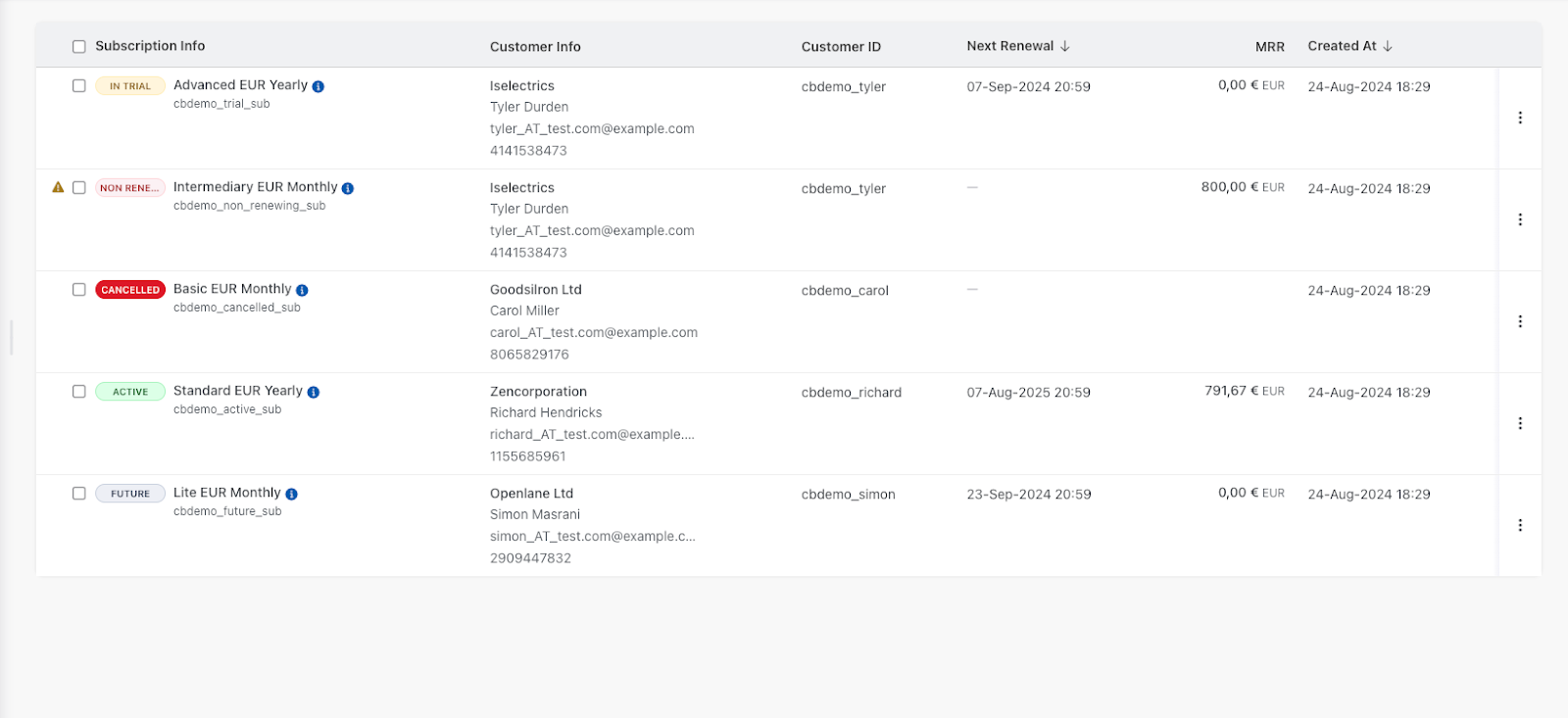
The first and most important feature in Chargebee is Subscription Management.
Once you sign up and configure your account, the Subscriptions tab is front and center.
You can view every active customer subscription in detail: what product they bought, their billing cycle, start date, coupons, payment status, and more.
You can also edit subscriptions manually, pause or delete them, and apply changes like discounts or trial extensions.
The Customers page gives you a clear picture of each customer: their contact info, invoices, payment methods, tax details, and any past or active subscriptions.
It’s not the most intuitive dashboard, but everything you need is there in a straightforward layout. Since this is Chargebee’s core feature, it makes sense that it’s built to handle a lot of complexity once you get used to it.
Automated invoicing
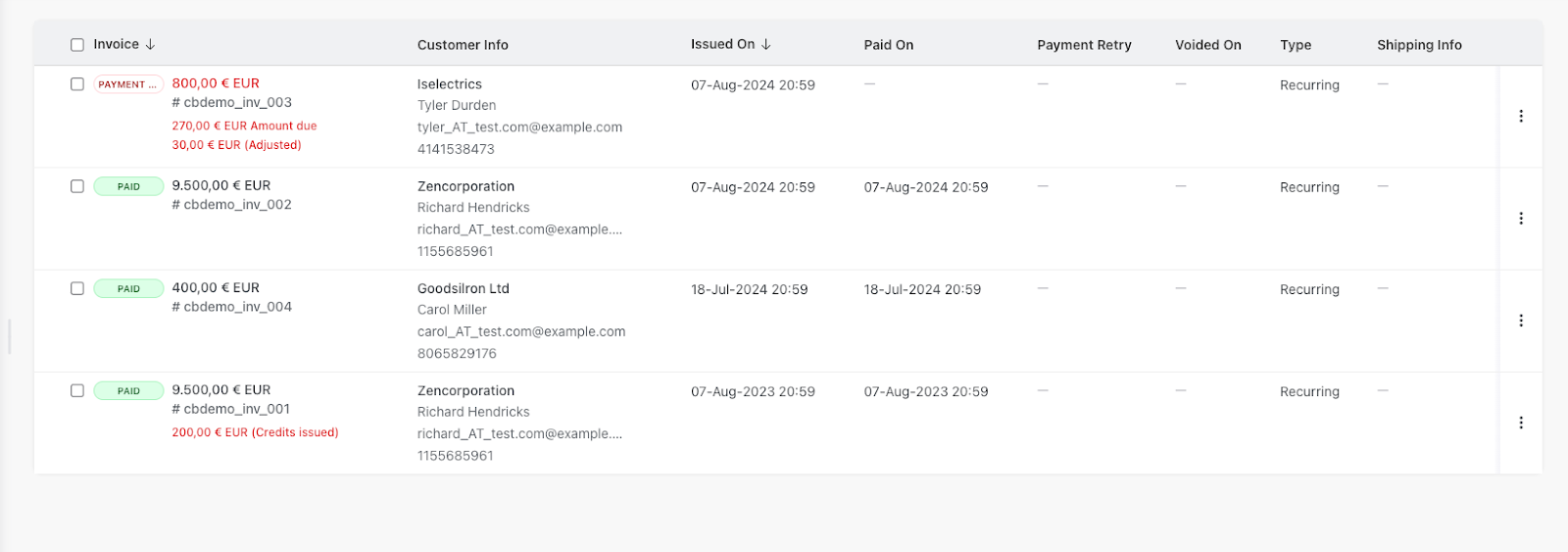
Right under Subscriptions, you’ll find the Invoices tab.
Chargebee automates the entire invoicing process, generating and sending invoices automatically whenever a customer signs up, renews, or changes a plan.
If you issue refunds or pricing changes, Chargebee can also apply credit notes or adjustments automatically.
For recurring subscriptions, invoices are sent on the set billing date, so you never have to trigger them manually.
The tab gives you all the data you need at a glance: when invoices were sent, whether they’ve been paid, and which are overdue.
You can also click into each invoice for details or send reminders manually.
It’s well-organized and does what you’d expect from a platform built for recurring billing, though it could live under the same tab as Subscriptions for a cleaner experience.
Data analytics and revenue reporting
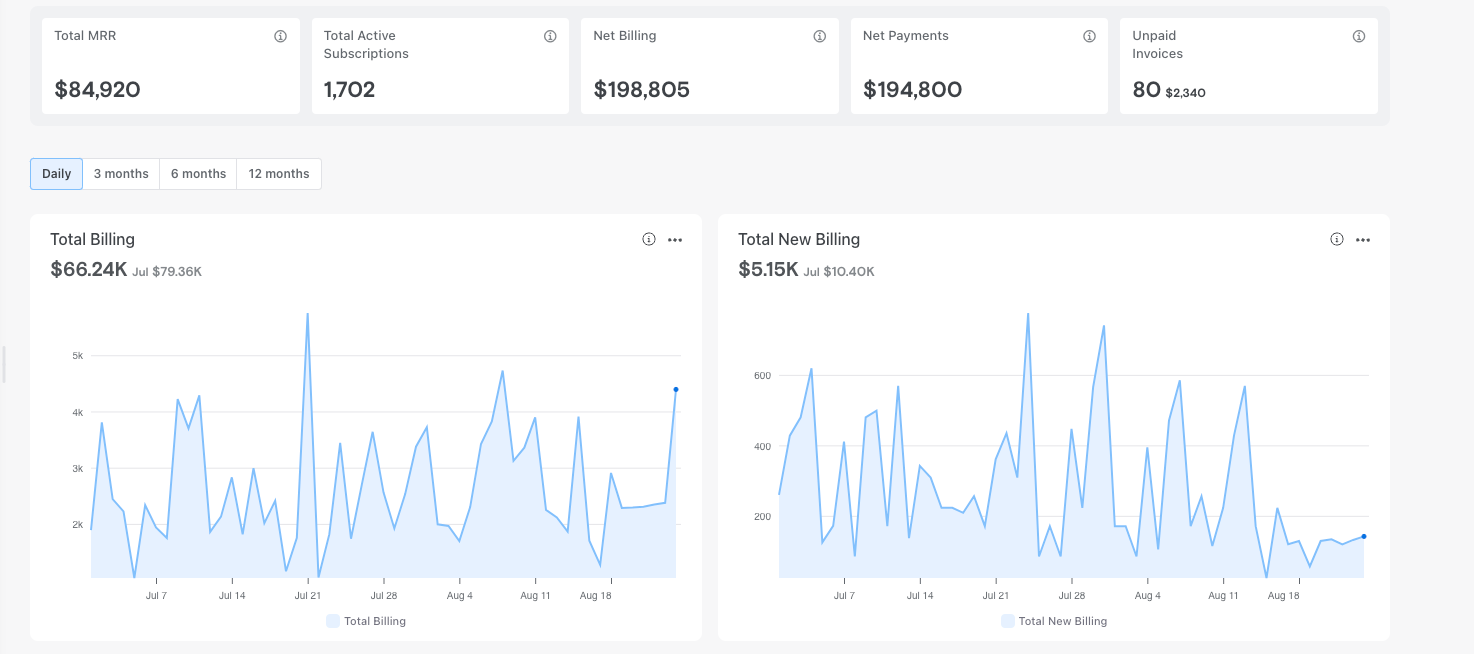
Chargebee’s reporting system, called RevenueStory, is one of its key features.
It tracks metrics like monthly recurring revenue (MRR), churn, active customers, unpaid invoices, and more – all displayed on your dashboard.
You can filter data by day, quarter, half-year, or year, and compare performance over time.
RevenueStory includes more than 100 built-in reports covering everything from accounting and customer insights to growth analytics. You can even set revenue goals and alerts to track progress.
Note: It can feel overwhelming at first, especially if you’re new to analytics-heavy platforms.
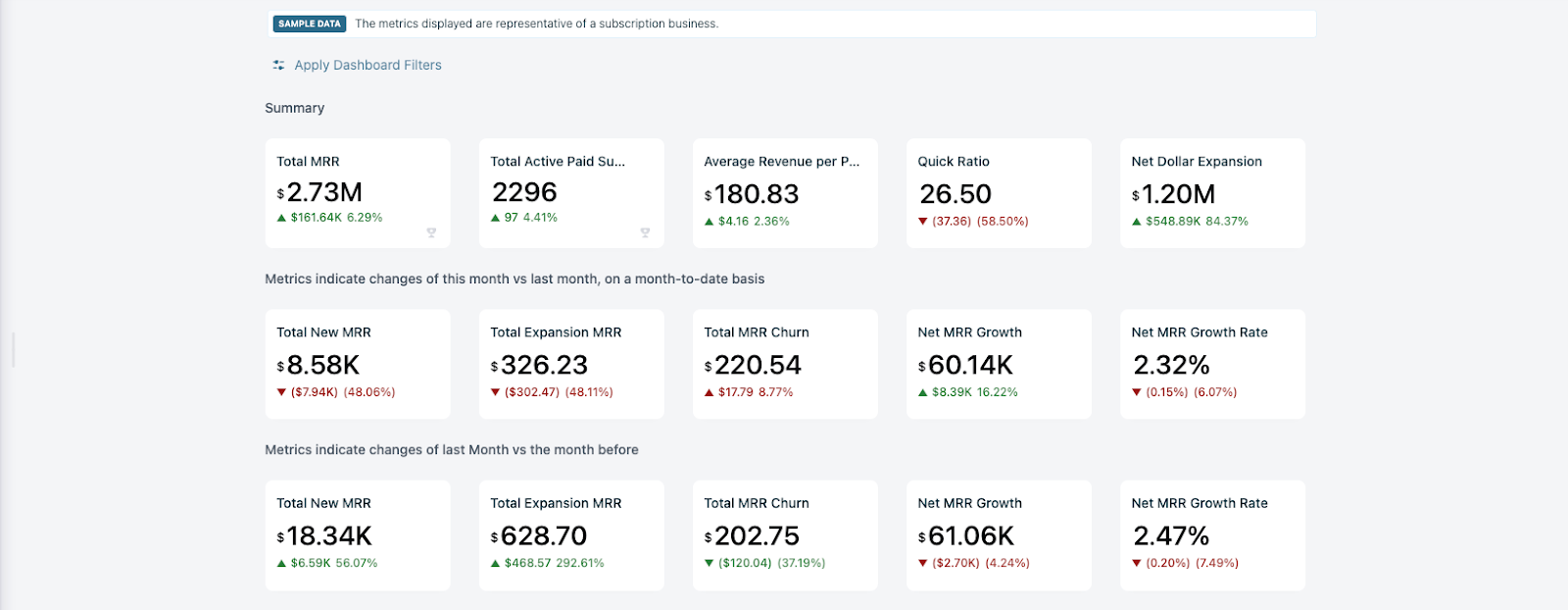
All of this is also configurable for daily, quarterly, 6-month, and yearly periods, with notes on the previous month's data or annual averages.
AI-powered features
Chargebee has introduced several AI-powered capabilities to help streamline subscriptions.
The platform includes Chargebee Copilot, an AI assistant that helps you navigate the dashboard and find information quickly, and Billing for AI and Agents: pricing models built specifically for token, credit, and agent-action billing.
This is aimed at companies monetizing AI products where usage is not based on human seat count. It also includes Payments Intelligence, which is designed to diagnose failed payments and fee issues.
Chargebee API and developer tools
For teams building custom integrations, Chargebee offers an API Playground for testing calls in real time, along with a Chargebee API covering subscriptions, invoices, customers, and usage events.
Chargebee also offers Chargebee MCP: a headless platform integration aimed at connecting Chargebee to AI agents, plus prebuilt integrations and a Next.js integration for faster setup.
Custom checkout pages and self-serve portal
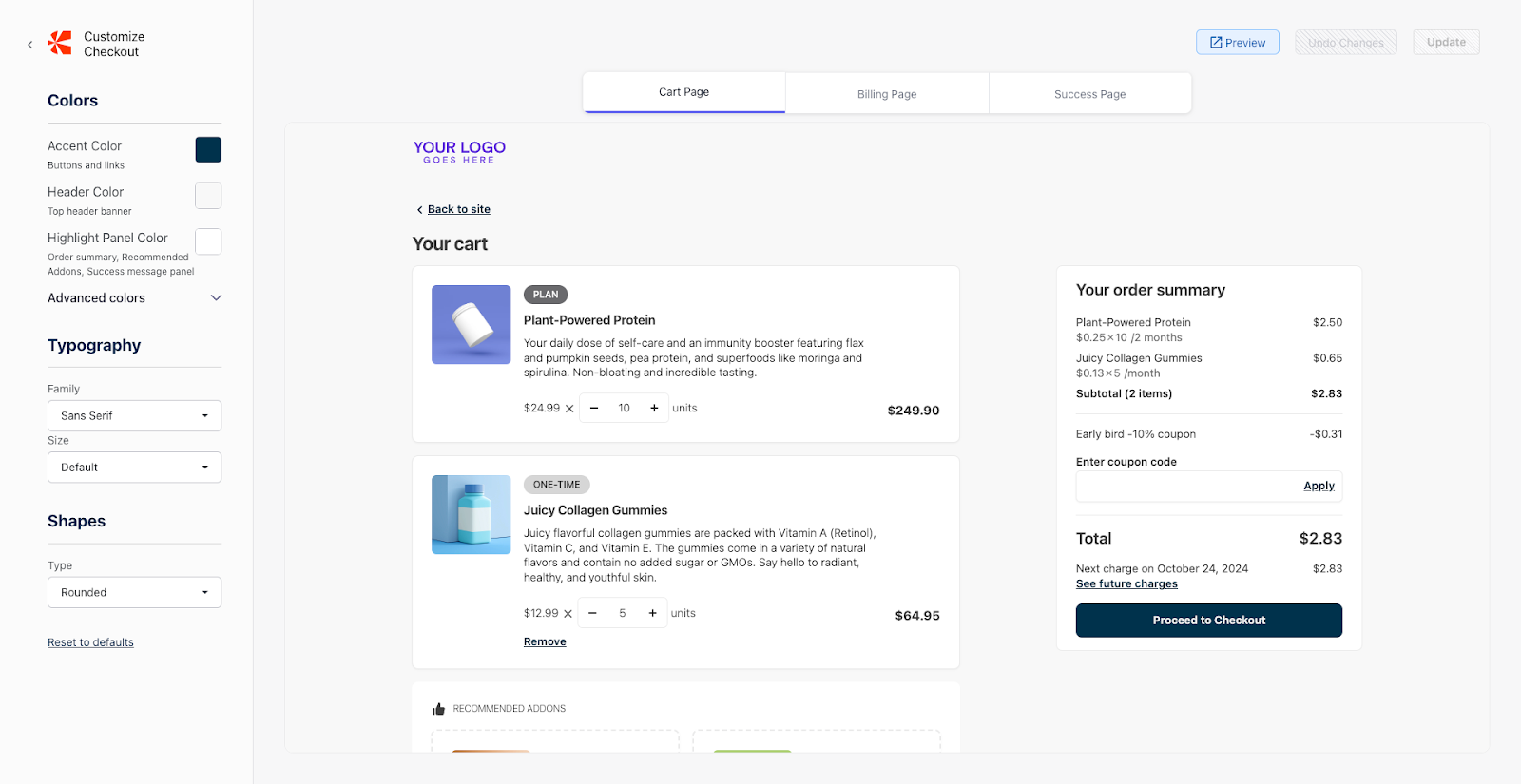
Chargebee includes tools for building custom checkout pages and a self-serve customer portal.
The checkout editor offers ready-made templates that you can customize with your own branding (fonts, colors, and layout tweaks) without any coding.
It’s basic, but effective if you want to stay on-brand and get customers through checkout quickly.
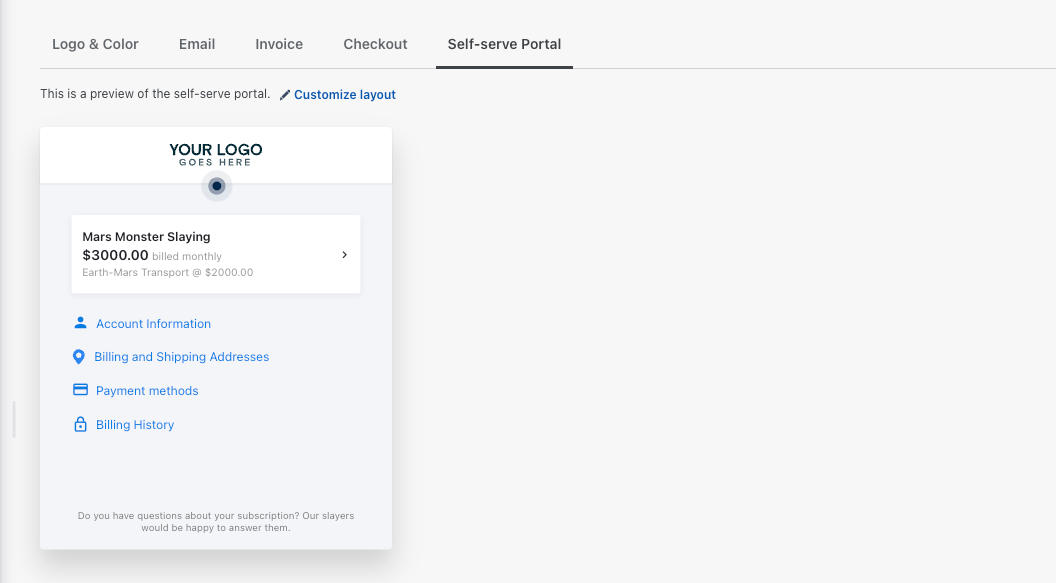
The self-serve portal ties in seamlessly, letting customers log in to update billing information, add or remove payment methods, change their subscription, or download invoices.
Both features help reduce support requests and give users more control over their accounts.
Dunning and payment gateways
Chargebee’s dunning process lets you automate reminders for failed or overdue recurring payments.
You can define how many reminders to send, how often, and what happens after the final attempt (such as pausing or canceling the subscription).
On the payments side, Chargebee integrates with over 40 payment gateways across 150+ countries, including Stripe, PayPal, and Authorize.Net.
By default, Chargebee doesn’t process payments itself; it connects to whichever gateway you already use to handle transactions.
The exception is Chargebee Pay, built-in payment processing powered by Adyen.
It’s available to pre-qualified Chargebee Billing customers in the US, UK, and select European countries, supports cards and direct debit (ACH, SEPA, and BACS), and can run alongside your other gateways. Chargebee doesn’t publish its rates.
How much does Chargebee cost?
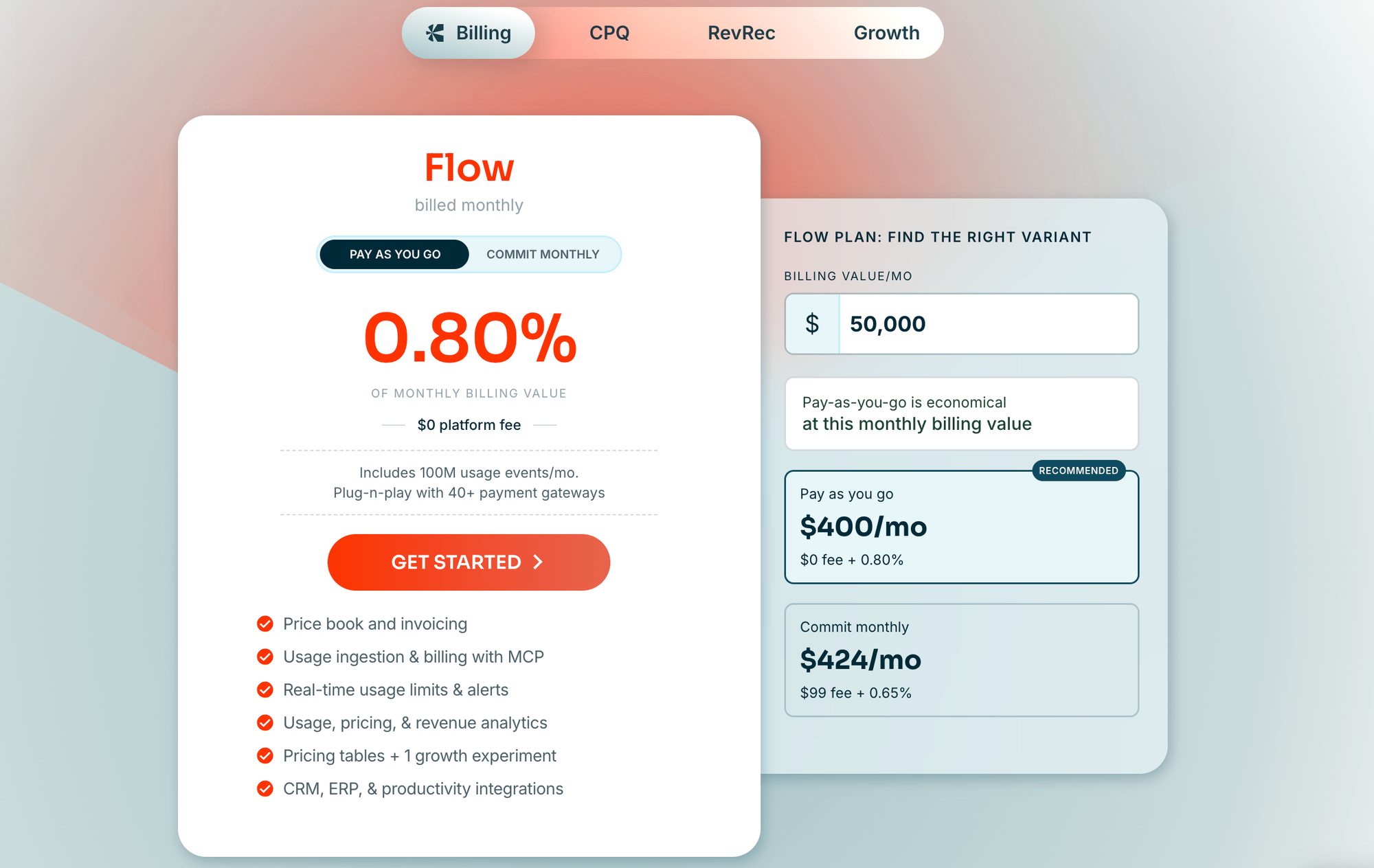
Chargebee Billing is sold as two plans:
Flow: pay-as-you-go, with two options:
- No commitment: $0 platform fee + 0.80% of monthly billing volume
- Monthly commitment: $99/month + 0.65% of monthly billing volume
Enterprise: custom pricing, built for companies running multi-entity billing, account hierarchies, or high-volume usage events (up to 500M/month). This requires an annual commitment.
Beyond Billing, Chargebee's other products are priced separately:
- CPQ: CPQ Lite is free for your first 50 quotes. Full CPQ (with multi-product quoting and approval workflows) is quote-based through the sales team.
- RevRec: Performance and Enterprise tiers, both quote-based.
- Growth: a free Starter tier (pricing tables, hosted checkout, basic retention tools) and a custom Enterprise tier (AI churn prediction, cohort experimentation, Salesforce integration).
There's no one flat monthly fee. What Chargebee costs your business depends on which of these products you layer on top of billing, and whether you commit to the monthly Billing plan for a lower cut of your sales volume.
Chargebee's two Flow options cost the same at $66,000 in monthly billing.
Below that, the no-commitment 0.80% rate is cheaper; above it, $99 + 0.65% wins.
Either way, you still pay a payment gateway on top.
Here's what billing plus payments costs at three volumes, assuming an average charge of $50 and Stripe's standard 2.9% + $0.30 as the gateway (where one is needed).
| Monthly cost | $20K billing | $66K billing | $200K billing |
|---|---|---|---|
| Chargebee Flow (no commitment) + Stripe | $860 | $2,838 | $8,600 |
| Chargebee Flow ($99 commitment) + Stripe | $929 | $2,838 | $8,399 |
| Recurly Starter + Stripe | $949 | $2,793 | $8,689 |
| Stripe Billing (pay-as-you-go) | $840 | $2,772 | $8,400 |
| Paddle | $1,200 | $3,960 | $12,000 |
| Whop (with Billing) | $760 | $2,508 | $7,600 |
Whop's total uses its standard rate of 2.7% + $0.30 plus the 0.5% Billing fee, with payment acceptance included.
Paddle's 5% + $0.50 is higher because it acts as Merchant of Record, handling global sales tax and compliance for you. At $200K, Stripe Billing's monthly plan ($620 for up to $100K, then 0.67%) would bring its total down to $8,290.
Chargebee Pay doesn't publish payment acceptance rates, so the Chargebee rows use Stripe as the gateway.
Early-stage companies should also check Chargebee for Startups: qualifying startups can use Chargebee Billing free until they've billed their first $1 million in cumulative revenue.
How easy is it to use Chargebee?
Chargebee is generally considered an easy platform to use once you're past initial setup. Most users say they can find everything they need without digging through the entire dashboard, though some newcomers still find it complex at first.
The dashboard is clean, but it’s packed with options that reflect its enterprise roots – and that's grown slightly with the addition of separate CPQ, RevRec, and Growth products sitting alongside Billing.
Basic setup (sign-up, adding products, and creating your first plan) is simple enough. You can start in a sandbox environment to test everything before going live, which is a big plus.
Where things get tricky is configuration: setting up custom checkout pages, integrating payment gateways, or adjusting tax and dunning rules takes time.
There’s solid documentation and AI-powered guidance now (via Chargebee Copilot), but you’ll still need to dig into menus and settings to get everything running perfectly.
Chargebee pros and cons
As of October 2026, Chargebee holds 4.3/5 on Capterra across 110 reviews and 4.4/5 on G2 across 1,013 reviews. Its lowest Capterra sub-score is customer service (3.9), followed by value for money (4.0).
Pros:
- Automated retries that cut churn: Churn is a big concern for subscription based businesses, and reviewers credit Chargebee’s dunning with recovering failed payments. One Capterra reviewer said it “reduced our involuntary churn without our team lifting a finger.”
- Works with your existing processor: Because Chargebee sits on top of 40+ gateways, it's likely that it will integrate with your existing processor. Voitek Sobieszczanski, VP of Finance at Study.com, said Chargebee was able to “sit on top” of its existing payment processor “with no complications.”
- Easy day-to-day use once set up: If configuring a complicated platform is of concern, Chargebee's ease of use scores 4.2 on Capterra.
Cons
- Configuration effort: While Chargebee scores highly for ease of use, its setup takes time, and complex renewal logic is the most common sticking point – one Capterra reviewer explicitly states that Chargebee makes it “Hard to configure complex subscription renewal logic".
- Inconsistent support: Support is the most divided theme in reviews, and customer service is Chargebee’s lowest-rated category on Capterra.
- Cost as you grow: Chargebee’s fee is a percentage of billing volume on top of your gateway fees, and reviewers note “the pricing can feel high for smaller businesses.” In these cases, an alternative billing solution may be worth considering.
Is Chargebee worth it?
Chargebee may be worth it for established businesses with high recurring revenue and complex billing needs.
If you’re managing multiple pricing models, currencies, or customer segments, the platform’s automation and reporting tools can easily justify the cost.
For smaller teams or creators, though, it’s probably overkill. The Flow plan's percentage-based fees stack on top of whatever your payment gateway already charges, and since Chargebee isn't a Merchant of Record, your team still owns tax registration, compliance, and chargeback handling.
Add in the layered pricing across CPQ, RevRec, and Growth (if you need them) and the cost of using Chargebee can climb well past the headline Flow rate.
Here are the most popular alternatives to Chargebee:
5 Chargebee alternatives
If you like what Chargebee does but not its limits or pricing, there are plenty of subscription billing platforms that cover the same ground.
Here are five strong alternatives worth checking out.
| Platform | Model | Pricing | Best for |
|---|---|---|---|
| Whop | Payment acceptance with built-in billing | 2.7% + $0.30 standard rate, plus 0.5% Billing | One fee for payments and subscription billing |
| Stripe Billing | Billing on top of Stripe payments | 0.7% of billing volume, plus 2.9% + $0.30 processing | Businesses already processing on Stripe |
| Paddle | Merchant of Record | 5% + $0.50 per transaction | Software companies that want Paddle to own global sales tax |
| Recurly | Billing layer, connects to your gateway | $249/month (first $40K included), then 0.9% | Businesses billing roughly $31K–$84K a month |
| Zoho Billing | Billing layer, connects to your gateway | From $79/month (billed annually) for subscriptions | Businesses already running Zoho Books or Zoho CRM |
For a head-to-head on the Merchant of Record question, see our Chargebee vs Paddle comparison, or browse all 23 subscription billing platforms.
Whop
Whop is the end-to-end platform for building a business: payments, checkout, payouts, and community tools in one place.
Whop is for any kind of business, subscription-based included. Use Whop to sell subscriptions to your coaching and consulting services, physical products, software access, communities, and more.
For subscription billing specifically, Whop collects payment details upfront for free trials and automatically converts them to paid subscriptions, with built-in trial-abuse detection to stop repeat sign-ups from the same person.
Split payments let customers pay off higher-ticket plans in installments, and the subscription lifecycle itself – renewals, failed-payment retries, cancellations, and plan changes – is automated. Customers manage their own subscriptions through a self-serve billing portal without needing to contact support.
“My first month on Whop, I made $12.5k all from X organic traffic – with 0 failed payments. Thanks Whop!”
- Whop seller @0xroas
Whop supports 100+ payment methods worldwide (including cards, wallets, BNPL, and crypto) and pays out to 195+ countries via ACH, crypto, Venmo, real-time payments, and more.
The best part? You can run your business agentically with the Whop CLI, which gives you and your AI agent direct access to Whop's API through terminal commands. Need to look up failed subscription payments? Add a new pricing tier? Refund a customer? Do it all through the Whop CLI.
For teams that do want to build custom, Whop offers embedded checkout (a drop-in component for accepting payments directly on your own site or app), embedded payouts (programmatically paying out sub-merchants or users through the API), and a full developer API covering the entire payment lifecycle: checkout, refunds, disputes, invoicing, and payouts.
Whop charges 2.7% + $0.30 per successful transaction, with no monthly platform fee. An automated billing add-on (0.5%) is available if you want dunning and lifecycle automation layered in beyond the base rate.
Unlike Chargebee's 0.80% Flow rate, which covers billing only and sits on top of a payment gateway (typically 2.9% + $0.30), Whop's 2.7% + $0.30 already includes payment acceptance itself.
Recurly

Recurly offers a full suite of subscription management, billing, and analytics tools aimed at SaaS companies and online businesses.
The platforms share similarities: automated invoicing, dunning, revenue recognition, and deep reporting, but Recurly stands out in a few key areas.
It integrates natively with more than 20 payment gateways, giving you the flexibility to choose your preferred processor and keep redundancy across providers.
Recurly’s reporting tools are comparable to Chargebee’s, too. You’ll get insights into MRR, churn, lifetime value, and customer behavior, though the interface feels slightly more straightforward for everyday use.
Recurly’s Starter plan costs $249 per month, with the first $40,000 of monthly billing included and 0.9% on volume above that.
That flat fee works against the smallest businesses: below about $31,000 a month, Chargebee’s no-commitment 0.80% costs less.
Recurly comes out cheaper than either Chargebee option between roughly $31,000 and $84,000 a month.
For businesses billing $1M+, the All-Access plan is negotiated and billed annually.
Stripe Billing
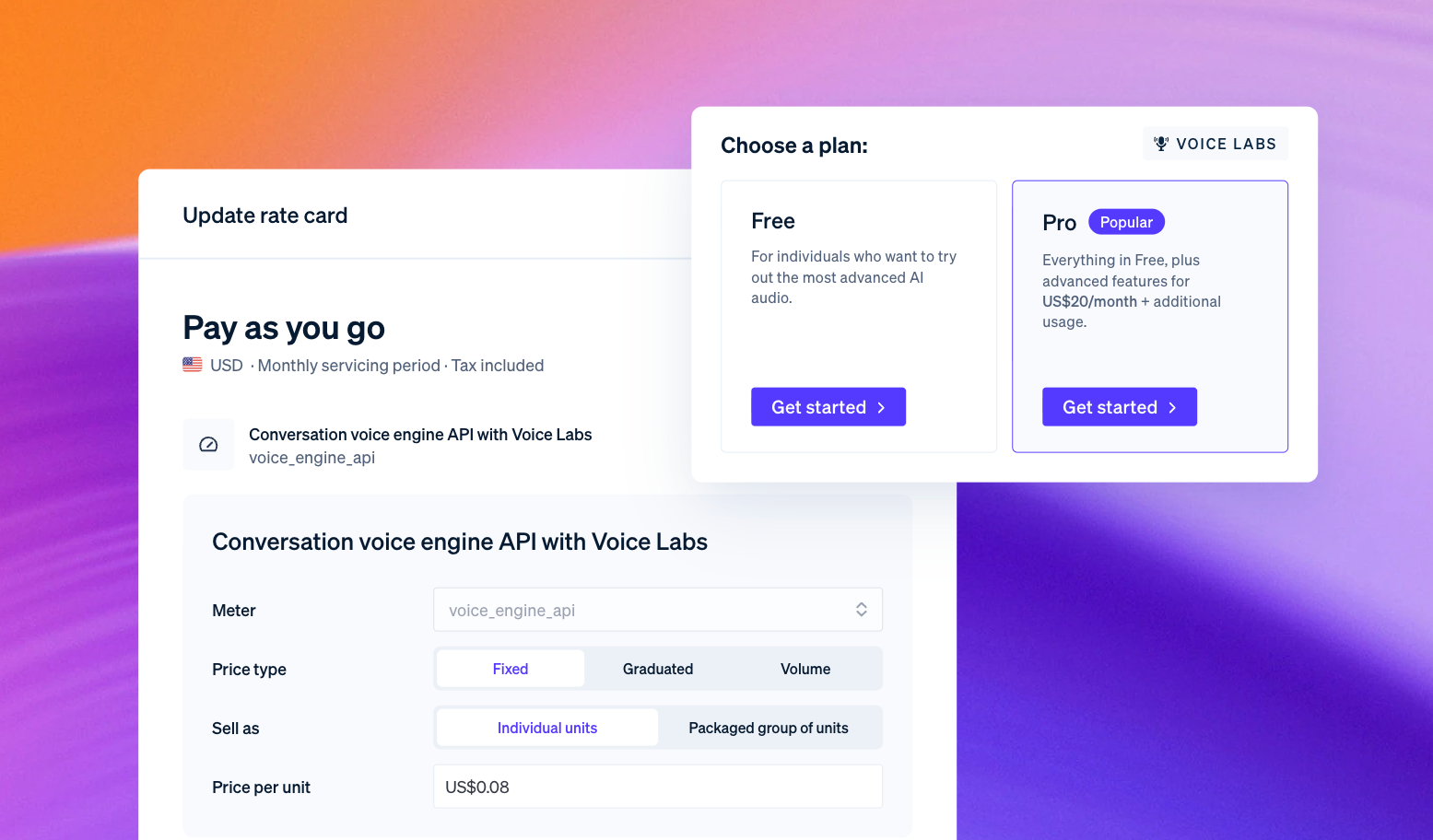
Stripe Billing is Stripe’s subscription and recurring revenue product, and one of the most popular alternatives to Chargebee. It layers invoicing, recurring billing, revenue recognition, and reporting on top of Stripe’s underlying payment gateway, so you can manage the full subscription lifecycle inside the same platform you use to process payments.
You also get access to rich transaction data, fraud protection tools (via Stripe Radar), and global payment support – though Stripe Billing comes with its own fees on top of standard processing.
Pricing works one of two ways: pay-as-you-go at 0.7% of billing volume, or tiered monthly plans that start at $620/month for up to $100,000 in monthly billing volume (with 0.67% on additional volume). On top of that, you’ll still pay standard Stripe processing fees of 2.9% + 30¢ per successful card charge.
It’s worth noting that Stripe Billing itself is not a Merchant of Record – that’s handled through Stripe’s separate Managed Payments product, which you’d need to opt into if you want MoR coverage for tax and compliance.
The trade-off is complexity: to unlock Stripe Billing’s potential, you’ll need some technical knowledge or developer support.
Paddle
Paddle is a Merchant of Record built specifically for SaaS and software companies – meaning Paddle itself is the legal seller on every transaction rather than your business.
It builds payments, subscription billing, checkout, and global tax/VAT compliance into every single product.
You also get fraud protection, chargeback handling, and customer support for billing-related inquiries, all included as one fee rather than add-ons.
There's no monthly platform fee or tiered structure. Pricing is 5% + $0.50 per transaction. However, custom pricing is available for large-scale businesses, and those selling products under $10.
Check out our review of Chargebee vs Paddle for a deeper comparison.
Zoho Billing
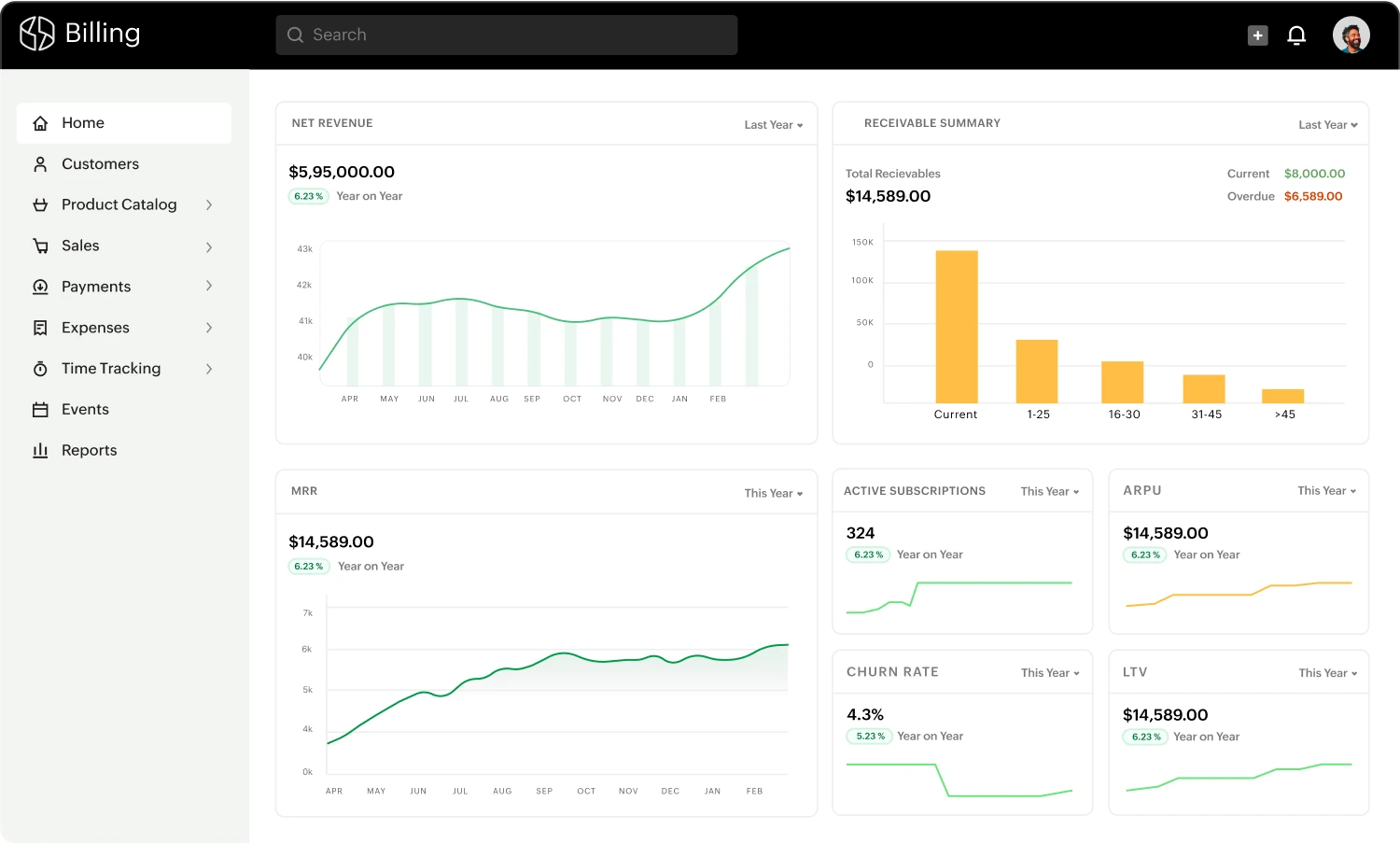
Zoho Billing (the rebrand of Zoho Subscriptions) is a subscription and invoicing platform built into the broader Zoho ecosystem, aimed at small and mid-sized businesses that want billing tied into their existing CRM and accounting tools rather than a standalone product.
It covers recurring billing, usage-based pricing, hosted payment pages, and dunning management, plus native integrations with Zoho Books and Zoho CRM if you're already running on Zoho.
Like Chargebee, it isn't a Merchant of Record, so your business remains responsible for payment processing, tax collection, and compliance, with Zoho connecting out to your chosen gateway rather than processing payments itself.
Zoho's pricing is far simpler than Chargebee's: Standard is $29/month (or $25/month billed annually) but includes one-time billing only. Premium - which includes subscription billing, usage-based pricing, and dunning - is $69/month (or $59/month when billed annually) as per Zoho Billing's pricing page, October 2026.
An Enterprise Edition offers custom pricing for high-volume or multi-entity operations.
Manage your subscriptions with Whop
Chargebee's billing-orchestration layer works well for finance teams managing enterprise complexity, but Whop gives you the same ability to scale subscription billing without needing to be a developer.
Accept 100+ global payment methods and get paid in 195+ countries. With the Whop CLI, you and your agent can manage the entire subscription lifecycle – creating plans, checking failed payments, issuing refunds – through plain language commands, without digging through logs and databases.
Start using Whop today and turn your subscriptions into a frictionless, global revenue engine.
Chargebee FAQs
What are the best alternatives to Chargebee for subscription billing?
The best alternatives to Chargebee include Whop, Stripe Billing, Paddle, Recurly, and Zoho Billing. Whop offers subscription billing alongside payment acceptance, with an easy migration from Stripe available. Stripe Billing suits businesses already on Stripe, Paddle acts as a Merchant of Record, Recurly fits mid-volume billing, and Zoho Billing ties into Zoho’s CRM and accounting tools.
Which accounting software can Chargebee integrate with?
Chargebee integrates with popular accounting platforms, including QuickBooks Online, Xero, NetSuite, and Sage Intacct. These integrations allow you to automatically sync invoices, payments, and revenue data, reducing manual bookkeeping errors.
How does Chargebee handle failed payments?
Chargebee uses an automated dunning management system to handle failed or overdue payments. You can configure the number of retry attempts, timing, and follow-up actions such as pausing or canceling subscriptions.
Does Chargebee process payments directly?
Chargebee connects to external payment gateways like Stripe, PayPal, Adyen, and Authorize.Net to handle transactions, while it manages billing logic, invoicing, and the subscription lifecycle. Its built-in Chargebee Pay does process payments directly, but it’s only available to pre-qualified Chargebee Billing customers in the US, UK, and select European countries.
Can customers manage their subscriptions themselves?
Yes, Chargebee offers a self-serve customer portal. Customers can update payment methods, view or download invoices, change plans, and manage their subscriptions directly, reducing support workload and improving customer satisfaction.
What payment methods does Chargebee support?
Chargebee supports all payment methods available through connected gateways, including credit/debit cards, ACH, SEPA, digital wallets, and Buy Now, Pay Later options. The exact methods depend on the gateway you choose.










![Mighty Networks: is it the best choice for your community? [2026 review]](https://storage.ghost.io/c/12/7b/127b828b-bdc2-4972-9cf2-de857df9c324/content/images/size/w1000/format/webp/2024/05/What-is-Mighty-Networks-Features--Pricing--and-Alternatives-2024-Review.webp)

![The best online newsletter platforms [2026]](https://storage.ghost.io/c/12/7b/127b828b-bdc2-4972-9cf2-de857df9c324/content/images/size/w1000/format/webp/2024/05/Best-online-newsletter-platforms.webp)
![Top 17 best online course platforms to sell your course [2026]](https://storage.ghost.io/c/12/7b/127b828b-bdc2-4972-9cf2-de857df9c324/content/images/size/w1000/format/webp/2026/01/best-online-course-platforms_1x.webp)